Overview
As the end of the year approaches, along with the Christmas and New Year holidays, corporate inboxes become flooded with emails related to typical year-end processes such as bonuses, holiday events, and requests from HR and finance departments. The expected nature of these topics makes them a convenient and effective pretext for phishing campaigns.
This report examines real-world examples of such emails observed in the ANY.RUN sandbox and highlights their practical value for threat intelligence activities, email security tuning, and accounting for seasonal risks.
End Of Year Bonus
One of the most commonly used phishing lures in the run-up to the end of the year is a supposed annual salary review based on employees’ year-end performance.
Sample: ANY.RUN
Key Observations
- Use of salary and benefits review as a social engineering theme
- Spoofing of the sender’s display name
- Pressure through a sense of urgency
- Disguising the link as a corporate resource
- Hosting of the phishing page on IPFS
- Transmission of harvested credentials to a third-party URL
Summary
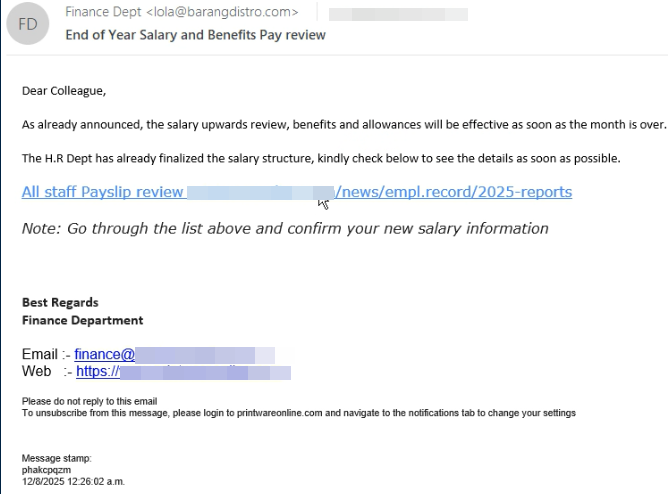
The email with the subject “End of Year Salary and Benefits Pay Review” is disguised as a notification from the finance department and uses the sender display name Finance Dept to increase credibility. The message creates a sense of urgency and encourages the recipient to review updated salary and benefits information.
The embedded link is visually masked as printwareonline.com, but redirects the user to a phishing page hosted on IPFS and styled to resemble Printwareonline. Submitted credentials are exfiltrated via a POST request to a third-party URL hosted on a likely compromised domain.
Sample: ANY.RUN
Key Observations
- Masquerading as an internal corporate mailing
- Use of an HR-themed pretext related to payroll and compensation
- Quishing
- URL association with the Tycoon phishing kit
- Predominant activity originating from the United States
Summary
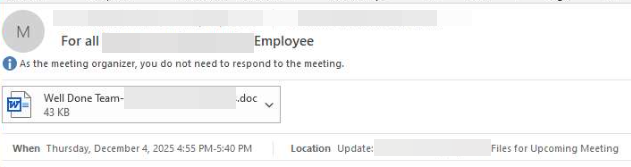
The message is disguised as an internal corporate mailing addressed to all employees and includes an attachment with a neutral filename, “Well Done Team - [company name].doc”, which reduces suspicion.
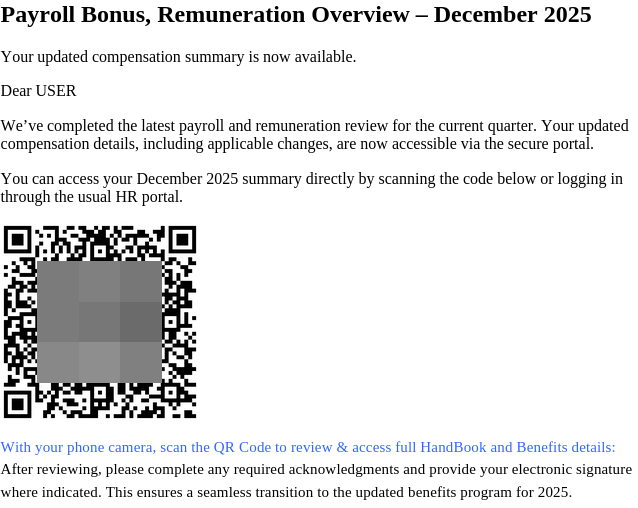
The document is presented as an HR notification regarding payroll and compensation review and instructs recipients to access “updated information” via a QR code leading to an external resource. A formal tone and references to confidentiality are used to increase trust.
Sample: ANY.RUN

Key Observations
- Payroll / compensation pretext
- Quishing
- Personalization and corporate branding
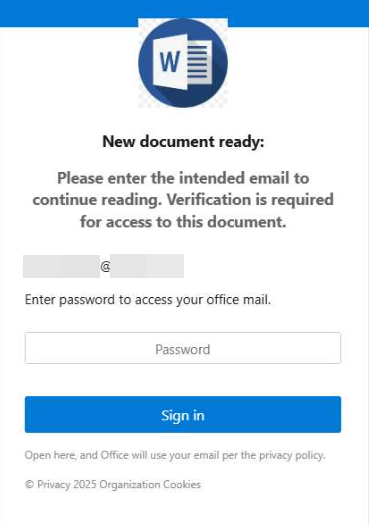
- Fake document access page
- Microsoft Word login page impersonation
Summary
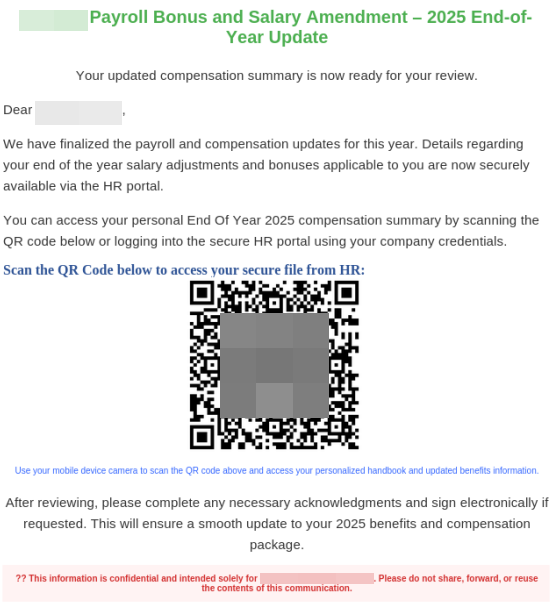
In this case, the payroll and compensation update pretext is again combined with the use of a QR code to redirect the victim to a malicious link. However, the document is further reinforced through corporate branding and a personalized address to a specific recipient.
After scanning the QR code, the user is redirected to a page allegedly intended to provide access to the document, which is styled with a logo and visual elements impersonating Microsoft Word.
Sample: ANY.RUN
Key Observations
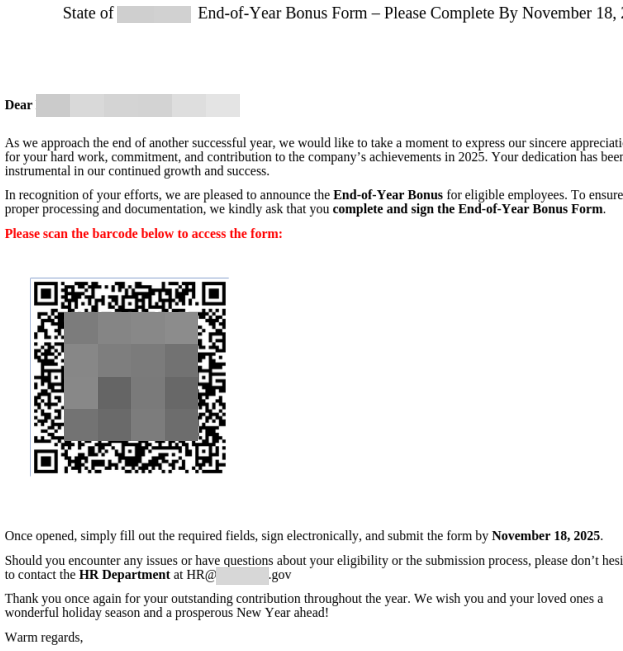
- PDF document containing a QR code
- Annual bonus pretext
- Masquerading as a government institution
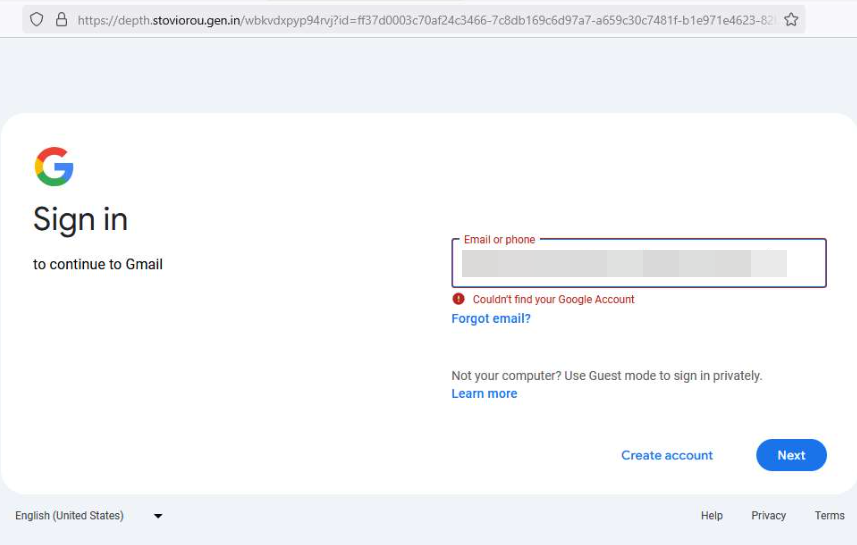
- Redirection to a fake Gmail login page
- Targeting of U.S. government employees
Summary
The PDF document is presented as an official notification regarding the issuance of an annual bonus and uses a formal style typical of government correspondence. The stated source is a government institution of a U.S. state, and the document features a logo visually resembling official state symbolism. The main emphasis is placed on the requirement to complete and sign an End-of-Year Bonus Form by a specified deadline, with access provided via a QR code leading to an external resource.
Sample: ANY.RUN
Key Observations
- Annual bonus pretext
- Message personalization
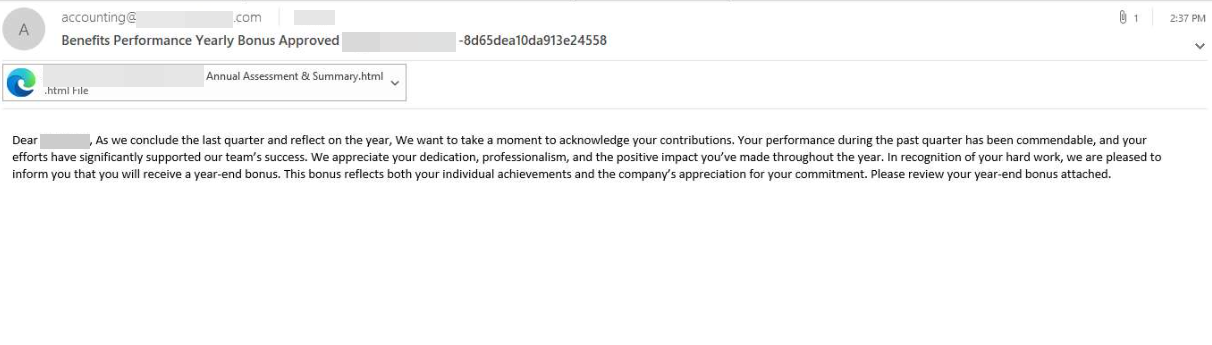
- HTML attachment
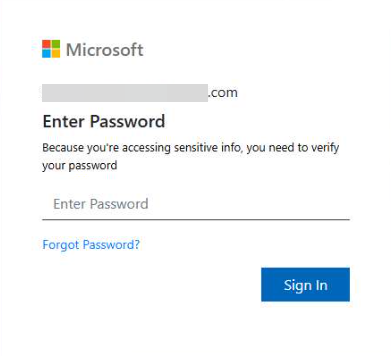
- Fake Microsoft login page used to harvest credentials
Summary
In this case, the email uses an annual bonus approval pretext based on performance evaluation results. The message is presented as a personalized notification expressing appreciation for the recipient’s contribution and includes an attached HTML file disguised as a year-end report and performance summary.
When the attachment is opened, the user is redirected to a credential input page impersonating a Microsoft interface, where the password for the corporate account is requested under the pretext of accessing confidential information.
Sample: ANY.RUN

Key Observations
- End-of-year bonus pretext
- SVG attachment containing embedded JavaScript
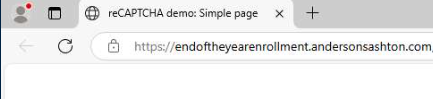
- CAPTCHA hosted on a domain masquerading as endoftheyearenrollment
- Fake login page using company branding
Summary
In this case, the email is disguised as an HR notification and uses an End-of-Year Bonus theme. The attachment is an SVG file with embedded JavaScript that redirects the user to an external resource when opened.
The SVG leads to the domain endoftheyearenrollment.andersonsashton[.]com, created specifically for this phishing campaign, where a CAPTCHA is displayed. After completing it, the victim is redirected to a fake credential-harvesting page designed to mimic a corporate authentication portal.
With the following TI Lookup query, we can search through recent public sandbox analyses and identify this malicious activity.
TI Lookup:
domainName:"endoftheyearenrollment"
Sample: ANY.RUN
Key Observations
- Year-end bonus and salary review pretext
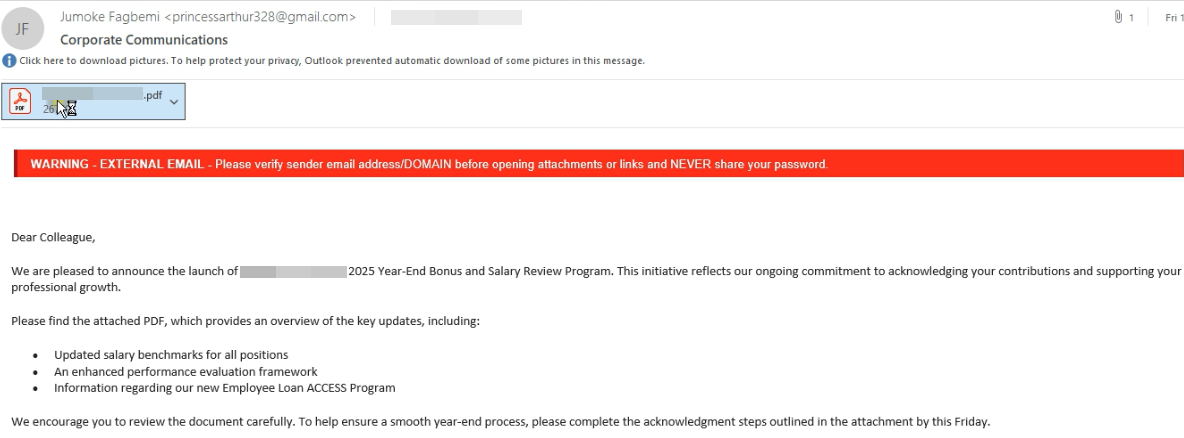
- PDF attachment using corporate branding
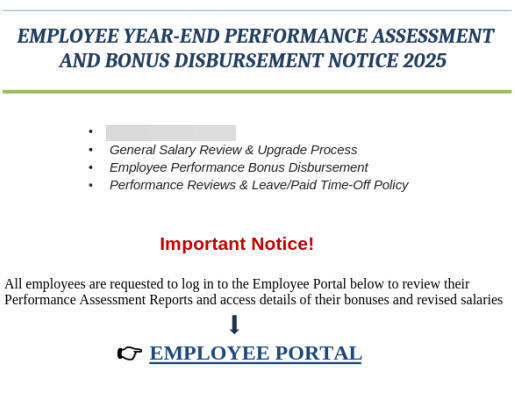
- Call to log in to the “Employee Portal”
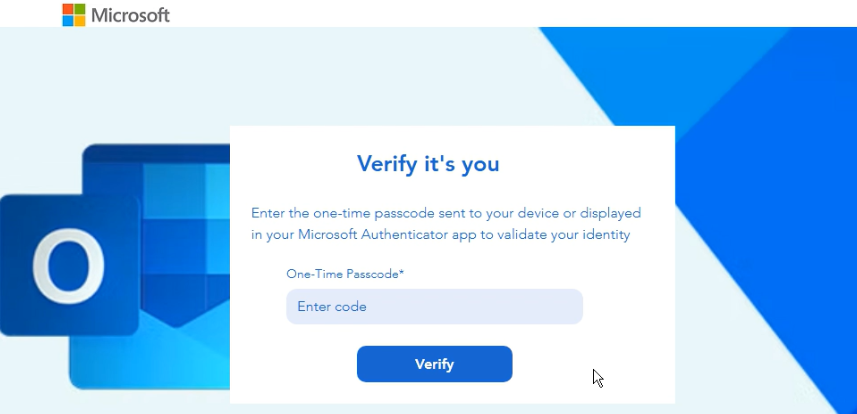
- Microsoft login page impersonation
- Credential harvesting
Summary
In this case, the email is presented as a corporate notification announcing a Year-End Bonus and Salary Review program and includes a PDF attachment using the branding of a Canadian food company. The document urges employees to access the “Employee Portal” to review performance results and compensation details.
The link in the PDF leads to a phishing authentication page hosted on a third-party domain and visually impersonating the Microsoft Outlook login page. Under the pretext of verifying employee status, the page prompts users to enter their corporate email credentials.
Event Invitation
In the lead-up to the end of the year and the holiday season, invitations to corporate events - such as Christmas parties and festive gatherings -are also a common phishing pretext. By using an informal tone and prompting recipients to confirm attendance, attackers lower employees’ vigilance and encourage them to click links or scan QR codes.
Sample: ANY.RUN
Key Observations
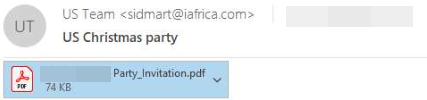
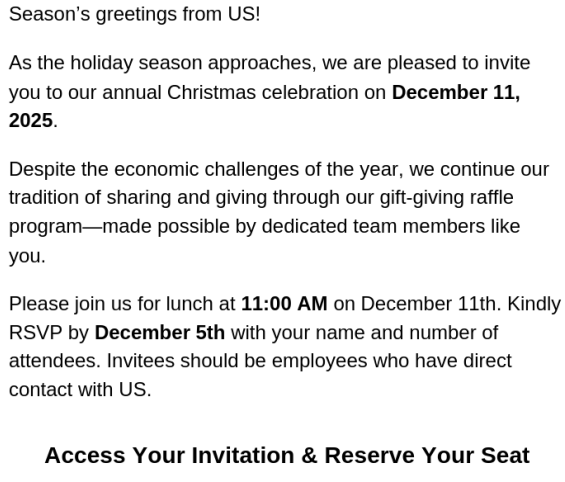
- Christmas party invitation pretext
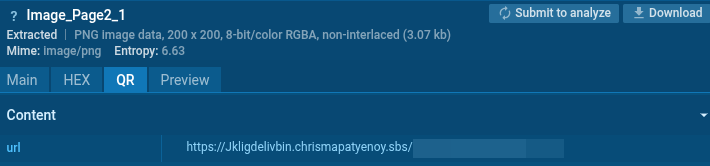
- PDF attachment containing a QR code
- Phishing domain themed around a Christmas party
- Victim’s email address embedded in phishing link parameters
Summary
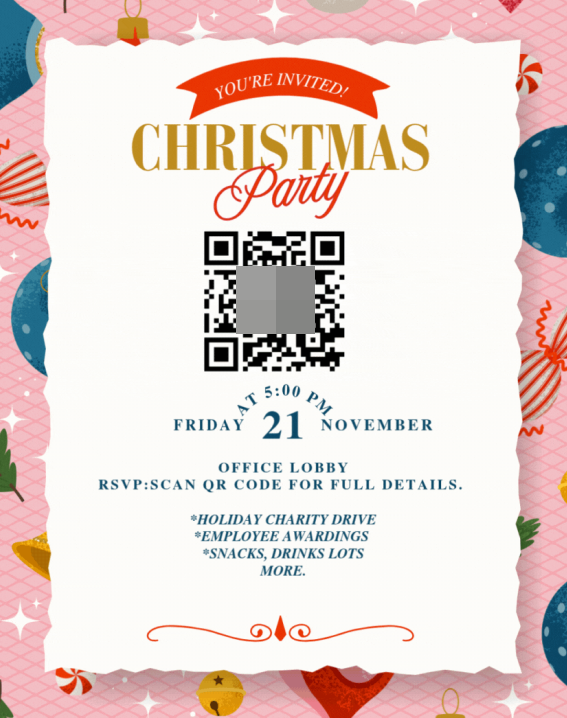
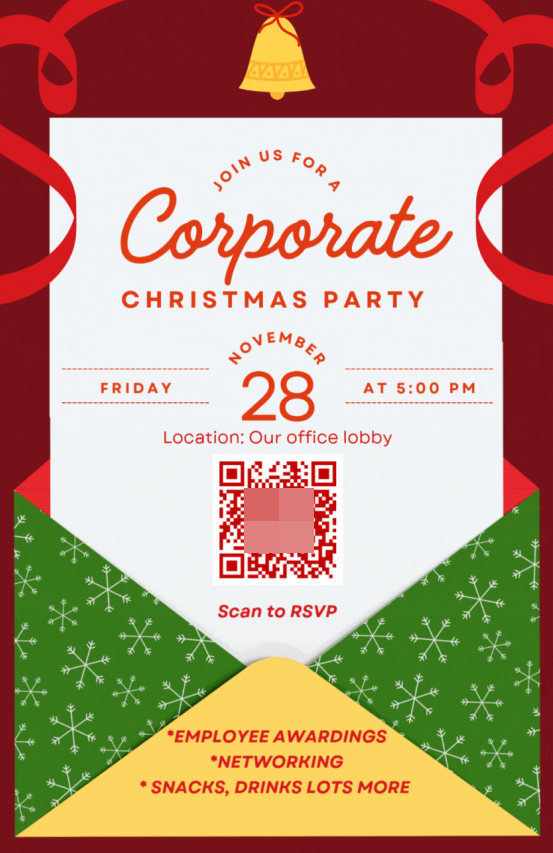
In this case, the phishing email uses a Christmas corporate party invitation as a pretext. The informal tone and a visually designed PDF invitation help reduce the recipient’s suspicion.
To confirm attendance, the recipient is prompted to scan a QR code in the document, which leads to an external domain created specifically around a Christmas party theme. The link is personalized with the recipient’s email address, allowing attackers to identify the victim and increase the credibility of follow-up interactions.
Sample: ANY.RUN
Sample: ANY.RUN
Sample: ANY.RUN
Key Observations
- Christmas party invitation pretexts
- Multiple invitation variants
- Quishing
- Domains following a consistent naming pattern
- Email input and CAPTCHA verification
- Phishing login form
Summary
As part of this campaign, phishing emails are distributed using corporate Christmas party invitations as a pretext. Although the invitation visuals vary, all versions rely on QR codes as the primary redirection vector.
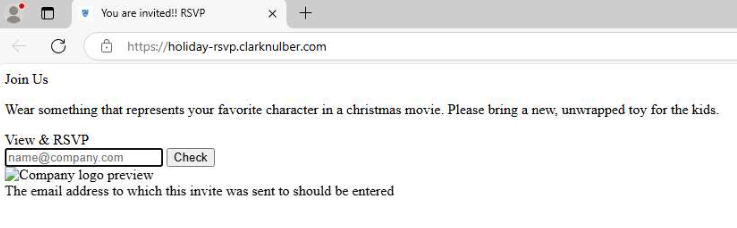
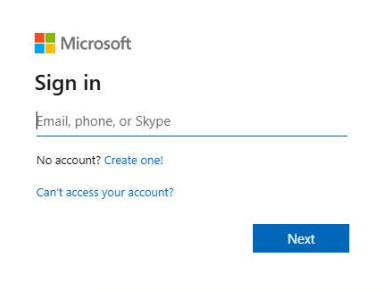
Scanning the QR code leads to domains following a consistent pattern (e.g., holiday-rsvp.clarknulber[.]com, holidayevite-rsvp.cohcur[.]com), where users are prompted to enter their email address and complete a CAPTCHA. They are then redirected to a phishing page designed to collect credentials.
With the following TI Lookup query, we can search through recent public sandbox analyses and identify this malicious activity.
TI Lookup:
domainName:"holiday*-rsvp*"
Year-End Compliance Confirmation
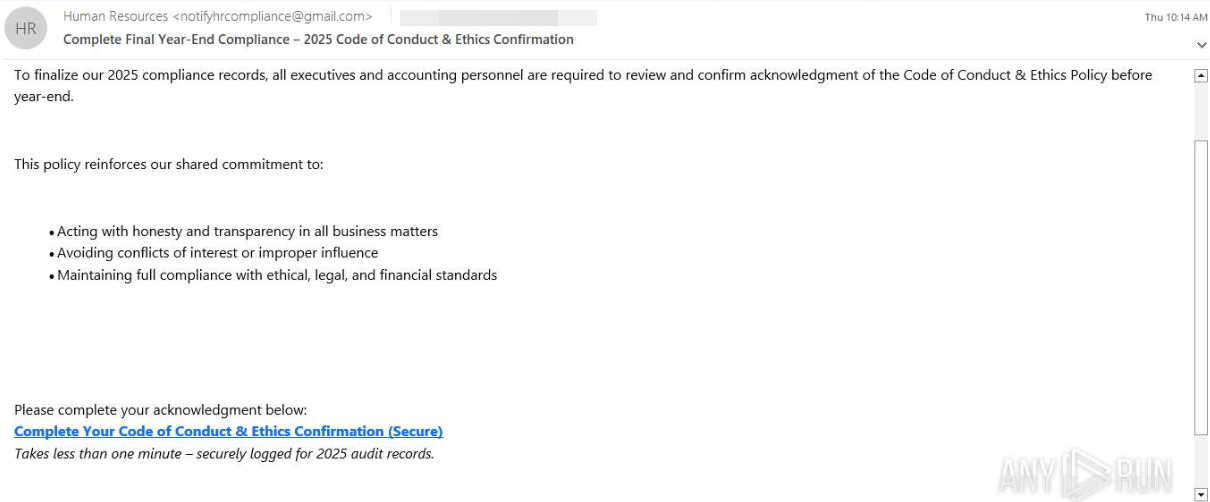
Another common year-end phishing tactic involves emails prompting employees to review, confirm, or sign mandatory compliance documents - such as a Code of Conduct or Ethics Policy - under the pretext of completing annual procedures.
Sample: ANY.RUN
Key Observations
- Year-end compliance-themed pretext
- Link embedded directly in the email body
- Deadline pressure
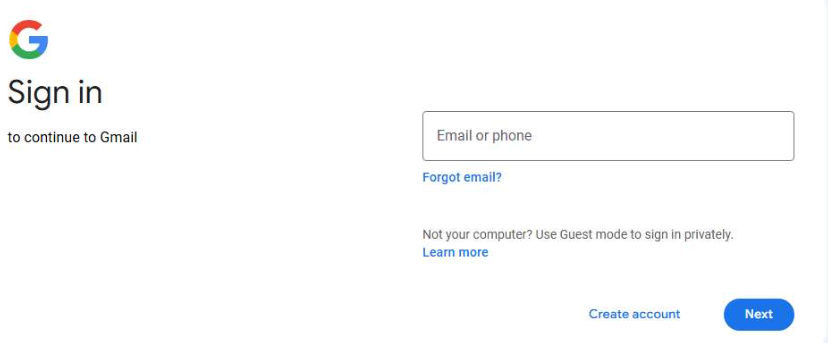
- Redirection to a phishing login page
Summary
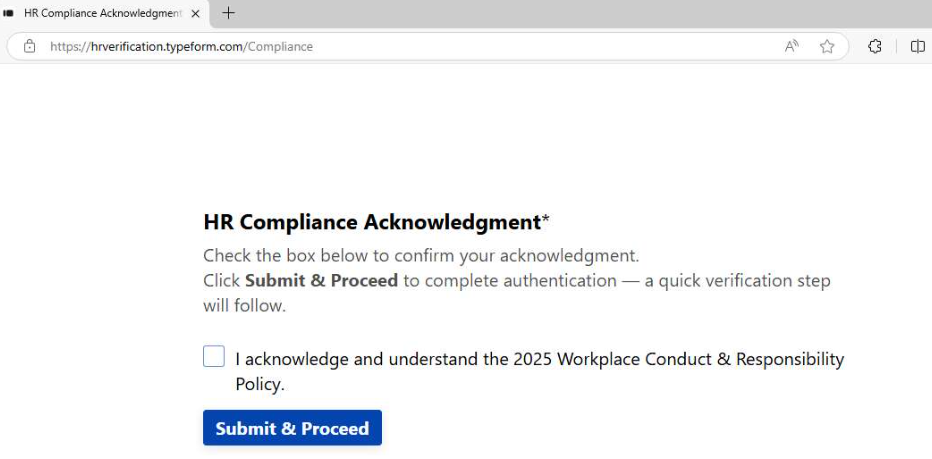
In this case, the phishing email is disguised as a mandatory HR notification requiring completion of an annual Code of Conduct & Ethics confirmation before year-end. The message references regulatory requirements and emphasizes that the action is mandatory for executives and employees in financial roles.
The link in the email leads to an intermediate compliance confirmation page, after which the user is redirected to a phishing authentication page visually impersonating the Google login interface, designed to harvest credentials.
Conclusion
The examples reviewed in this report demonstrate how sandbox analysis can be used to identify and investigate seasonal phishing campaigns already at the delivery stage. Analyzing attachments, QR codes, and redirection chains makes it possible to quickly determine the phishing nature of emails, uncover related infrastructure, and link individual incidents into a single campaign.
For organizations, this enables faster response, improved threat intelligence enrichment, and the ability to proactively adjust defensive measures during periods of increased phishing activity - without waiting for actual compromise.
IOCs
- URL: hxxps[:]//mtmdesignbd.com/wp-includes/pomo/mipags/su56774.php
- URL: hxxps[:]//html.lachacho.in.net/@UO2ccNQraFtxXaAXs/
- SHA-256: 06e2a2d51833f71f6771ff696df74df93d38273d8c9079e8def0956579a29dc6
- SHA-256: b95403e6e07c18318ebef7ff05ffbc2c77fb08de014f85b855b1bdab2feadf97
- SHA-256: f2bb4d55acdf0fd96dd04292e39fcf792e4494c526b43803ba4e486c51a6493e
- SHA-256: b340037a8567e8f42174e030a231cf3d52cdb49c16e7b3ffd08867f3faff3079
- SHA-256: 64dbf49dc740032341989f2780958bcfa65243501c78fbb1b072bb6b32e4053e
- SHA-256: c12c02fadd11b055a7e28eb09e427ef8dd7538fb69c79171c5821c5fe72f69b1
- SHA-256: 56d135e95abcc0cca255961446f4935335d16429d0a042938d70de5294c56d2b
- SHA-256: c03ac9c0be417886dddb7db76b27ce475cc580f7331891128600c8104bbe1f1a
- SHA-256: 8cd8566f54d0a8b07207828b1c830819c87d0c845cfba9c96ad9edc0648081d9
- Domain: Jkligdelivbin.chrismapatyenoy[.]sbs
- Domain: endoftheyearenrollment.andersonsashton[.]com
- Domain: keyword.cooreathoo.sa[.]com
- Domain: depth.stoviorou.gen[.]in
- Domain: holiday-rsvp.clarknulber[.]com
- Domain: holidayevite-rsvp.cohcur[.]com
- Domain: whisper.drucrefou[.]ru