TL;DR
- Sturnus: Banker distributed via infected APK files. It is used to dump data from messengers and any other data that appears on the device screen, since it directly reads the information that appears on the screen to collect it. The malware can harvest banking credentials through fake banking apps. In addition, it provides attackers with extensive remote control.
- ShinySpider: New Ransomware-as-a-Service platform created by the ShinyHunters group in collaboration with hackers from Scattered Spider and Lapsus$. Its key features include: blocking logging in Windows Event Viewer by intercepting the EtwEventWrite function, forced termination of processes and services, filling free disk space with random data to complicate recovery, deleting Volume Shadow Copies, encrypting files in network shares, using the ChaCha20 algorithm with RSA-2048 key protection.
- Tsundere: Botnet targeting Windows users. Distributed through fake MSI installers or through PowerShell scripts. After installation, Tsundere deploys its own Node.js environment and launches a bot that connects to the command server, the server address is stored not in the configuration, but in a smart contract on the Ethereum blockchain. The bot receives an encrypted WebSocket connection and can execute arbitrary JavaScript code sent from C2.
1) Sturnus (Android)

Sample: ANY.RUN
Sturnus is a banker distributed via infected APK files. It is used to dump data from messengers and any other data that appears on the device screen, since it directly reads the information that appears on the screen to collect it. It can harvest banking credentials through fake banking apps. In addition, it provides attackers with extensive remote control.
How to detect: Detected by monitoring abnormal access to stored application data, where the malware queried and retrieved time-related values indicative of its hidden activity.
Key facts:
- Multipurpose malware that can steal credentials, private messenger chats. It can provide remote control and keylogging capabilities.
Analytical note:
| Detected | External sources | ANY.RUN First Submission | Sandbox Evasion | VT First Submission |
|---|---|---|---|---|
| 2025-11-24 | News | 2025-11-26 | 2 | 2025-11-12 |
With the following TI Lookup query, we can search through recent public sandbox analyses and identify this malicious activity.
TI Lookup:
threatName:"STURNUS"
IOCs:
- SHA256:
0cf970d2ee94c44408ab6cbcaabfee468ac202346b9980f240c2feb9f6eb246d - Domain:
walnut[.]almondcollections[.]com
MITRE:
| Technique ID | Technique Name | Evidence |
|---|---|---|
| T1623 | Command and Scripting Interpreter | Executes system commands or scripts and accesses system-level resources |
| T1626 | Abuse Elevation Control Mechanism | Determines whether a component is an active device admin |
| T1628 | Hide Artifacts | Hides app icon from display |
| T1629.001 | Impair Defenses: Prevent Application Removal | Prevents its uninstallation by user |
| T1426 | System Information Discovery | Detects root access on device, reads device bootloader configuration, retrieves Android OS build information |
| T1074 | Data Staged | Stages collected data prior to Exfiltration |
| T1057 | Process Discovery | Retrieves a list of running services |
2) ShinySpider (Windows)
Sample: ANY.RUN
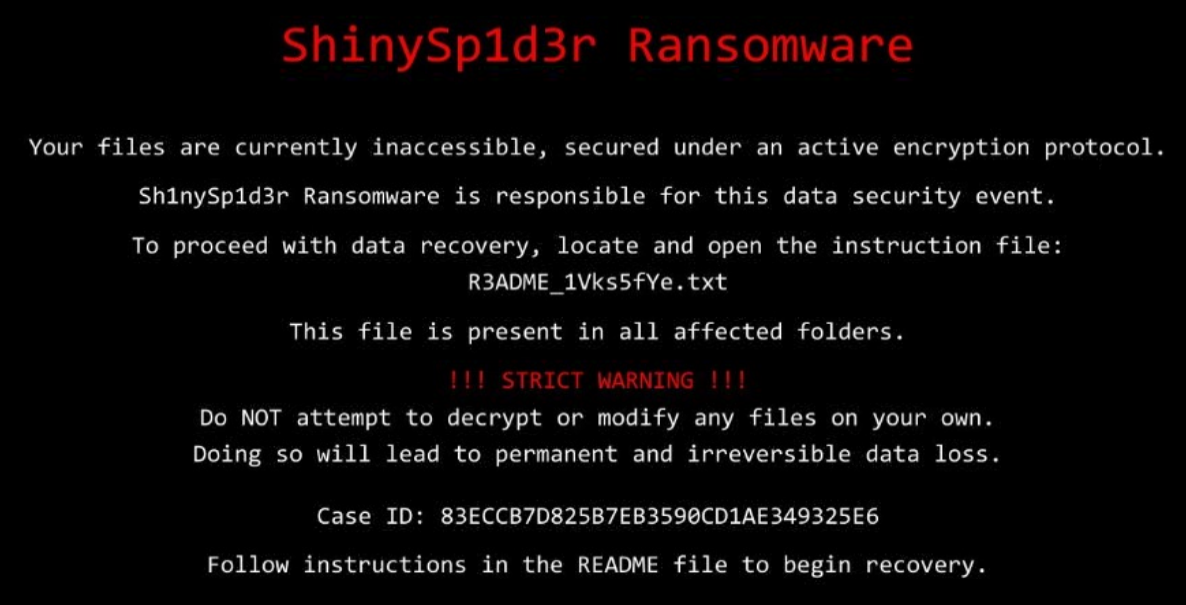
ShinySpider is a new Ransomware-as-a-Service platform created by the ShinyHunters group in collaboration with hackers from Scattered Spider and Lapsus$. Key features include: blocking logging in Windows Event Viewer by intercepting the EtwEventWrite function, forced termination of processes and services, filling the free disk space with random data to complicate recovery, deleting Volume Shadow Copies, encrypting files in network shares, using the ChaCha20 algorithm with RSA-2048 key protection.
How to detect: A YARA rule based on functional and informational strings, and also a signature for the note and an image for the desktop.
YARA
rule ShinySpider_Ransomware
{
    meta:
        description = "Detects Sh1nySp1d3r Ransomware"
        date = "2025-11-27"
        author = "ANY.RUN"

    strings:
        $x1 = /Sh1nySp1d3r Ransomware v\d.\d/ fullword ascii

        $s1 = "Failed to decode obfuscated wallpaper" fullword ascii
        $s2 = "Failed to create GPO script:" ascii
        $s3 = "ETW evasion enabled - EDR detection suppressed" fullword ascii
        $s4 = "[*] Hook shield initialized - API protection enabled"  ascii
        $s5 = "[*] Starting network shares encryption (parallel)..."  ascii
        $s6 = "Phase 1: Network Discovery" fullword ascii
        $s7 = "[Network Discovery] Starting network host discovery..."  ascii
        $s8 = "/process killer completed - all targets processed"  ascii
        $s9 = "[*] API hashing initialized"  ascii
        $s10 = "[Propagation] Vector %s failed on %s with current user: %v" ascii
        $s11 = "[Share Access] Warning: Could not get current username: %v" ascii
        $s12 = "- likely due to insufficient privileges or security restrictions"  ascii
        $s13 = "[*] Using payload: %s" ascii
        $s14 = "Shadow deletion error: %v" ascii
        $s15 = "[*] Total data: %.2f GB" ascii
        $s16 = "Successfully killed task: %s" ascii
        $s17 = "[*] Propagation methods: %s" ascii
        $s18 = "[*] Scanning system roots..." fullword ascii
        $s19 = "[*] Calculating total size..." fullword ascii
        $s20 = "File renaming completed" fullword ascii
        $s21 = "[*] Deploying ransom notes..." ascii
        $s22 = "[*] Creating file tree report..." ascii
        $s23 = "[!] No wallpaper data configured" fullword ascii
        $s24 = "[*] Propagation credentials: %s" ascii
        $s25 = "[*] Local encryption completed" ascii
        $s26 = "[*] Changing desktop wallpaper..." ascii
        $s27 = "[*] Starting free space cleanup..." ascii
        $s28 = "Error creating file tree report: %v" ascii
        $s29 = "[*] Waiting for network operations to complete..." fullword ascii
        $s30 = "[*] Network propagation enabled - Credentials: %s" ascii
        $s31 = "[!] Hook shield initialization failed: %v" ascii

        $f1 = "main.generateMutexName" fullword ascii
        $f2 = "main.isRunningAsAdmin" fullword ascii
        $f3 = "main.generateExtension" fullword ascii
        $f4 = "main.isValidExtension" fullword ascii
        $f5 = "main.lockMemory" fullword ascii
        $f6 = "main.unlockMemory" fullword ascii
        $f7 = "main.getAvailableMemory" fullword ascii
        $f8 = "main.generatePartialEncryptionOffsets" fullword ascii
        $f9 = "main.normalizeIntervals" fullword ascii
        $f10 = "main.calculateChunkSize" fullword ascii
        $f11 = "main.deobfuscateData" fullword ascii
        $f12 = "main.encryptNetworkShares" fullword ascii
        $f13 = "main.selfDestruct" fullword ascii

    condition:
        uint16(0) == 0x5A4D and (
            ($x1 and (5 of ($f*) or 5 of ($s*))) or
            (20 of ($s*) and 10 of ($f*)) or
            (all of ($s*))
        )
}
Key facts:
- Advanced evasion through blocking logging and anti-analysis techniques.
- Focus on Windows with future expansions.
Analytical note:
| Detected | External sources | ANY.RUN First Submission | Sandbox Evasion | VT First Submission |
|---|---|---|---|---|
| 2025-12-03 | News | 2025-11-23 | 3 | 2025-11-20 |
With the following TI Lookup query, we can search through recent public sandbox analyses and identify this malicious activity.
TI Lookup:
filePath:"Temp\\wallpaper.jpg" and filePath:"R3ADME_"
IOCs:
- SHA256:
e41dd341f317cb674ff12c83a17365e5c5aa3240d912ab3801ff4cf09a00ccb2 - Ransomware note:
→ BY SH1NYSP1D3R (ShinyHunters)

This communication has been issued on behalf of the ShinySp1d3r group.
It is intended exclusively for internal incident response personnel,
technical leadership, or designated external advisors.
- JPG for desktop wallpaper:
9c401f4c28ede758dd3e6277a07e85a9c75cd13ebd689f92effbf12ff9957999
MITRE:
| Technique ID | Technique Name | Evidence |
|---|---|---|
| T1486 | Renames files like ransomware | File encryption |
| T1012 | Reads the computer name | Reconnaissance |
| T1082 | System Information Discovery | Reconnaissance |
3) Tsundere (Windows)
Sample: ANY.RUN
Tsundere is a botnet targeting Windows users. It is distributed through fake MSI installers or through PowerShell scripts. After installation, Tsundere deploys its own Node.js environment and launches a bot that connects to the command server, the server address is stored not in the configuration, but in a smart contract on the Ethereum blockchain. The bot receives an encrypted WebSocket connection and can execute arbitrary JavaScript code sent from C2.
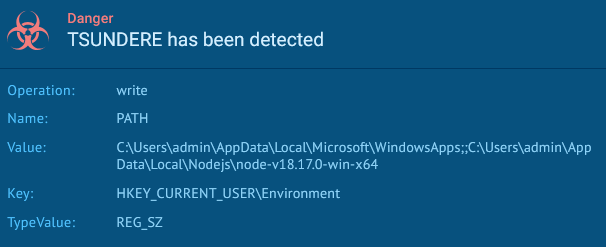
How to detect: Detection of TSUNDERE is based on tracking characteristic artifacts of its installation and persistence in the system: it records changes to the PATH environment variable in the HKEY_CURRENT_USER\Environment key, where the malware adds the path to its own local Node.js build to prepare the runtime environment, as well as the use of a PowerShell command to add autostart in HKCU\Software\Microsoft\Windows\CurrentVersion\Run, where it registers the launch of pm2 start .js, ensuring constant restart of the botnet after user login.
Key facts:
- Uses atypical infrastructure, storing C2 addresses in an Ethereum smart contract.
- To execute malicious code, deploys a local Node.js.
- Capable of executing arbitrary JavaScript code received from its C2 server.
Analytical note:
| Detected | External sources | ANY.RUN First Submission | Sandbox Evasion | VT First Submission |
|---|---|---|---|---|
| 2025-11-28 | News | 2025-12-03 | 12 | 2025-07-15 |
With the following TI Lookup query, we can search through recent public sandbox analyses and identify this malicious activity.
TI Lookup:
registryValue:"AppData\\Local\\Microsoft\\WindowsApps" and registryValue:"AppData\\Local\\Nodejs\\node-*"
IOCs:
SHA256:
608894b1c8746140e8a7c482fcec46ab247332c20449cd10ad5444eb482fff3aSHA256:
7f0ca27e22b03d6d41dc4c122df865822caa61f6d0b843a81d9a82a3917d02e9SHA256:
6b42188a8b70b031b818920f6f0258199fc67744c0cc4a9b14c5d38b6b5729a0SHA256:
9454ad9326c1580ee524f6897d287c91b5ccd1deedab049051004819f5c488efSHA256:
1f715a97657a547e9eb55878bb0b946c3a2d43b6d467ca60e816853d4d727828SHA256:
2d994b6d56622095a0a5e24481aff9f5aa0fefceb731aa2e3456fcaed34915bcDomain-name:
amyaguirrerealestate[.]com/y6l5Domain-name:
booking[.]revers-id3152-extranet[.]comDomain-name:
booking[.]extranet-id-73251[.]com
MITRE:
| Technique ID | Technique Name | Evidence |
|---|---|---|
| T1204.002 | User Execution: Malicious File | The user manually launches the infected MSI installer, disguised as the installation of popular games (Valorant, CS2, R6). |
| T1059.003 | Command and Scripting Interpreter: PowerShell | The malware uses PowerShell to write autostart to HKCU...\Run and launch pm2 start .js. |
| T1547.001 | Boot or Logon Autostart Execution: Registry Run Keys | Tsundere maintains persistence by creating a Run key with a command to restart the Node.js bot. |
| T1059.007 | Command and Scripting Interpreter: JavaScript | The main logic of the botnet is the execution of JavaScript code transmitted via WebSocket from the C2 server. |
| T1105 | Ingress Tool Transfer | The bot downloads Node.js, npm libraries, and updated JS modules directly from C2 and/or npm. |
| T1571 | Non-Standard Port | C2 uses non-standard ports (1234, 3001, 3011) for WebSocket messages, complicating network detection. |
| T1008 | Fallback Channels | The C2 address is stored in an Ethereum smart contract, allowing dynamic switching between servers. |
| T1090 | Proxy | Infected hosts can be used by attackers as SOCKS proxies, sold through the Tsundere panel. |
| T1027 | Obfuscated/Encrypted Execution | WebSocket traffic is encrypted with AES, excluding reading of transmitted commands and complicating analysis. |
| T1055 | Process Injection / Script-based Execution | C2 can send arbitrary JS code that is executed in the Node.js process to load additional modules and functions. |
Conclusion
1) The use of screen captures is becoming near ubiquitous among mobile bankers: Sturnus demonstrates bypassing messenger encryption through direct capture of displayed information.
2) More threat actors now want their own brand: The ShinySpider RaaS platform, which is a custom encryptor from ShinyHunters, is just one example of this trend.
3) Botnets are integrating blockchains: Tsundere uses Ethereum to store C2, making the infrastructure resilient and dynamic.